7. NBDP SYSTEM OVERVIEW
7-7
Function key F3: [Operate] menu
The [Operate] menu mainly controls transmission and reception.
Function key F4: [Window] menu
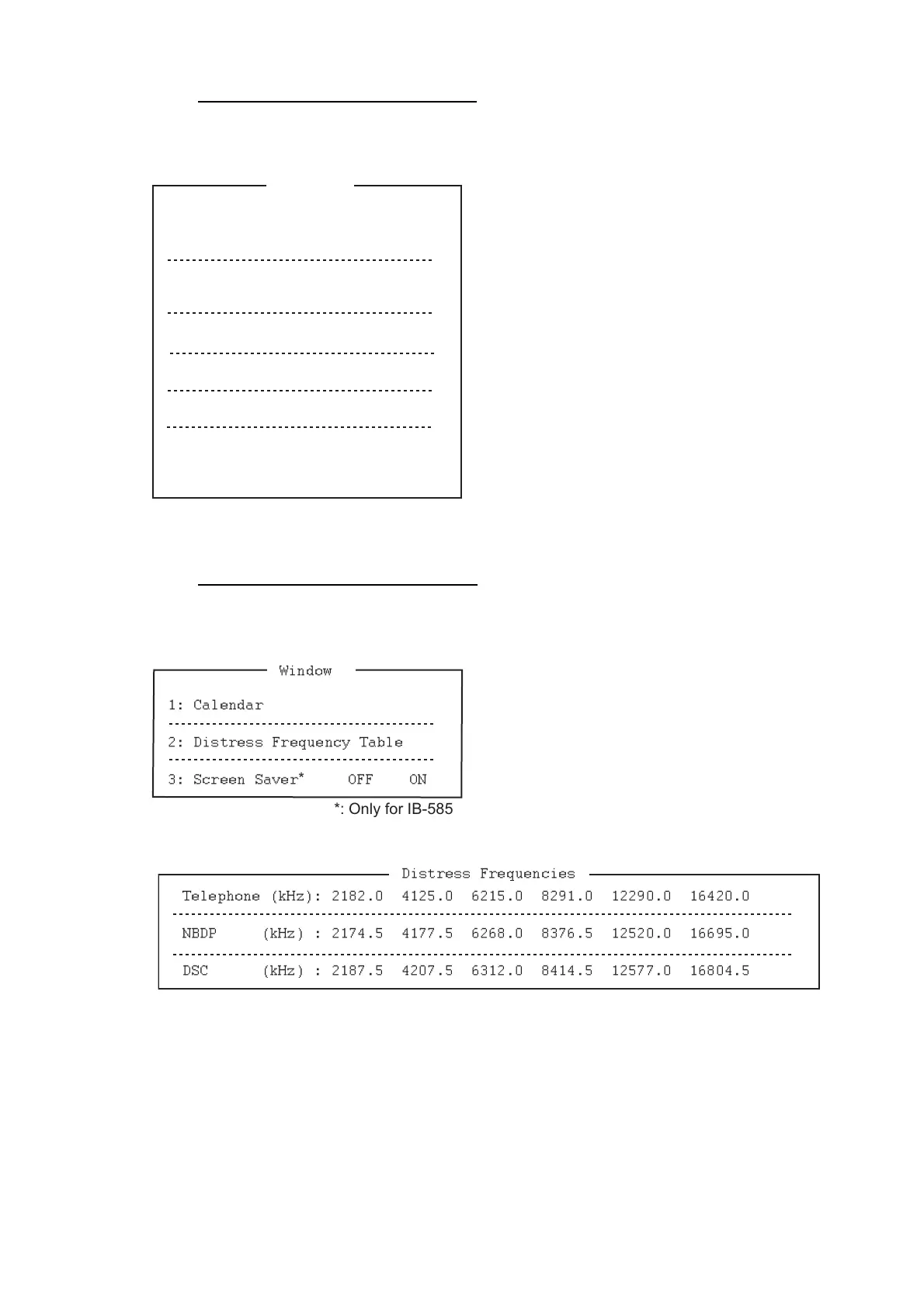
The [Window] menu lets you display the corresponding data of the window below.
1: Select a station on the station list.
2: Start macro operation. For details, see
section 10.10.
3: Select a file then transmit it.
4: Stop sending a file.
5: Start/stop frequency scanning.
6: Select communication mode for reception;
AUTO, ARQ, FEC.
Note: Do not select DIRC (only for IB-583).
7: Enable timer programming.
8: Set TX mode and subscriber's ID number and
start manual calling.
9: Set TX and RX frequencies and start waiting
for reception.
0: Set ITU or user channel and start waiting for
reception.
1: Display desired calendar month and year. To
change year or month, select item with the ↑ or
↓ key and change setting with the ← or → key.
2: Display all distress frequencies (see the fol-
lowing table).
3: Turn on or off the screen saver function. For
details, see section 8.7.
1: Call Station
3: File to Send
4: Cancel Sending
5: Scan (Start/Stop)
6: Manual Reception
7: Timer Operation
8: Manual Calling
9: Set Frequency
0: Set Channel*
Operate
2: Macro Operation
*: Only for IB-585
1: Calendar
2: Distress Frequency Table
3: Screen Saver
*
OFF ON
Window
*: Only for IB-585
Distress Frequencies
Telephone (kHz): 2182.0 4125.0 6215.0 8291.0 12290.0 16420.0
NBDP (kHz) : 2174.5 4177.5 6268.0 8376.5 12520.0 16695.0
DSC (kHz) : 2187.5 4207.5 6312.0 8414.5 12577.0 16804.5



 To Next Page