4. DSC DISTRESS OPERATIONS
4-13
1. Press the DISTRESS MSG key and the OTHER DSC MSG key simultaneously to
open the screen for composing the distress relay individual.
2. Rotate the ENTER knob to select [MSG TYPE] then push the knob.
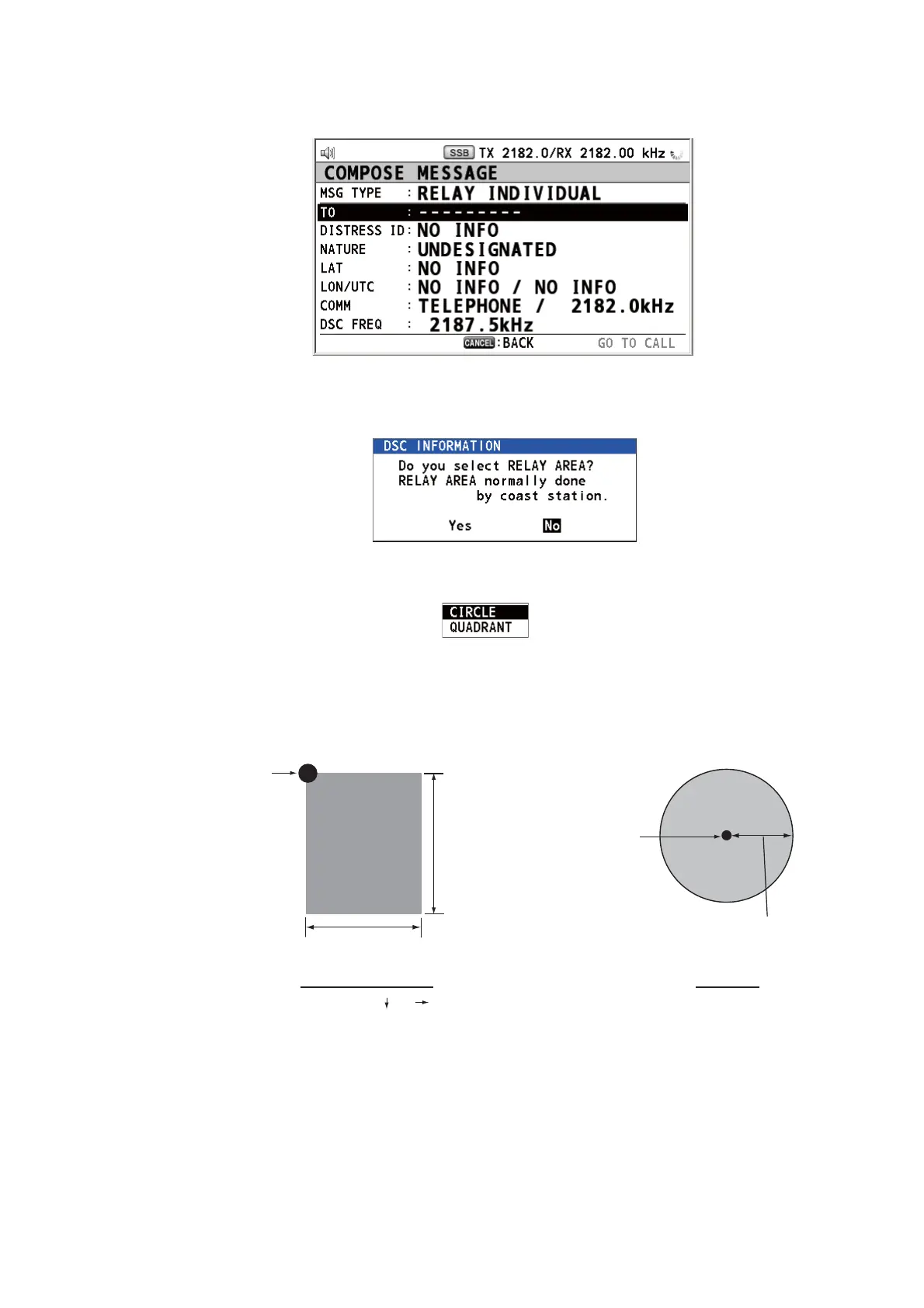
3. Rotate the ENTER knob to select [RELAY AREA] then push the knob. The follow-
ing message appears on the screen.
4. Rotate the ENTER knob to select [Yes] then push the knob.
5. With [AREA CR] selected, push the ENTER knob.
6. Rotate the ENTER knob to select [CIRCLE] or [QUADRANT] then push the knob.
7. Set the area with the numeric keys (see step 5 in paragraph 5.3.1). The geograph-
ical area call is for sending a call to all ships within the area you designated. In the
figure below, for example, the call will be sent to all ships within 24-34°N, 135-
140°W (QUADRANT (LL)) and 34°N, 140°W, range: 500 NM (CIRCLE).
8. With [DISTRESS ID] selected, push the ENTER knob.
9. Rotate the ENTER knob to select [DIRECT INPUT] or [NO INFO] then push the
knob. For [DIRECT INPUT], go to step 10. For [NO INFO], go to step 11.
10. Enter the ID (MMSI) of the ship in distress with the numeric keys then push the
ENTER knob.
11. With [NATURE] selected, push the ENTER knob.
12. Rotate the ENTER knob to select nature of distress then push the knob.
13. With [LAT] and [LON/UTC] selected, push the ENTER knob.
QUADRANT (LL)
34°N, 140°W, 10° 5°
34°N
24°N
10°
5°
140°W
135°W
Reference point
(For example,
34°N, 140°W)
500 NM
CIRCLE
34°00N, 140°00W, 0500NM
Reference point
(For example,
34°00N, 140°00W)



 To Next Page