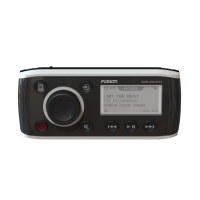
This document is an owner's manual for the FUSION MS-RA210 stereo, providing comprehensive instructions for its operation, configuration, and maintenance.
Function Description
The FUSION MS-RA210 is a marine stereo designed to provide audio entertainment in various environments, such as boats. It features a digital signal processing (DSP) system for optimized audio reproduction with Fusion speakers and amplifiers. The stereo supports multiple audio sources, including AM/FM radio, SiriusXM Satellite Radio, DAB (Digital Audio Broadcasting), Bluetooth wireless technology, and USB devices. It can be controlled directly via its physical interface, through a compatible Garmin watch, an ARX70 remote control, or the Fusion-Link wireless remote control app on Apple or Android devices. The stereo also integrates with NMEA 2000 networks, allowing control and display through compatible multi-function displays and wired remote controls.
Usage Features
The stereo's interface includes a dial for volume adjustment, menu navigation, and item selection. Pressing the dial switches between zones or selects highlighted options. Dedicated buttons allow users to power on/off, mute audio, open menus, return to previous screens, and change sources. Track navigation buttons are provided for skipping, rewinding, and fast-forwarding media.
For radio functions, the stereo allows users to set the tuner region, scan for stations (AM/FM, DAB, SiriusXM), and save favorite stations as presets. SiriusXM features include artist/song alerts, game alerts for sports teams, TuneMix™ for creating custom music collections from favorite channels, and TuneStart™ for playing songs from the beginning on preset channels. Parental controls are available for SiriusXM, allowing users to lock channels and manage access with a passcode.
Bluetooth connectivity enables pairing with up to eight media devices, allowing wireless audio streaming. Users can select different paired devices and manage auto-connection settings. For USB devices, the stereo supports flash drives, Android devices (MTP mode), and Apple devices (iAP2) for music playback. The stereo's menu allows browsing music files, artists, albums, genres, and playlists from connected USB sources. Repeat and shuffle modes are available for media playback.
The MS-RA210 offers extensive audio control features. Users can adjust the volume for individual speaker zones, set subwoofer levels, and fine-tune tone settings (bass, treble). The "Loud" setting can be disabled for specific zones. Gain adjustment is available for auxiliary devices to match volume levels with other sources. The DSP settings, configured via the Fusion-Link app, allow for precise audio optimization based on speaker models, amplifiers, and the environment.
The stereo supports multi-zone audio, enabling individual control over speaker zones. Users can disable unused zones, set custom names for zones, and link zones to synchronize volume levels. Power-on volume limits can be set to prevent excessively loud audio upon startup.
Maintenance Features
Software updates are crucial for maintaining optimal performance and compatibility. The manual provides instructions for updating the stereo's software using a USB flash drive. Users are cautioned not to turn off or disconnect power during updates to prevent unresponsiveness. The stereo also supports updates for optional NRX remote controls and DAB modules.
Troubleshooting guidance is included for common issues such as the stereo not responding to key presses, locking up when connected to an Apple device, or failing to find a connected Apple device. Solutions involve resetting the stereo, checking connections, ensuring the latest software versions, and verifying device compatibility. Bluetooth audio interruptions and incomplete song information display are also addressed, with recommendations to ensure clear line-of-sight, proper pairing, and up-to-date media player applications.
For SiriusXM, troubleshooting covers antenna faults, tuner communication issues, no signal, subscription updates, and channel availability problems. Resolutions typically involve checking antenna connections, verifying tuner installation, ensuring clear sky view, and contacting SiriusXM listener care for subscription inquiries. The manual also explains how to clear all entered SiriusXM user information and alerts, and how to perform a factory reset to restore all settings to default values.
The device also includes a power-save mode to conserve battery power by disabling the LCD backlight after a period of inactivity. This helps in managing power consumption, especially in marine environments.


 To Next Page


 General