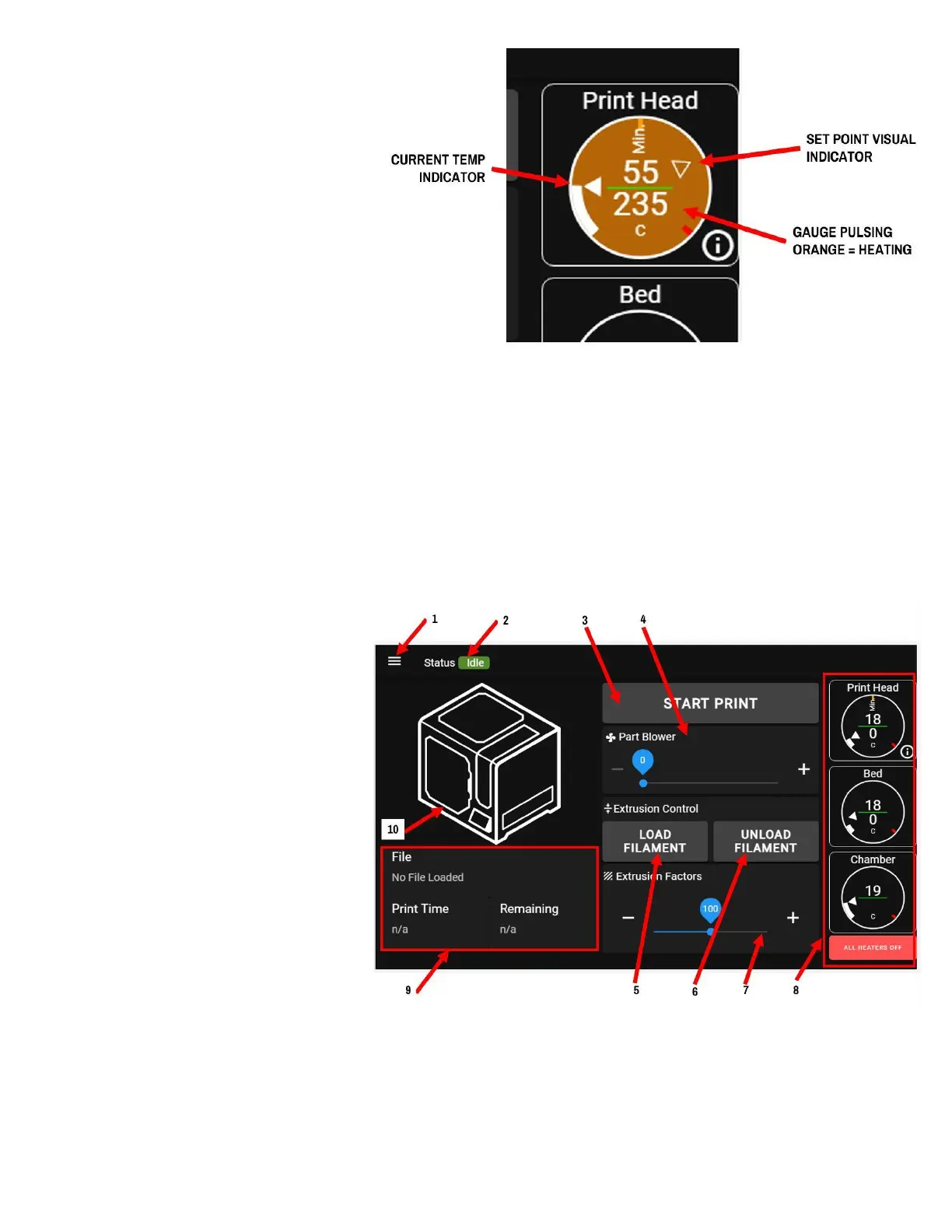
The temperature gauges have a few
colors they will display during
operation:
● Black background: component
is cold (below 40C) and heater
is off
● Pulsing orange background:
component is heating up to a
set point
● Solid orange: component is hot,
use caution if you're sticking a
hand or other body part in the machine
● Pulsing blue: heater is off, component is cooling down
● Pulsing red: heater is in a fault state
The red "ALL HEATERS OFF" button is a quick way for you to immediately turn both heaters off and begin
cooling down the print head and bed.
PRINT SCREEN (Idle)
This is the main screen that the printer
defaults to when it powers up.
From this screen you can start a print,
load filament, and view basic status
information about the printer and what
it's doing at the moment.
This screen will change slightly when a
print is running.
1. Menu icon: press to show/hide
menu tree
2. General status indicator (idle, busy, printing)
3. Start print button: press to upload a print, or to start a print
4. Part blower control: use to manually set the speed of the part cooling blower
5. Load filament: press to begin the process to load filament into the print head



 To Next Page