90
0RGHO0HQX$LUSODQH*OLGHU)XQFWLRQV!
7KLVIXQFWLRQLVXVHGZKHQ
1RWH7KHHOHYDWRURQWKHWD
HHIIHFWHGZKHQWKLVPL[LVDFWLYDWHG
XVWPHQW
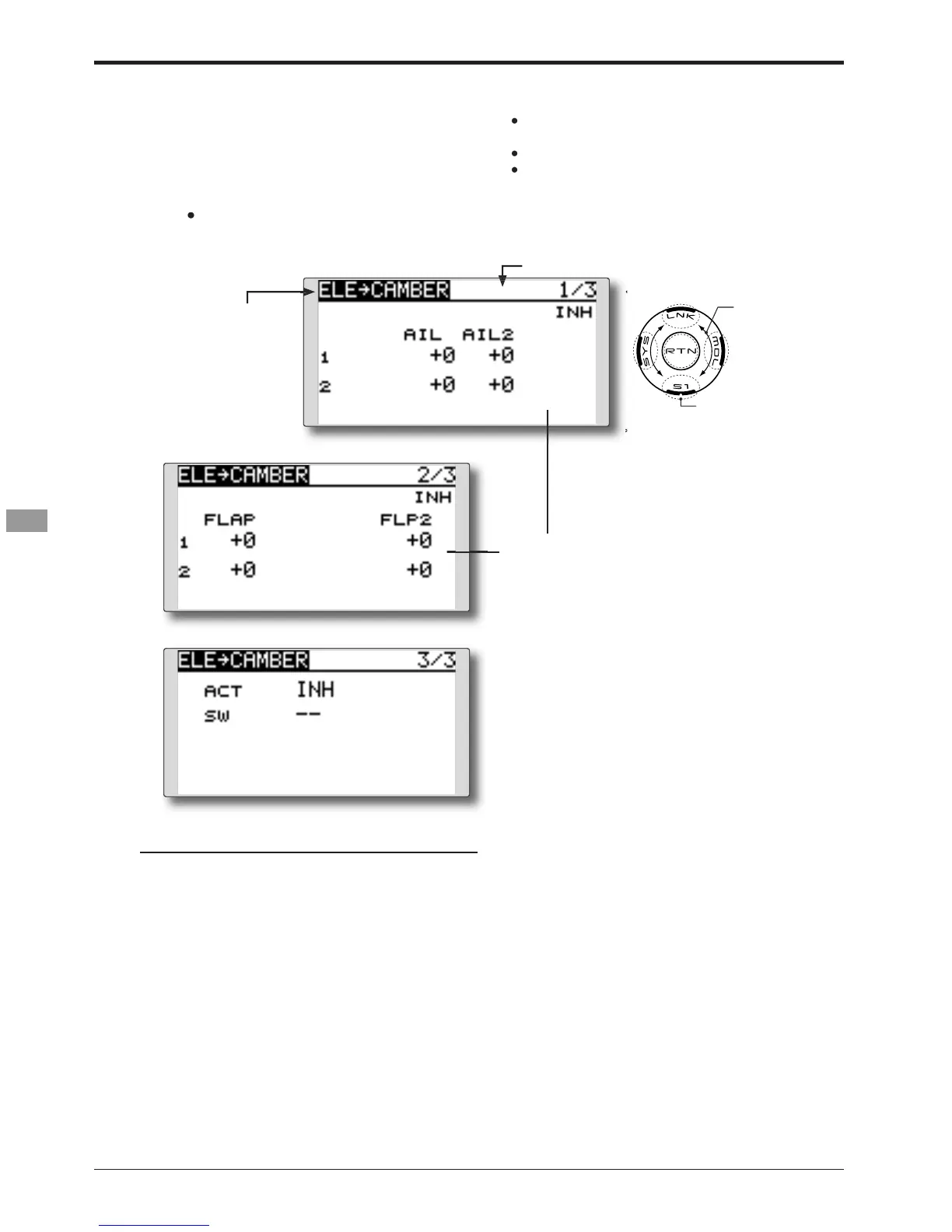
Move the cursor to the up or down m
or each servo and touch the RTN
HVHWWRWKHLQLWLDOYDOXH
Touch the RTN button to end the ad
RQ
Move the cursor to the [ACT]
ode. Select the ACT mode by scrollin
unction and return to the cursor mode.
a switch, move the cursor to
tem and touch the RTN button to
WLRQRIWKHVZLWFKVHOHFWLRQPHWKRGVHHWKH
descri
tion at the back of this manual
or one second to set the range.
7KHPL[LQJGRHVQRWZRUNQHDUQHXWUDORIWKHHOHYDWRUVWLFN
*OLGHU&XUUHQWO\VHOHFWHGFRQGLWLRQQDPH
O
menu and access the setu
screen
shown below by touch


 To Next Page