3
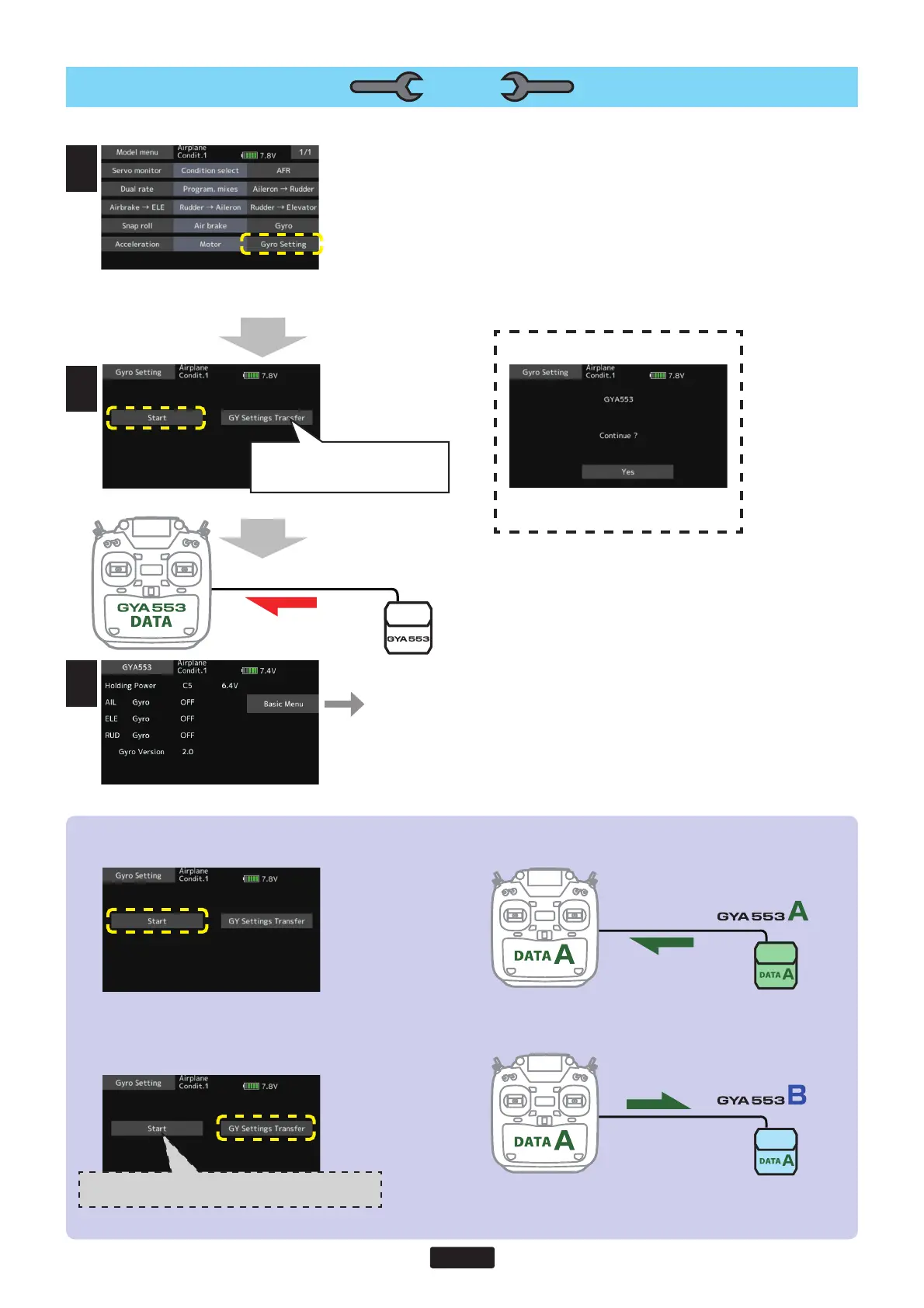
1.Select“Gyrosetting”onthelastpageof
AirplaneModelMenu
3.Homescreenisdisplayed
ToBasicmenu
◆ WhencopyingdatafromGyroAtoGyroB
ConnectthegyroAtotheT16IZandpress[Start].(EnterthedataofAintoT16IZ)
ConnectGyroBtoT16IZandpress[GYSettingsTransfer].(PutdataonAintogyroB)
2.Select"Start"
Select"Start"
Thiswilldownloadthegyrodatato
theT16IZ.
*Atthistime,ifGyroisnotconnectedto
T16IZbywire,thisscreenappears.
Tap"Yes"todisplaytheGYA553datasaved
inT16IZ.
1
3
2
SETTING
When"GYSettingsTransfer"is
selected,thegyrosettingdatasaved
inT16IZiswrittentothegyro.
IfyoupressStarthere,theBdatawillbedownloadtothe
T16IZandtheAdatawillbelost.



 To Next Page