14 user manual GSC_4
2.5 Onscreen numbers keyboard
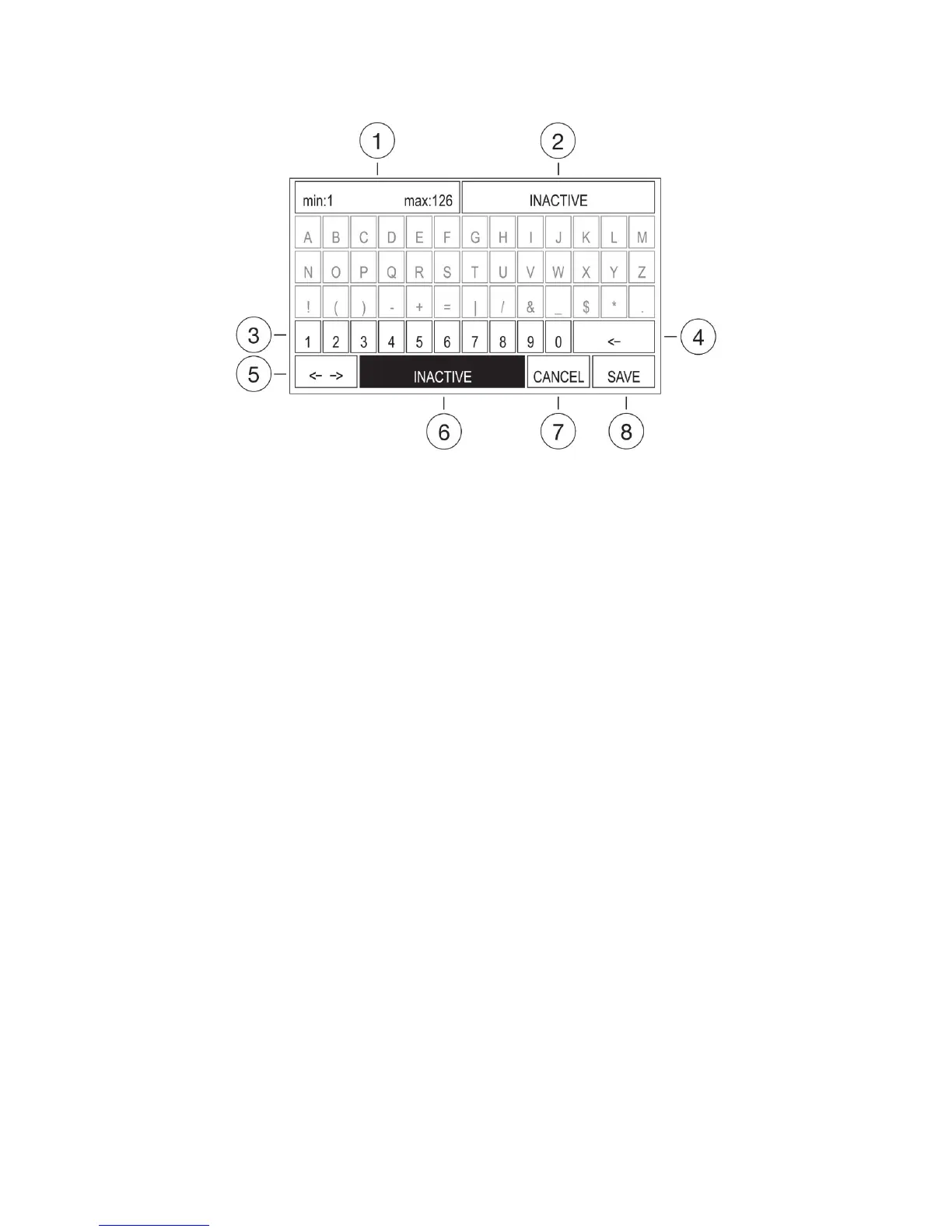
Figure 2.5 Onscreen numbers keyboard
Description:
1 – Minimum value and maximum value.
2 – Entered value.
3 – Numbers field (fields of letters and special characters are inactive on purpose).
4 – BACKSPACE key field.
5–MOVETHECURSORkeyeld.
6–INACTIVEkeyeld.
7 – CANCEL key field.
8–SAVEkeyeld.
This screen is used for entering the number values. The actual value of the setting is indicated in the
editing field (No. 2 in Figure 2.05). Information of the provided range of entered values is on the top left
side (No. 1 in Figure 2.05).
TheINACTIVEeldistherstactiveeldafterthescreenisdisplayed.Atthisinstance,therearefewoptions:
-PressOKtosetthevaluetoINACTIVE.
- Use ARROWS to choose the number and then OK to overwrite the previous value with the selected one.
- Select the BACKSPACE field and press OK for clearing the actual number. Then use ARROWS for select-
ing the number. Pressing OK will add the selected number (if it is in the available range). It is possible
to use MFS footswitches for adding numbers. Anytime you can press ESC key to quit the edition with no
changes. Select the CANCEL key field and press OK for the same result.
TosaveoverwritesselecttheSAVEeldandpressOK.


 To Next Page