4.- ADVANCED FUNCTION
OPEN WINDOW DETECTION
With open window detection activated, the heating element will be disconnected automatically when a sharp decrease in
temperature in the room is detected avoiding energy wastage. After this period of time, the panel heater returns to the prior
operation mode.
When Open Window Detection is working, the word Open will be displayed alternating with the status of the current mode.
Note: To activate the open window detection please refer to ADVANCED FUNCTION ACTIVATION section.
ADAPTIVE START CONTROL
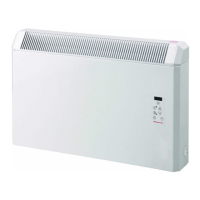
PH Plus electronic control analyses the heating requirements of the room where the panel heater is installed using this
information to turn on the heating element in advance in order to reach the set point temperature at the desired time.
When Adaptive Start Control is working, the word AdAP will be displayed alternating with the status of the current mode.
Note: To activate the adaptive start control please refer to ADVANCED FUNCTION ACTIVATION section.
ADVANCED FUNCTION ACTIVATION
Advanced functions Open Windows Detection and Adaptive Start Control are disabled by default. To enable / disable these
functions, the following steps must be followed:
Switch off the panel heater by turning off the main switch at the right side of the heater, the display will be Off. Press the key
and at the same time turn on the main switch maintaining the key at least five seconds.
The display will show OPEn alternating with the status of the function (On or OFF). Use the navigation keys + or – to enable /
disable Open Windows Detection function.
Confirm the new value for the function by pressing the PRG key. The next function (AdAP) is shown alternating with its status
(On or OFF). Use the navigation keys + or – to enable / disable Adaptive Start Control function. Confirm the new value for the
function by pressing the PRG key.
5.- UNIT RESET
The panel heater reset establishes the factory configuration of the heater removing the programming, establishing the daily
programming and disabling the advanced functions. To reset the unit, hold the PRG key for 4 seconds, the display will show
InIC to indicate the heater has been reset.
6.- CLEANING AND MAINTENANCE
The panel heaters do not precise any special maintenance providing thermal comfort during large periods. Clean dust with a
dry, soft cloth only when the unit is disconnected and cold.
Do not use solvents or abrasive products for cleaning.
This panel heater has been manufactured under an assured quality system using environment friendly processes.
Please take the panel heaters to a clean point once their useful life is finished, in order to recycle their materials in the right way.


 To Next Page