Pilot’s Guide G7490-07
Setting the Flight ID
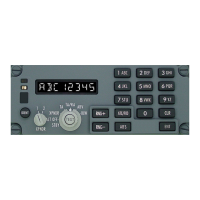
Press the ATC/FID button to select the Flight ID Mode. The FID indicator illuminates and the
display will show the last 8-digit alphanumeric code entered. The FID indicator starts flashing
when you press one of the keypad buttons to enter a new Flight ID. Refer to Fig 9.
Figure 9 – Flight ID Mode
The first alpha characters are called the Airline Call Sign. The Call Sign is retained in memory. To
clear Call Sign, press and hold the CLR button for at least 2 seconds.
The Call Sign and the Flight Number can be set to any values consisting of up to eight alpha
or numeric characters. Any combination of numbers and letters from 0-9 and A-Z can be
entered. If you enter a wrong digit, press the CLR button to go back one position. Set the
Flight ID as follows:
1) Enter the Call Sign. The Call Sign consists of two or three alpha characters. Since
the same keypad buttons are used to enter alpha or numerical characters, you must
press a keypad button more that once to enter a letter.
For example, to enter an “A”, you must press the “1 ABC” button twice (within 1.5
seconds). To enter “N”, you must press the “5 MNO” button three times. Refer to
Figure 10 below for an example of the sequence using the “1 ABC” button. To enter
the same letter twice (i.e.: AA) or if the two letters are on the same button (i.e.: V
and X) you must wait 1.5 seconds after you enter the first letter before you press the
same button again.
For example, to enter VX you must press the “8 VWX” button twice (for “V”), wait
1.5 seconds, and then press the “8 VWX” button four times (for ‘X). Refer to Figure
11 for an example.
G7490-07 Pilot’s Guide Rev 01
COPYRIGHT © Gables Engineering, July 28, 2004
Page 7 of 17


 To Next Page