Pilot’s Guide G7490-07
G7490-07 (Flight ID/ATC/TCAS) System Description
This control panel is capable of controlling two Dual Mode-S transponders with TCAS
and Flight ID capabilities. This guide describes the operation of the G7490-07 Flight
ID/ATC/TCAS control panel
.
Panel Controls and Indicators
This section describes the control functions of the G7490-07 Flight ID/ATC/TCAS
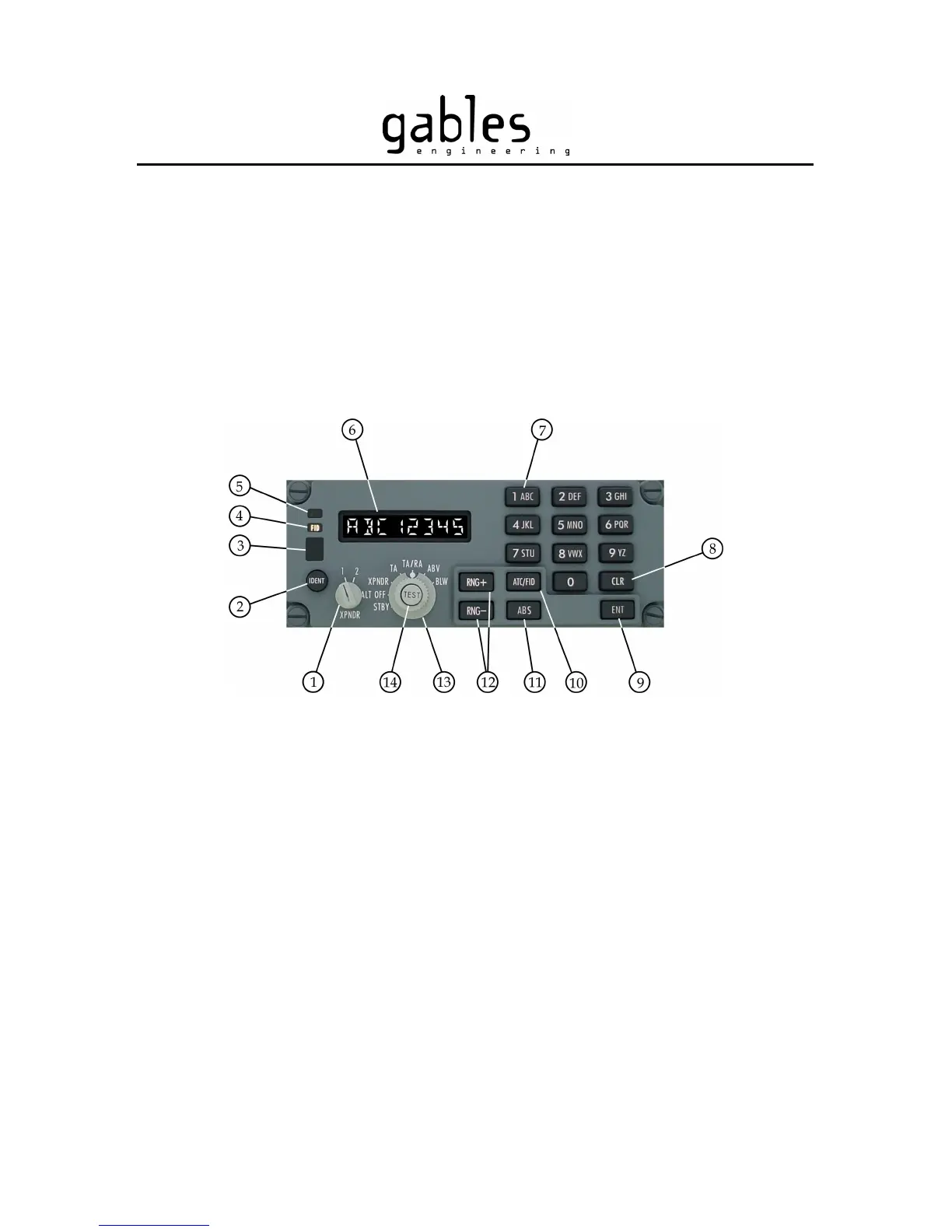
control panel. Refer to Figure 1 for location of controls and indicators
.
1. XPNDR (Transponder) Select Knob – Rotate to select transponder system 1 or system 2.
2. IDENT (Identification) Button – Press to transmit identification information.
3. XPNDR (Transponder) FAIL Indicator – Illuminates when a failure is encountered.
4. FID (Flight Identification) Indicator – Illuminates when Flight Identification (FID) mode is selected.
5. ATC (Air Traffic Control) Indicator – Illuminates when the ATC mode is selected.
6. Display – Digital indication of ATC or FID codes.
7. Keypad Buttons – Press these buttons to enter the ATC or FID code.
8. CLR (Clear) Button – Press to go back one space, or press and hold for 2 seconds to clear display.
9. ENT (Enter) Button – Press to validate and transmit a Flight ID code.
10. ATC/FID Button – Press to switch between the ATC and the FID modes.
11. ABS Button – Press to change traffic altitudes from relative to absolute.
12. RNG+ and RNG- Buttons – Press to increment/decrement TCAS display range to 5, 10, 20, or 40 nm.
13. Mode Select Knob – Rotate to select mode.
14. TEST Button – Press to initiate functional test.
Figure 1 – G7490-07 Controls and Indicators
G7490-07 Pilot’s Guide Rev 01
COPYRIGHT © Gables Engineering, July 28, 2004
Page 1 of 17


 To Next Page