Pilot’s Guide G7490-07
Setting the ATC Code
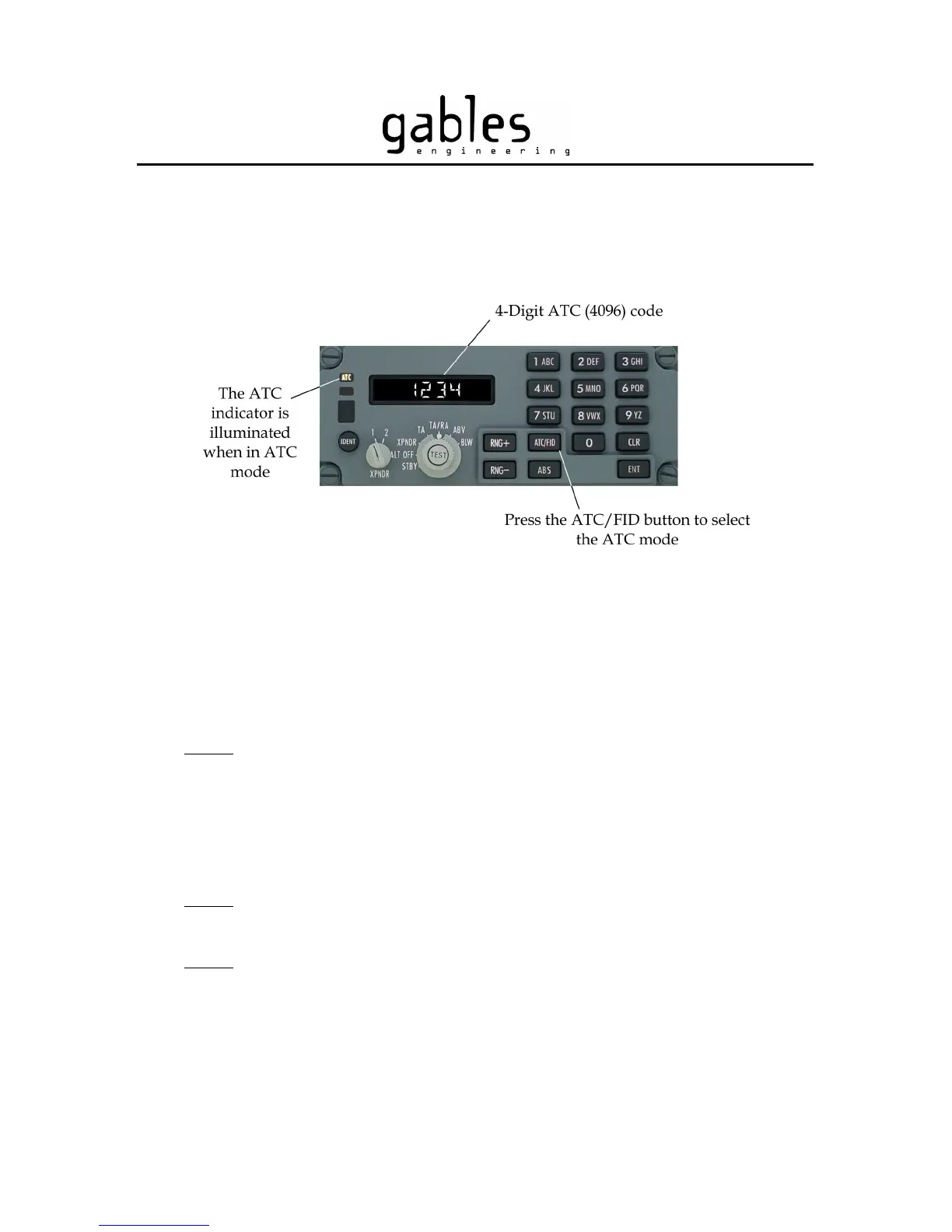
Press the ATC/FID button to select the ATC Mode. The ATC indicator is illuminated and
the display shows the last 4-digit ATC code entered. Refer to Fig 8.
Figure 8 – ATC Mode
The ATC code can be set to any values from 0000 to 7777. To set an ATC code, use the
keypad buttons 0 thru 7 to enter a 4-digit code. The new ATC code will be transmitted
after 5 seconds. If you press the IDENT button before 5 seconds has elapsed, the new
code will be transmitted immediately.
NOTE
: Keypad buttons “8 VWX” and” 9 YZ” do not operate in ATC Mode. The
display will show INVALID if you press one of these two buttons.
If you do not enter a complete 4-digit code, the display will revert back to the previous ATC
code after 5 seconds. If you enter a wrong digit, press the CLR button to erase the last digit
entered, or press and hold the CLR button to clear the entire display.
NOTE
: 5 seconds after you press the CLR button, the display will show the previously
transmitted ATC code unless you complete the code entry.
NOTE
: If you press the IDENT button while the code entered is incomplete (if the code
has less than 4 digits), the incomplete code is not transmitted and the previously
transmitted code will re-appear on the display.
G7490-07 Pilot’s Guide Rev 01
COPYRIGHT © Gables Engineering, July 28, 2004
Page 6 of 17


 To Next Page