Pilot’s Guide G7490-07
Selecting the Altitude Display Mode
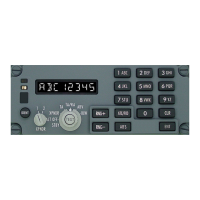
There are three available altitude display modes. The Mode Select Knob is used to select
one of the three available modes. The three available altitude display modes are as follows:
ABV (Above) Mode – The ABV mode is active when the Mode Select Knob is set
to the “ABV” position. The TCAS system will only display and provide traffic
information for targets located between 9900 feet above and 2700 feet below your
aircraft (+9900 ft and -2700 ft relative to your aircraft).
N (Normal) Mode –The Normal (N) mode is active when the Mode Select Knob is
set to any of the following positions:
• XPNDR
• TA
• TA/RA
In the Normal mode, the TCAS system will only display and provide traffic
information for targets located between 2700 feet above and 2700 feet below your
aircraft (+2700 ft and -2700 ft relative to your aircraft).
BLW (Below) Mode - The BLW mode is active when the Mode Select Knob is set
to the “BLW” position. The TCAS system will only display and provide traffic
information for targets located between 2700 feet above and 9900 feet below your
aircraft (+2700 ft and -9900 ft relative to your aircraft).
Refer to Figure 16 for a visual representation of the “Above (ABV), Normal (N) and
Below (BLW)” altitude bands of the TCAS system.
G7490-07 Pilot’s Guide Rev 01
COPYRIGHT © Gables Engineering, July 28, 2004
Page 13 of 17


 To Next Page