EasyManua.ls Logo

Game ready GRPro 2.1 - User Manual

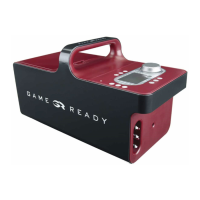
Game ready GRPro 2.1
27 pages
Print Icon
To Next Page IconTo Next Page
Loading...
This User’s Manual is also available online in
English, French, German, Italian, Japanese, and Spanish
at www.gameready.com under Products.
MODEL NUMBERS
550550-03, 550550-03-RN, 550550-53
GRPro
2.1 CONTROL UNIT
User’s Manual

Questions and Answers

  • U
    uheathAug 20, 2025
    How to fix Game Ready Control Unit temperature if it won't reach target or is unstable?
    • D
      Dr. Brandon SmithAug 20, 2025
      If your Game Ready Control Unit isn't reaching the target temperature or the temperature is unstable, ensure the ice/water ratio in the reservoir matches the fill-line labels. For warmer temperatures, turn the Temperature Knob to full warm, use less ice, and reduce water if needed. For colder temperatures, use ATX Series Heat Exchangers, set the Temperature Knob to full cold, and keep the reservoir full of ice, replenishing and stirring as needed. Ensure there are no kinks in the Wrap or Connector Hose and that the Wrap is correctly applied. If it still doesn't reach the coldest temperature, add water to the top of the ice level. Note: Overfilling disables the temperature control feature, administering therapy at “full cold.
  • K
    Karen GonzalesAug 23, 2025
    What to do if Game Ready Control Unit shows under pressure?
    • C
      Christopher EstesAug 23, 2025
      If your Game Ready Control Unit shows an under pressure error, indicating a potential leak, ensure the Wrap is securely applied. Try using a different Wrap and Hose to identify the faulty component. For example, if the error occurs with a Shoulder Wrap but not a Knee Wrap, the Shoulder Wrap may be the issue. If using a Dual Hose, ensure two Wraps are attached.
  • L
    Luke BrownAug 26, 2025
    How to troubleshoot low flow error on Game Ready Control Unit?
    • C
      Casey McgrathAug 26, 2025
      If your Game Ready Control Unit detects a low flow, indicating a blockage, ensure you are using ATX Series Heat Exchangers. Check all hose connections and disconnect and reconnect the Wrap from the Connector Hose. Make sure there is water in the ice box and that the ice box filter is not clogged. Also, ensure there are no kinks in the Wrap or Connector Hose. Reapply the Wrap snugly, following all application instructions. Turn the Control Unit off and on again, and disconnect and reconnect the hose from the Control Unit and the Wrap.
  • M
    Mrs. Allison HillAug 27, 2025
    What to do if Game Ready Control Unit shows a deflation error?
    • A
      Amanda RobertsAug 28, 2025
      If your Game Ready Control Unit displays a deflation error, turn the unit off. If there is air in the Wrap, disconnect it from the Connector Hose and manually deflate it. Reconnect the Hose to the Wrap, reapply the Wrap, and turn the Control Unit on, then press play/pause. Ensure the Wrap is securely applied. If possible, test with a different Wrap and Hose to identify if a specific component is causing the error.
  • M
    melanieayalaAug 30, 2025
    Why is my Game Ready Control Unit showing an over pressure error?
    • K
      Kristina RomeroAug 30, 2025
      If your Game Ready Control Unit shows an over pressure error, turn the unit off and back on. Make sure the Wrap is applied securely. Avoid sudden movements during treatments, as rapid shifts in position can cause quick pressure changes and trigger this error.
  • S
    Sharon WalshSep 2, 2025
    What does pump performance error mean on Game Ready Control Unit?
    • S
      shawrileySep 2, 2025
      If your Game Ready Control Unit displays a pump performance error, turn it off and back on again. Reapply the Wrap, following all application instructions. Disconnect and reconnect the hose from the Control Unit and the Wrap, ensuring you hear an audible “click” at both connection points. If the problem persists, turn the Control Unit off for 20 minutes to allow the pump to cool down before trying again.
  • J
    Jennifer RobinsonSep 4, 2025
    How to fix temperature calibration error on Game Ready Control Unit?
    • C
      chavezjacquelineSep 4, 2025
      To address a temperature calibration error on your Game Ready Control Unit, ensure you are operating and storing the System within 33-120 degrees Fahrenheit. Turn the Control Unit off, fill it with ice and water as per the label inside the reservoir, then turn it back on and push Play/Pause. Repeat this process up to three times. If the issue continues, contact Customer Service.
  • M
    Mary HughesSep 7, 2025
    What to do for self-test error air pump on Game Ready Control Unit?
    • T
      Terry JohnsonSep 7, 2025
      If your Game Ready Control Unit shows a self-test error related to the air pump, disconnect the Wrap from the Control Unit. Turn the Control Unit off and on again without a Wrap connected. Reconnect the Wrap and resume treatment. If the problem continues, contact Customer Service.
  • V
    Vanessa JonesSep 9, 2025
    What does self test error fluid circuit mean on Game Ready Control Unit?
    • D
      Daniel HoodSep 9, 2025
      If your Game Ready Control Unit displays a self-test error related to the fluid circuit, turn the unit off, then turn it back on and resume treatment. If the problem persists, contact Customer Service.
  • N
    Nathan FrankSep 12, 2025
    How to resolve air pressure sensor issue on Game Ready Control Unit?
    • A
      Alejandro BakerSep 12, 2025
      To resolve an air pressure sensor issue with your Game Ready Control Unit, detach the Wrap, pressing it flat to expel any accumulated air inside, and then try again.

Summary

GRPro 2.1 System Overview

Control Panel Functions

Describes the buttons and indicators on the GRPro 2.1 Control Unit's front panel.

Detailed Instructions for Use

Adjusting and Monitoring Temperature

Operating the GRPro 2.1 System

Cleaning Procedures

Indications for Use

Contraindications for Use

General Safety Warnings and Cautions

Important User Warnings

Critical warnings regarding treatment, skin monitoring, and wrap usage.

Safety Cautions

Specific cautions related to electrical safety, water, and device handling.

Electromagnetic Compatibility Information

Electromagnetic Immunity Standards

Troubleshooting Common Errors

Error Codes 01-06

Solutions for initial system startup errors like air pressure and pump issues.

Error Codes 07-10

Solutions for errors related to pressure, deflation, pump performance, and flow.

Error Codes 12-13 and Operational Issues

Solutions for fluid circuit errors, temperature calibration, and unit not turning on.

Product Warranty Information

Manufacturers Warranty Terms

Details the 2-year limited warranty for material and workmanship defects.

Game ready GRPro 2.1 Specifications

General IconGeneral
ModelGRPro 2.1
TypeControl Unit
Input Voltage100-240V AC
Output Voltage12V DC
Output Current5A
Power60W

Related product manuals