EN
13
CAUTION
• Insert the batteries as shown in the battery compartment.
• When
(LOW BATTERY mark) blinks in the display, replace all batteries
with new ones. Do not mix old and new batteries. lt may shorten the battery
life, or cause the device to malfunction.
•
(LOW BATTERY mark) does not appear when the batteries run out.
• Battery life varies with the ambient temperature and may be shorter at low
temperatures.
• Remove the batteries if the device is not to be used for a long time.
• The batteries may leak and cause a malfunction.
• Use the specied batteries only. The batteries provided with the device are for
testing monitor performance and may have a shorter life.
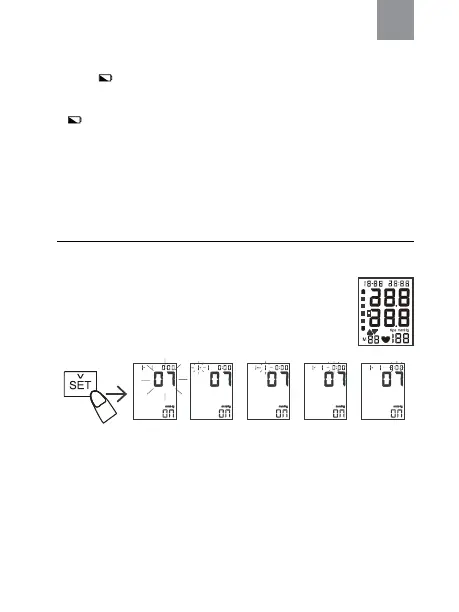
Setting the Date and Time
1. Press and hold “SET” key until the year number displays and ashes on LCD
to enter setting mode.
2. Press “MEM” key to adjust the year, then press “SET” key
again to save your setting and enter the month setting mode.
3. Press “MEM” key to adjust the month. Follow the same steps
to adjust date/hour/minute until setting completed.
NOTE: If the meter is idle for 1.5 minutes during the setting mode, it will switch
off automatically.
year month date hour minute


 To Next Page
 Loading...