12
&SFKJE(HJ(-KXG2RK()2EEKJPKF
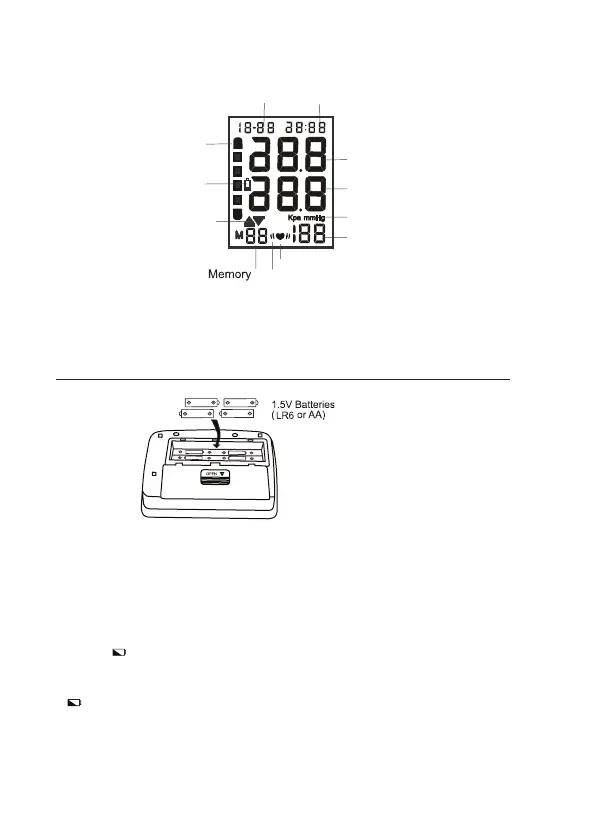
1. Remove the battery cover.
2. Insert new batteries into the battery compartment as shown, taking care
that the polarities (+) and (-) are correct.
3. Close the battery cover. Use only LR6, AA batteries.
'!"#&$0
• Insert the batteries as shown in the battery compartment.
• When
(LOW BATTERY mark) blinks in the display, replace all
batteries with new ones. Do not mix old and new batteries. lt may
shorten the battery life, or cause the device to malfunction.
•
(LOW BATTERY mark) does not appear when the batteries run out.
• Battery life varies with the ambient temperature and may be shorter at
low temperatures.
• Remove the batteries if the device is not to be used for a long time.
/:%)$*/($0(+&/,*!:
Month/Date
Hour/Minute
Value of systolic
Value of diastolic
Unit of pressure
Value of pulse per minute
Ination
Deation
Battery
WHO blood pressure
classication
Heart beat
Irregular heartbeat
detection


 To Next Page