14
/KEEPSQ(EDK(+2EK(2SI(#P3K
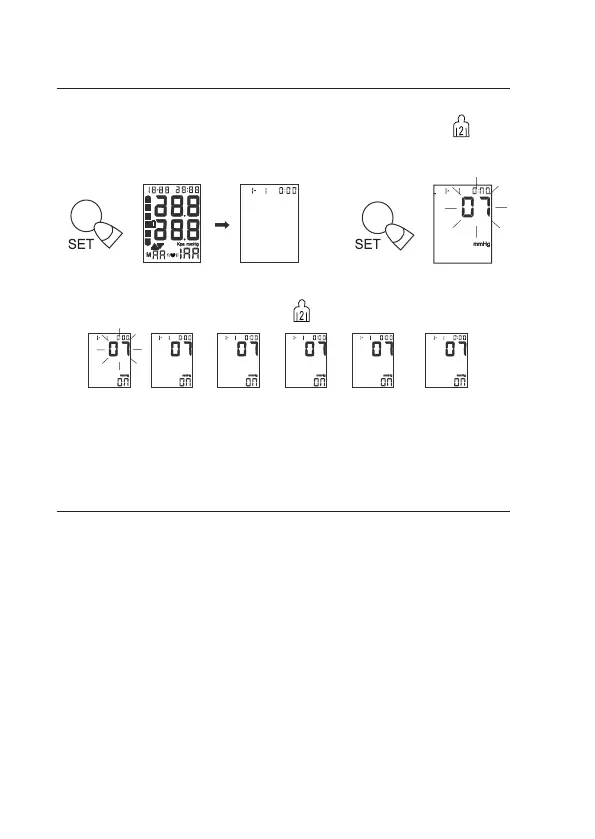
1. Under Power Off. Press and hold “SET” button until the year number
displays and ashes on LCD to enter setting mode. And press key to
adjust the year. Conrm your selection by pressing “SET” button.
2. Following the same steps to choose year, month, day, hour, minutes,
units conversion (mnHg/kPa), press to change the value.
!##.0#&$0Z(!E(PSFE2GG2EPHS(HT(LSPE(RHSUKJFPHS(VK(2EE2SEPUK6(
'DHHFK(LSPEF(HT(3K2FLJK(33@Q6
%.!/"-.%.0#(,-$'.+"-.
!##.0#&$0
• Find time to relax by sitting in a quiet atmosphere for some time before
measurement.
• Efforts by the patient to support the arm can increase the blood pres-
sure. Make sure you are in a comfortable, relaxed position and do not
activate any muscles in the arm during measurement.
• Always measure on the same arm (normally left).
• Remove any garment that ts closely to your upper arm. Do not roll
the sleeve since it can squeeze your hand and this can lead to false
results.
• Use only clinically approved original cuff.
• If you want to follow the results of your blood pressure measurements,
always perform measurements at the same time of day, since blood
pressure changes during the course of the day.
year month
day
hour minute
uni


 To Next Page