16
%K2FLJPSQ(,JHRKILJK
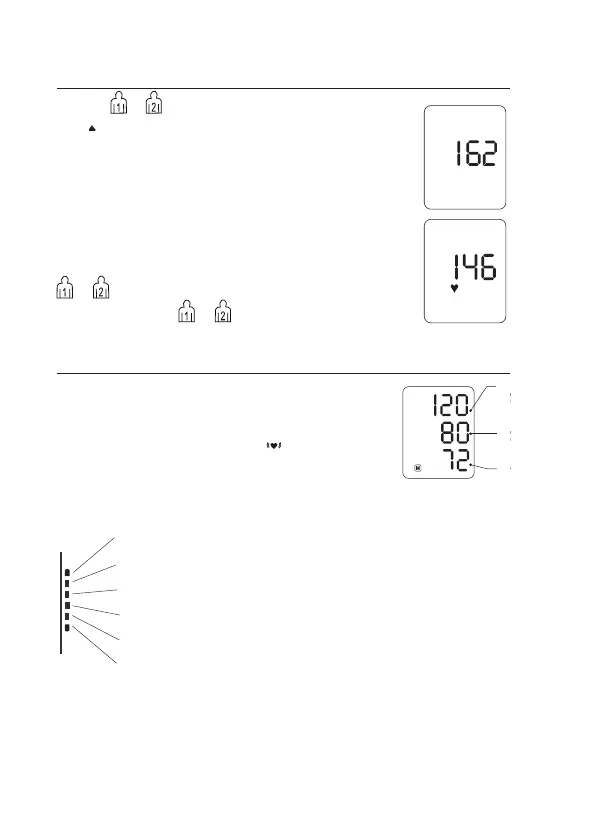
1. Press or button, the display shows “0”, Ination
icon ashes on display when it it begins to inate.
During the ination, please do not move.
2. Automatic deation after measurement, and display
the blood pressure,heart rate, and blood pressure
indicator.
• Mistake, display “E”, please refer the instruction about
troubleshooting.
• When cuff remove during the measurement, please
x the cuff and test again.
• Stop the measurement in emergency, please press
оr power. Automatic deation at the same time.
3. Power off. Press or ,to cut off the power.
-K2IPSQ(%K2FLJK3KSE(-KFLGEF
When the measurement has been concluded, the
measured blood pressure and pulse values are now
displayed.
The appearance of this symbol
signies that an
irregular heartbeat was detected. This indicator is only
a caution.
It is important that you be relaxed, remain still and do
not talk during measurements.
On the graphic indicator the element showing level of arterial pressure on
a scale of World Health Organization is displayed
0HEKZ We recommend contacting your physician if you see this indicator
frequently.
SYS
blood
pressure
DIA
blood
pressure
Pulse
Grade 3 hypertension (severe)
Grade 2 hypertension
Grade 1 hypertension (mild)
High-normal
Normal


 To Next Page