EN
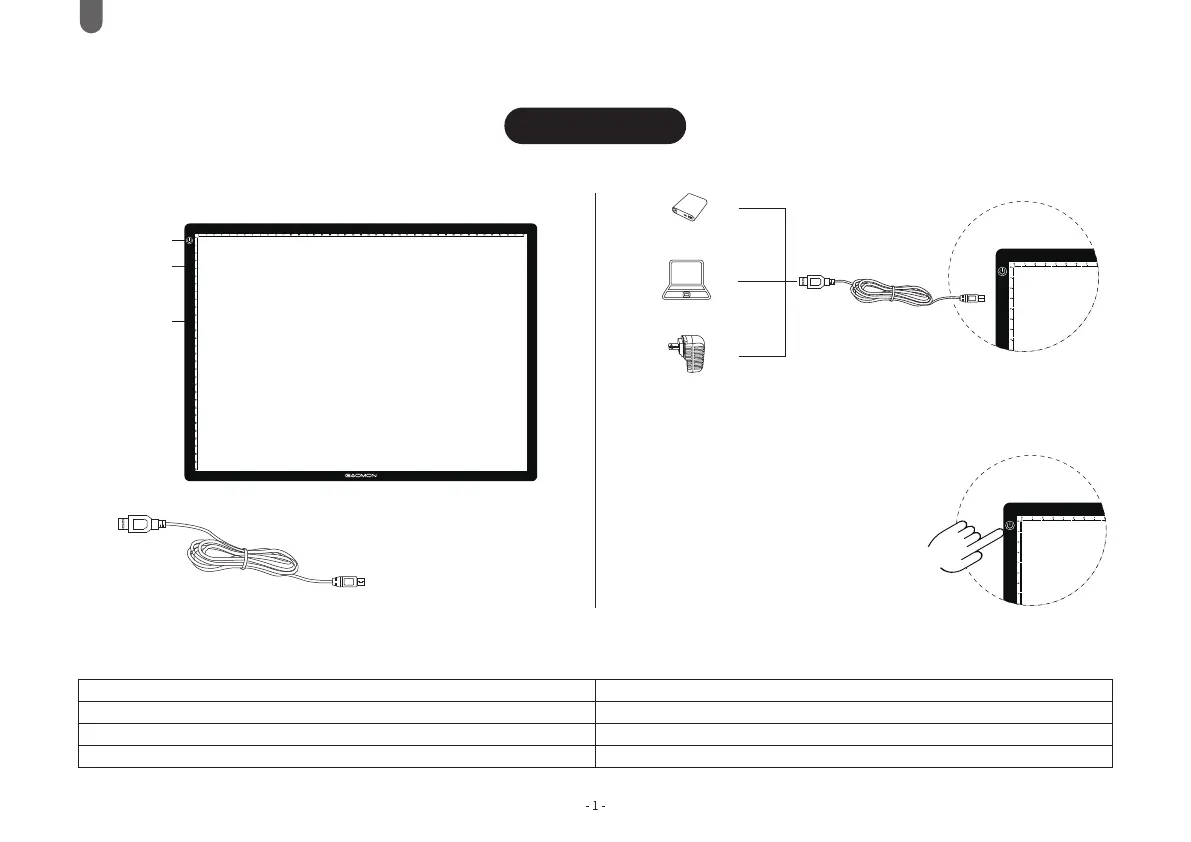
Power Bank
Computer
Power Adapter
Long working hours may cause a minor temperature
rise on the surface.
1. Connect the light pad to your computer or
power adapter via Micro USB cable(5V)
2. Touch the power button to light up the light pad.
Touch Switch
Micro USB
Interface
Work Surface
USB Cord
Model: GA3
Quick Start Guide
3. Touch and hold the power button to adjust the
brightness until it is the brightness you need.
4. Touch the power button to power off the light
pad under any brightness, it will remember
your last set of brightness.
Specifications
Dimension
llluminated Area
Work Surface
Light Source
459*336*6mm
420*300mm
PC Panels
LED
Working Voltage
Rated Power
Power Interface
Guide Light Way
DC 5V
<10W
Micro USB
Light Panel



 To Next Page