P
4x0.75 mm
2
1/2ELECTRICAL CONNECTION
Check that the mains voltage available on the system is as shown
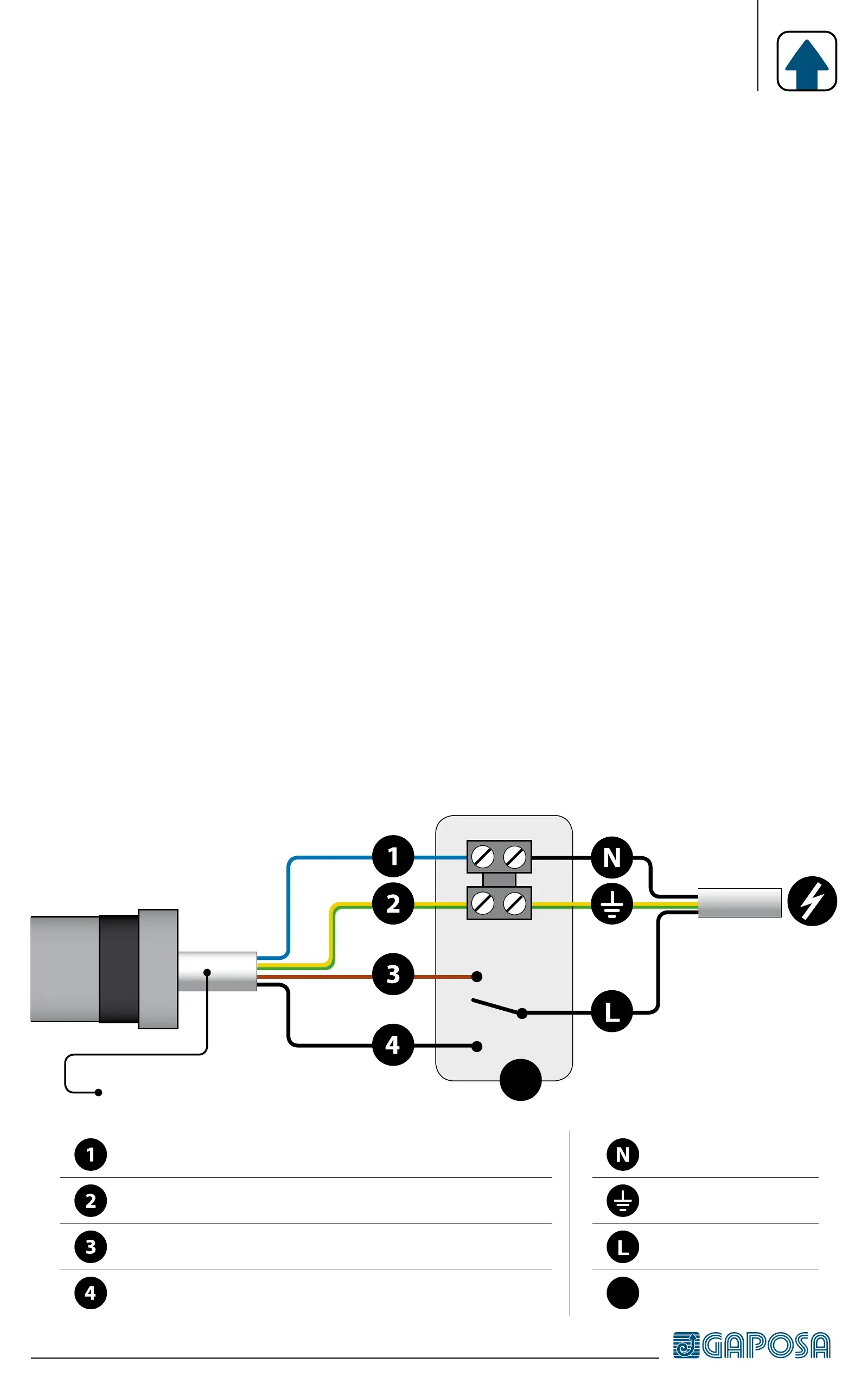
on the label. The motor mains connection should be executed according
to the diagram on the next page, by qualified technicians able to operate in
compliance with the rules.
ATTENTION: The power supply must contemplate a switching device
with an opening distance between contacts of at least 3mm.
The motors connecting cables to the network can only be replaced with
cables of the same type provided by the motor manufacturer.
•Do not connect more than one tubular motor to a single switch.
•Do not set the shutter/awning into motion while you are cleaning or
servicing the device and disconnect the supply.
•The switch controlling the motor must be installed in full view, not higher
than 1,5m and it must be kept far from moving parts.
230 V~ / 50 Hz
Powersupply
Neutral Blue
Ground Yellow/Green
Direction of rotation 1 Brown
Direction of rotation 2 Black
Neutral
Ground
Phase
P
Push button


 To Next Page