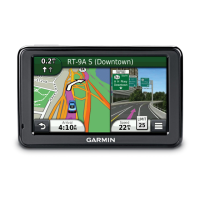
nüvi 2405/2505 Series Owner’s Manual 21
Navigation
Starting a Route
1
Search for a location (page 8).
2
Select a location.
3
Select Go!.
4
If necessary, select an option.
• Select Drive.
• Select Walk.
• Select Public Transit to calculate a route
that combines public transit and walking.
NOTE: You must have cityXplorer
™
maps
loaded to navigate using public transit
(page 29).
5
If necessary, select a route.
Starting a Route to a Saved Location
1
Select Where To? > Saved.
2
If necessary, select a category, or select All
Categories.
3
Select a location.
4
Select Go!.
Using Multiple Route Preview
1
Search for a location.
2
Select a location.
3
Select Routes and, if necessary, select
Drive (page 9).
A map appears with Faster Time, Shorter
Distance, and Less Fuel routes highlighted.
4
Use the on-screen buttons to select a route
5
Select Go!.



 To Next Page