Fishnder 350C Owner’s Manual 3
Sonar Views and Data Pages
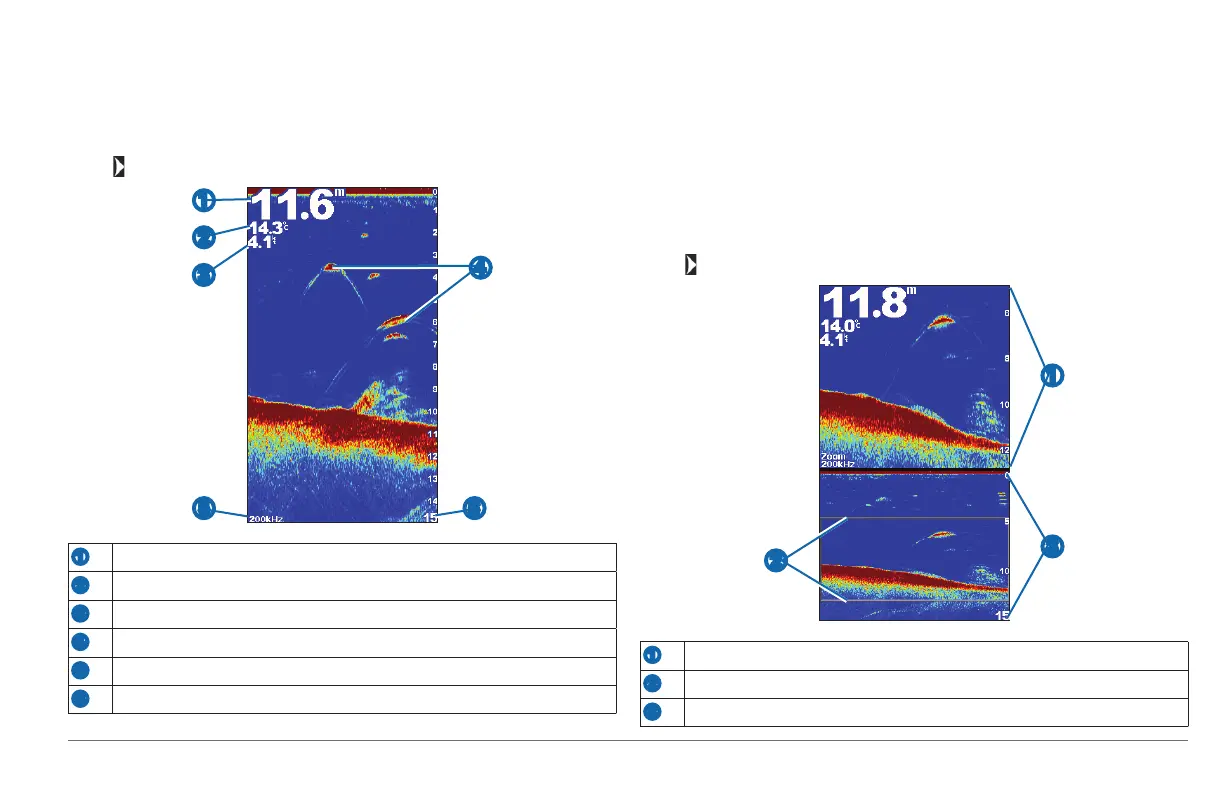
Full-Screen Sonar View
The full-screen sonar view shows a full-view graph of sonar readings from a
transducer.
Select > Full Screen.
➌
➋
➊
➎
➍
➏
➊
Bottom depth at your present location
➋
Water temperature (if a temperature-capable transducer is connected)
➌
Water speed (if a water-speed-capable transducer is connected)
➍
Suspended targets
➎
Transducer frequency
➏
Depth as the sonar view scrolls from right to left
Turning On the A-Scope
The A-Scope is a vertical asher along the right side of the full-screen sonar view.
This feature expands the most recently received sonar data so that it is easier to
see. It can also be helpful for detecting sh that are located close to the bottom.
From the full-screen sonar view, select MENU > Setup > Sonar Setup >
A-Scope > On.
Split-Zoom Sonar View
The split-zoom sonar view shows a full-view graph of sonar readings in the bottom
window and a magnied portion of that graph in the top of the sonar view.
Select > Split Zoom.
➋
➌
➊
➊
Zoomed depth range
➋
Zoom window
➌
Sonar depth range
190-01440-00_0B.indd 3 3/21/2012 1:00:07 PM









 To Next Page