Fishnder 350C Owner’s Manual 7
Drift: Sets an alarm to sound when variations in depth at your present location
exceed the specied depth.
Sonar Setup
When you adjust these settings in one sonar view, those adjustments are applied to
the other sonar views automatically.
Select MENU > Setup > Sonar Setup.
Frequency: Sets the frequency to display on the sonar view, when using a dual-
beam transducer.
The 200 kHz frequency shows better detail, has a narrower beam, and is
typically used in shallower waters.
The 77 kHz frequency has a wider beam, so it can be used to cover a larger
area. It can be used as a search tool to locate structures, such as brush piles,
and to see more sh.
Scroll Speed: Sets the rate at which the sonar display moves from right to left.
Using a higher scroll speed shows more detail, especially while moving or
trolling.
Fish Symbols: Displays selected information for the suspended targets.
Noise Reject: Minimizes the appearance of weak sonar returns by increasing noise
rejection.
NOTE: Noise rejection settings must be applied to the split-frequency view
separately from other sonar views.
Surface Noise: Sets whether the device displays sonar returns near the surface of
the water. Hiding surface noise helps reduce clutter.
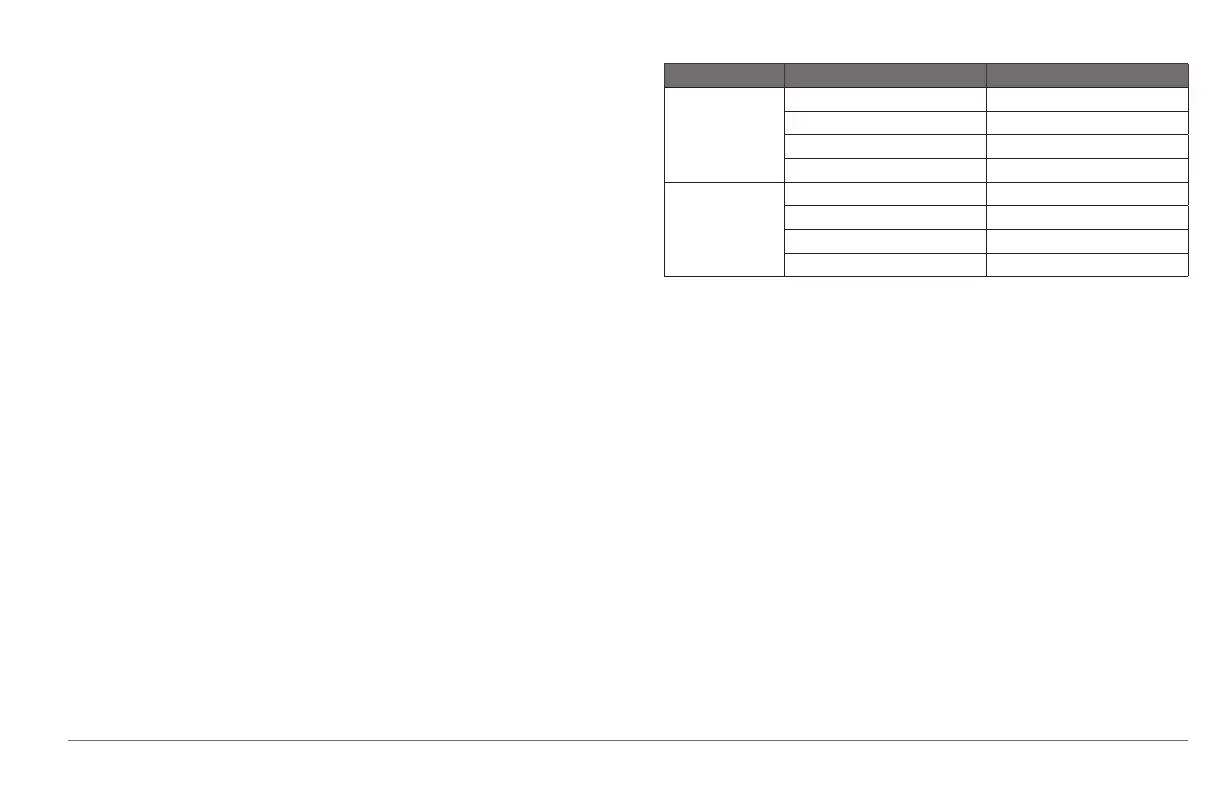
Color Scheme: Sets the color scheme.
Color Scheme Color Description
White Yellow Strong return
Purple Medium return
Blue Weak return
White (Black in night mode) No return
Blue Red Strong return
Yellow Medium return
Light Blue Weak return
Blue No return
Sonar Numbers
Select MENU > Setup > Sonar Numbers.
Number Size: Adjusts the size of the numbers shown on the sonar views.
Water Temp.: Shows or hides the water temperature on the sonar views, when
available.
NOTE: The device must be connected to a temperature-capable transducer to
show the water temperature.
Battery: Shows or hides the battery voltage on the sonar views.
Water Speed: Shows or hides the water speed on the sonar views, when available.
NOTE: The device must be connected to a water-speed-capable transducer to
show the water speed.
Odometer: Shows or hides the odometer on the sonar views, when available.
System Settings
Select MENU > Setup > System.
Language: Sets the language for the text.
190-01440-00_0B.indd 7 3/21/2012 1:00:09 PM









 To Next Page