GLO™ 2 GLONASS and
GPS Sensor Instructions
Installing the Battery
WARNING
This product contains a lithium-ion battery�
See page 5 for important battery safety
information�
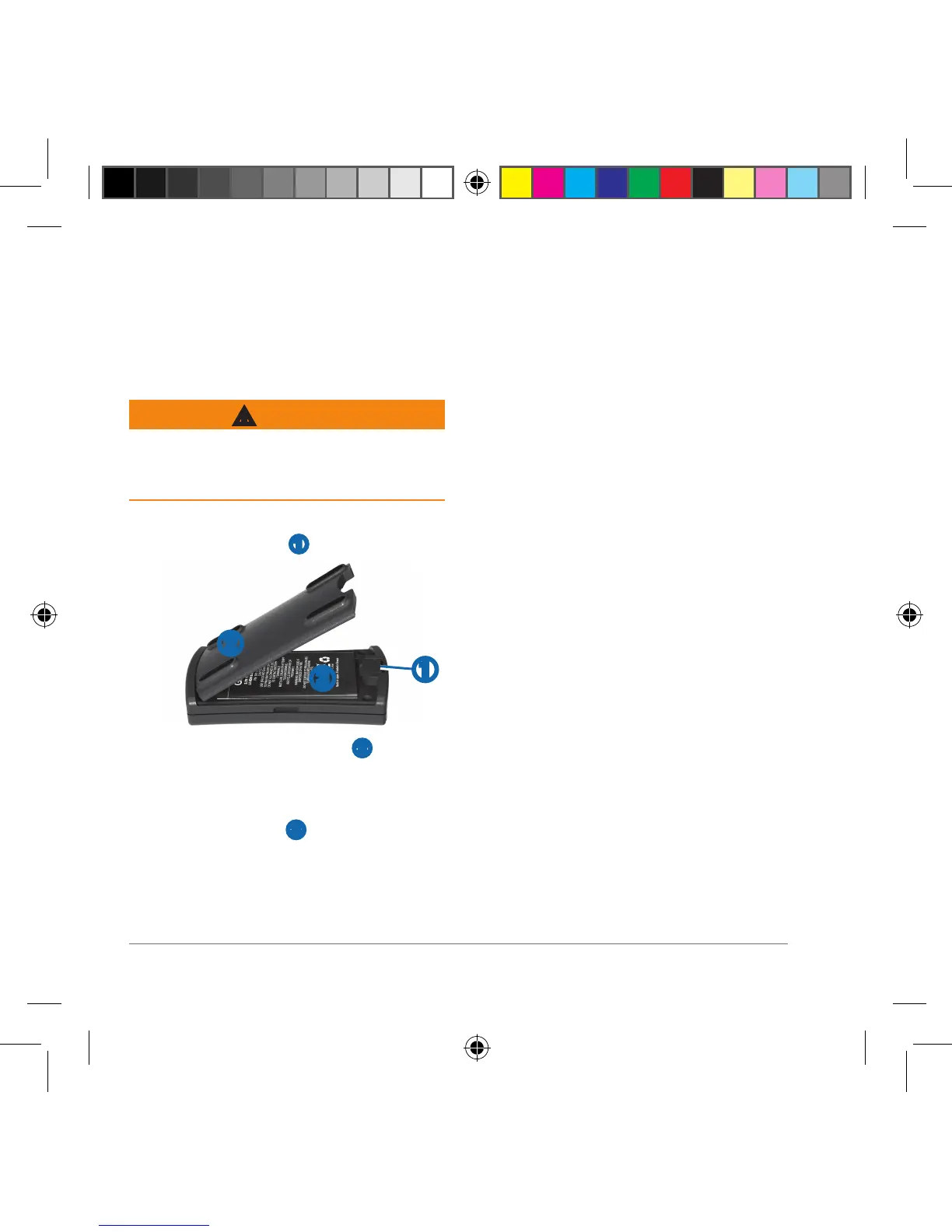
1
With your thumbnail, slide the battery
cover release tab
➊�
➌
➊
➋
2
Remove the battery cover ➋�
3
Locate the metal contacts on the end
of the lithium-ion battery�
4
Insert the battery ➌ so the metal
contacts on the battery align with
the metal contacts inside the battery
compartment�
5
Press the battery down into place�
6
Insert the battery cover into the
notches and press down�
The release tab locks the cover in
place�
Replacement Battery
You can purchase a replacement battery
(010-11935-00) at
http://buy�garmin�com�
Charging the Battery
You can use the sensor while you are
charging it�
1
Plug the small end of the power cable
into the mini-USB connector on the
end of the sensor�
2
Plug the other end of the power cable
into an appropriate source of power for
the cable type�
It takes about three hours to charge the
battery� A fully charged battery lasts about
13 hours�
NOTE: If the battery has not been charged
for a long period of time, remove the
battery, connect the cable to the device
and a power source, and then replace the
battery� The battery will charge as usual�
Glo_2_Instructions_print.indd 2 8/1/2018 12:36:52 PM



 To Next Page