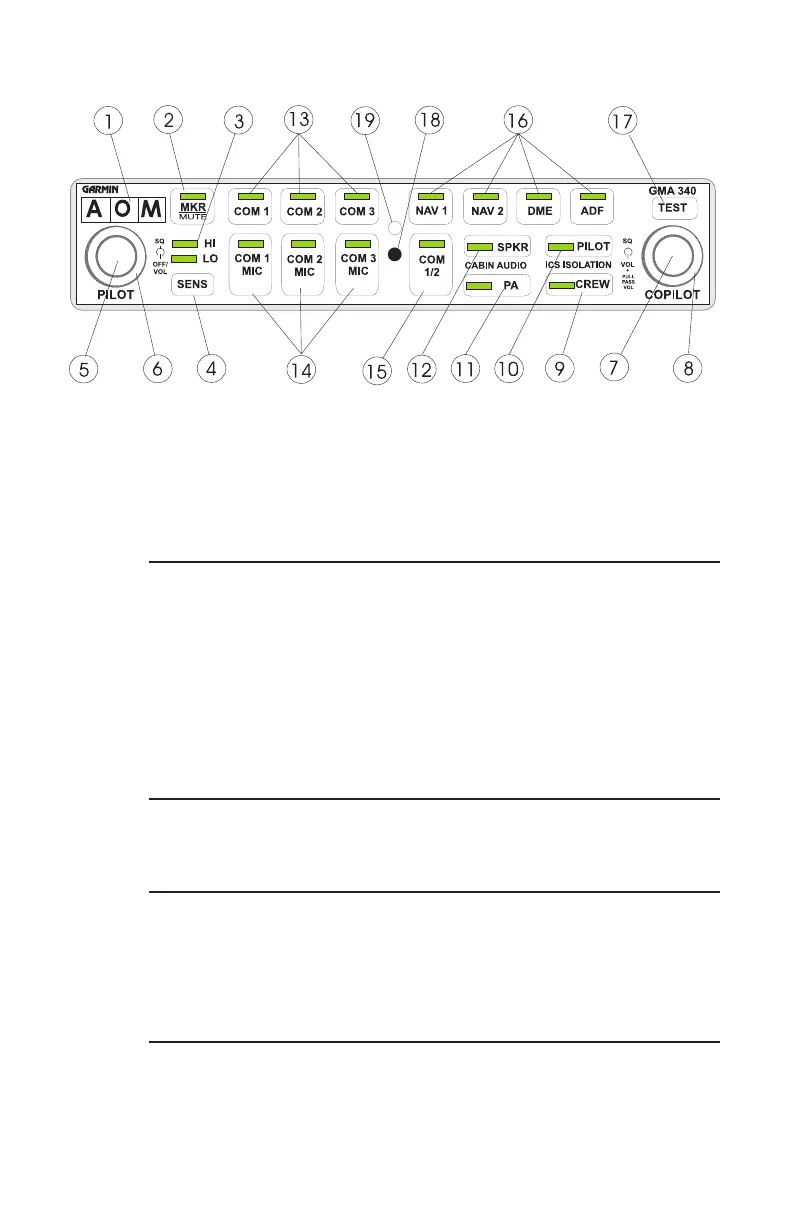
Front Panel Controls
1. Marker Beacon Lamps
2. Marker Beacon Receiver Audio Select/Mute Button
3. Marker Beacon Receiver Sensitivity Indicator LED.
4. Marker Beacon Receiver Sensitivity Selection Button
5. Unit On/Off, Pilot Intercom System (ICS) Volume
6. Pilot ICS Voice Activated (VOX) Intercom Squelch Level
7. Copilot and Passenger ICS Volume Control (Pull out for Passenger
Volume)
8. Copilot/Passenger VOX Intercom Squelch Level
9. Crew Isolation Intercom Mode Button
10. Pilot Isolation Intercom Mode Button
11. Passenger Address (PA) Function Button
12. Speaker Function Button
13. Transceiver Audio Selector Buttons (COM1, COM2, COM3)
14. Transmitter (Audio/Mic) Selection Buttons
15. Split COM Button
16. Aircraft Radio Audio Selection Buttons (NAV1, NAV2, DME, ADF)
17. Annunciator Test Button
18. Locking Screw Access
19. Photocell - Automatic Annunciator Dimming
1
MKR
BCN
ICS
COM/
NAV



 To Next Page