2 of 10 P/N 11934-S01
Section 9 Cirrus Design
Supplements SR20
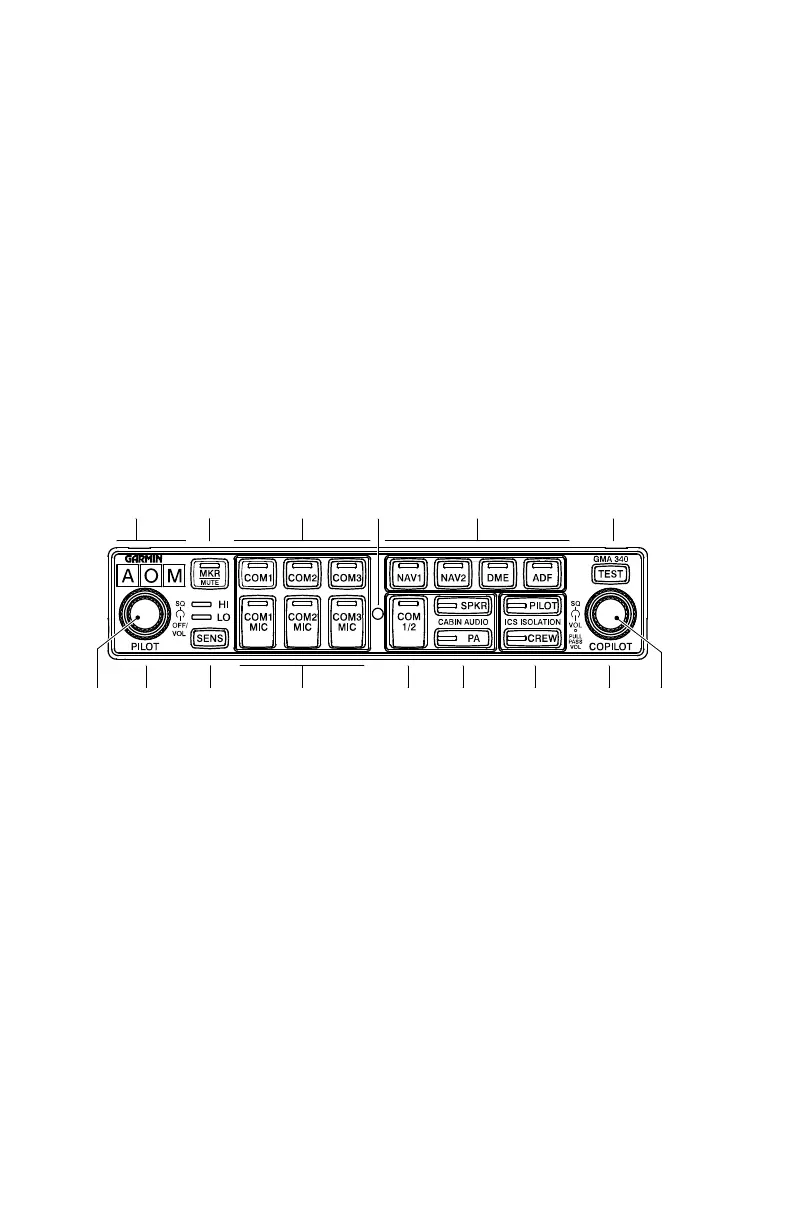
Figure - 1
Section 1 - General
This supplement provides detailed operating instructions for the
Garmin GMA 340 Audio Selector Panel/Intercom System with internal
Marker Beacon. This supplement covers the basic operating areas of
the Audio Control Panel.
• Power On / Fail-safe Operation
• Audio / Transceiver Selection
• Speaker Output
• Public Address (PA) Function
• Personal Music Inputs
• Intercom (ICS)
• Marker Beacon
1. Marker Beacon Annunciators
2. Marker Audio Select Button / LED
3. Marker Sensitivity Select Button
a. HI Sensitivity LED
b. LO Sensitivity LED
4. Pilot Intercom Squelch (outer knob)
5. Power / Intercom Volume (inner knob)
6. Transceiver Audio Select Buttons/
LEDs
7. Photocell
8. Receiver Audio Select Buttons / LEDs
9. Transceiver Audio/Transmit Select
Buttons / LEDs
10. Split COM Button / LED
11. Cabin Audio Select Buttons / LEDs
a. SPKR, Cabin Speaker
b. PA, Public Address
12. Intercom Isolation Buttons / LEDs
a. PILOT Intercom Mode
b. CREW Intercom Mode
13. Copilot / Passenger Intercom
Squelch (outer knob)
14. Copilot (IN) / Passenger (OUT)
Intercom Volume (inner knob)
15. Indicator Test Button
141312
11
10
9
345
15
8
7
62
1
SR20_FM09_1108
Audio Control Panel
Revision 1: 07-18-05



 To Next Page