22
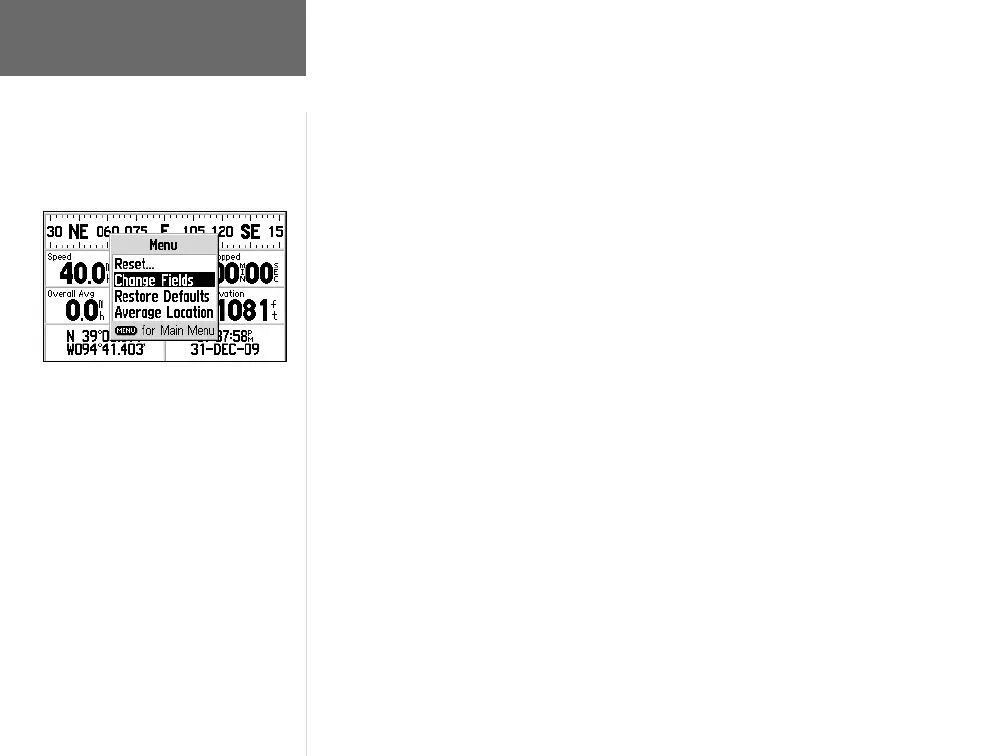
The following items appear on the Trip Information Page:
Current Heading—Your current direction of travel is indicated on a compass-like
display at the top of the page.
Speed—Your current vehicle speed can be indicated in miles per hour, knots or
kilometers per hour.
Trip Odometer—The running total of distance traveled, based upon the distance
between second-by-second location readings, since the Trip Information was last reset.
Stopped Time—The length of time that the vehicle has been stopped (stationary)
while the GPS V was still powered on and tracking your location (and since the Trip
Information was last reset).
Overall Avg—Your average speed of travel (including time stopped) during the
time the GPS V was on and tracking your location (and since the Trip Information
was last reset).
Moving Time—The length of time that the vehicle has been in motion, since the
Trip Information was last reset.
Total Time—The total length of time that the GPS V has been tracking your
location, since the Trip Information was last reset. This is always equal to Moving Time
plus Stopped Time.
Current Location—Your current position is displayed in latitude/longitude coordi-
nates at the bottom left corner of the page.
Current Time and Date—The current time and date appears in the lower right
corner of the screen. Time can be displayed in 12- or 24-hour format and in local time
or universal (UTC) time.
You can change any of these items to display different data by selecting the ‘Change
Fields’ option (see following page).
Reference
Trip Information Page
You can change the information types on
the Trip Information Page, using the ‘Change
Fields’ option.
GPS V OM.indd 10/3/01, 1:51 PM22


 To Next Page