62
Reference
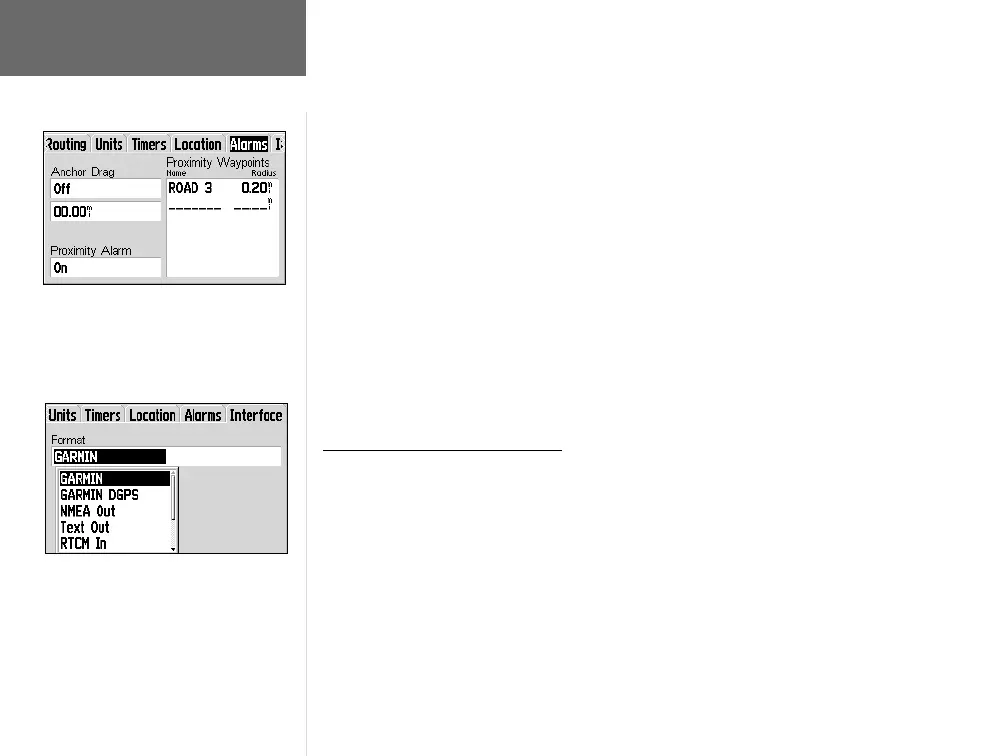
To enable/disable the proximity alarm:
1. Follow the steps on page 54 to select the Alarms Setup Page.
2. Use the ROCKER KEYPAD to highlight ‘Proximity’ and press ENTER. A pop-up
window will appear.
3. Use the ROCKER KEYPAD to highlight ‘On’ or ‘Off’ and press ENTER.
4. To specify the proximity waypoint and alarm radius, use the ROCKER KEYPAD to
highlight the fi rst blank line under ‘Proximity Waypoints’ and press ENTER. Use
the ROCKER KEYPAD and ENTER to specify the waypoint category and waypoint
name. (Use the steps on pages 26-32 is you need more guidance.) With the proxim-
ity waypoint selected, highlight the ‘Radius’ fi eld adjacent to the waypoint name and
press ENTER. Use the ROCKER KEYPAD and ENTER to enter the alarm radius.
5. To remove a proximity waypoint or all proximity waypoints from the list, use the
ROCKER KEYPAD to highlight the waypoint you wish to remove (not necessary
to remove all) and press MENU. Use the ROCKER KEYPAD to highlight ‘Remove
Waypoint’ or ‘Remove All’ and press ENTER.
Main Menu: Setup: Interface
The Interface Setup Page let you control the input/output format used when con-
necting your GPS V to a computer, external NMEA devices, a DGPS beacon receiver,
etc. The following settings are available:
GARMIN—The proprietary format used to exchange waypoint, route, track log and
MapSource data with a PC.
GARMIN DGPS—The proprietary format used with a GARMIN differential beacon
receiver (e.g., GBR 23). Provides for tuning of the beacon receiver directly from the
GPS V.
NMEA Out—Support the output of standard NMEA 0183 version 2.30 data. No
input functions are enabled.
Main Menu: Setup
Proximity waypoints allow you to mark loca-
tions you wish to avoid. If you penetrate the
alarm radius the GPS V will provide an alert
message.
The GPS V has a variety of interface settings
for connection to other equipment (such as
a GARMIN Beacon Receiver or a PC). You
should NOT use the GARMIN DGPS or
RTCM In settings when WAAS is enabled.
GPS V OM.indd 10/3/01, 1:53 PM62


 To Next Page