63
Reference
Text Out—Allows simple ASCII text output of location and velocity information.
No input functions are enabled.
RTCM In—Provides DGPS input using a standard RTCM SC-104 format. No output
functions are enabled.
RTCM In/NMEA Out—Allows DGPS input using a standard RTCM SC-104 format
and supports the output of standard NMEA 0183 version 2.30 data.
RTCM In/Text Out—Allows DGPS input using a standard RTCM SC-104 format
and supports the output of simple ASCII text information for location and velocity.
None—Provides no interfacing capabilities.
To change an Interface Setup Page feature:
1. Follow the steps on page 54 to select the Interface Setup Page.
2. Use the ROCKER KEYPAD to highlight ‘Format’ and press ENTER. A pop-up
window will appear listing the available interface settings.
3. Use the ROCKER KEYPAD to highlight the desired setting and press ENTER.
4. For Text Out and/or RTCM In, Use the ROCKER KEYPAD to highlight ‘Baud Rate’
and press ENTER. Use the ROCKER KEYPAD to highlight the desired setting and
press ENTER.
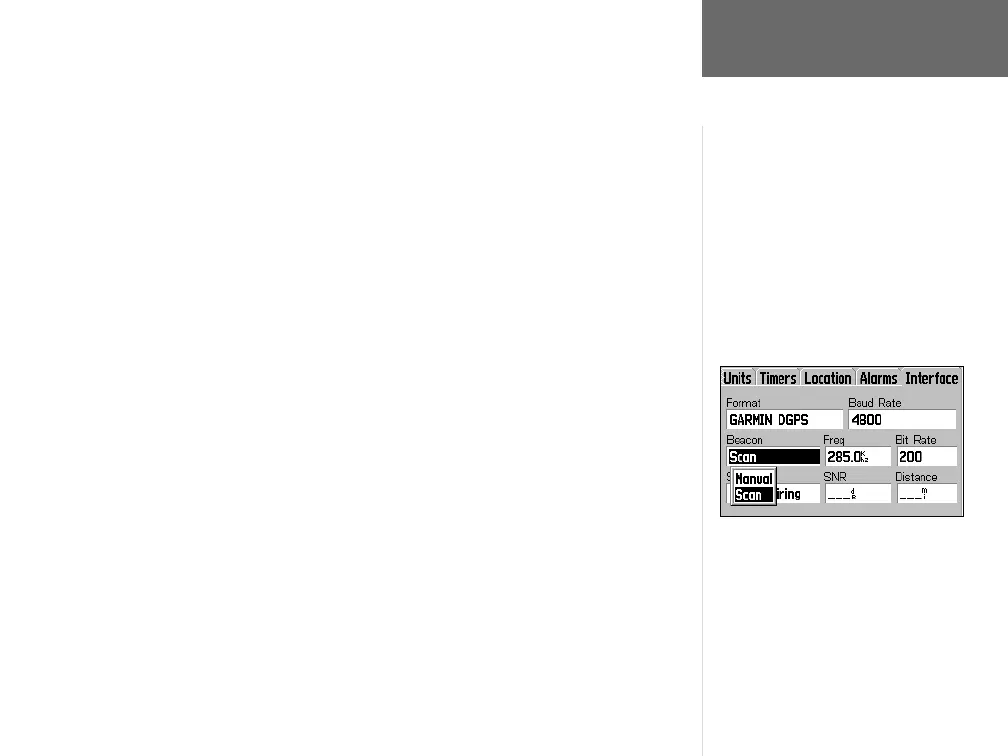
5. For GARMIN DGPS or RTCM In/NMEA Out, use the ROCKER KEYPAD to highlight
‘Beacon’ and press ENTER. Use the ROCKER KEYPAD to select ‘Scan’ or ‘Manual’
and press ENTER. If ‘Scan’ is selected, the GPS V will automatically direct the
beacon receiver to scan for available beacon transmitters. If ‘Manual’ is selected,
select the ‘Freq’ and ‘Bit Rate’ fi elds and enter the appropriate settings. The beacon
status, signal-to-noise ratio and distance to beacon are displayed on the bottom
of the page.
Main Menu: Setup
NMEA 0183, version 2.30 is transmitted
every two seconds at 4800 baud.
Approved sentences include GPRMC,
GPRMB, GPGGA, GPGSA, GPGSV, GPGLL,
GPBOD, GPRTE and GPWPL.
Proprietary sentences include PGRME,
PGRMZ, PGRMM and PSLIB.
When using a beacon receiver setting
(GARMIN DGPS or RTCM In/NMEA Out),
the GPS V can automatically communicate
with the beacon receiver to scan for available
stations. Or, you can select ‘Manual’ and
enter the beacon frequency and bit rate.
GPS V OM.indd 10/3/01, 1:54 PM63


 To Next Page