66
Reference
Main Menu: Accessories: Hunt & Fish
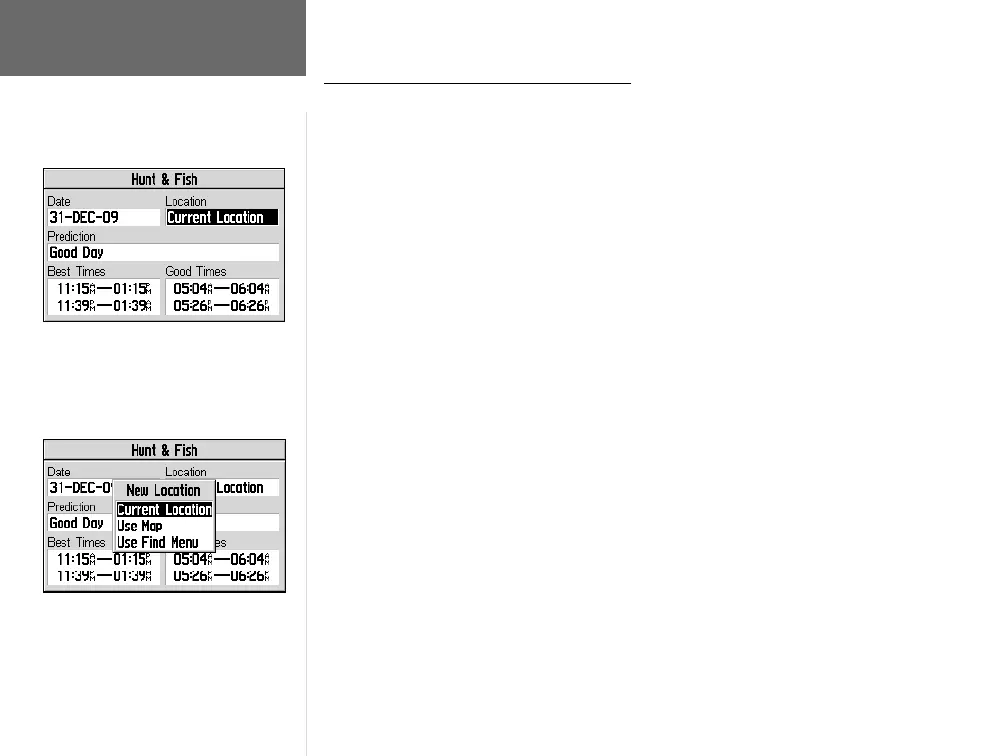
The Hunt and Fish Accessories Page provides you with a listing of best times for
hunting and fi shing, for a chosen date and location.
To display hunting and fi shing predictions for a specifi ed date and
location:
1. Follow the steps on page 64 to select the Hunt and Fish Accessory Page.
2a. Use the ROCKER KEYPAD to highlight ‘Date’ and press ENTER. Use the ROCKER
KEYPAD and ENTER to enter the desired date. Next, use the ROCKER KEYPAD
to highlight ‘Time’ and press ENTER. Use the ROCKER KEYPAD and ENTER to
enter the desired time.
or,
2b. Press MENU to display an options menu. Use the ROCKER KEYPAD to highlight
‘Use Current Time’ and press ENTER.
3. Use the ROCKER KEYPAD to highlight the location option and press ENTER. If
‘Current Location’ is selected, the ‘Best Times’ and ‘Good Times’ will be displayed.
4a. If ‘Use Map’ is selected, use the ROCKER KEYPAD to point to the desired location.
Press ENTER when the pointer is on the desired location.
or,
4b. If ‘Use Find Menu’ is selected, follow the step-by-step instructions on pages 26-32
in this manual.
NOTE: The times displayed are the recognized best and good times for hunting
and fi shing. But, be certain that they are not in confl ict with state and local game
laws which may vary from location to location. It is your responsibility to know and
abide by these laws.
Main Menu: Accessories
Time predictions can be calculated for any
date and any location.
The Hunt and Fish Accessories Page lists best
and good times for hunting and fi shing.
GPS V OM.indd 10/3/01, 1:54 PM66


 To Next Page