38
Reference
Sonar Page Options
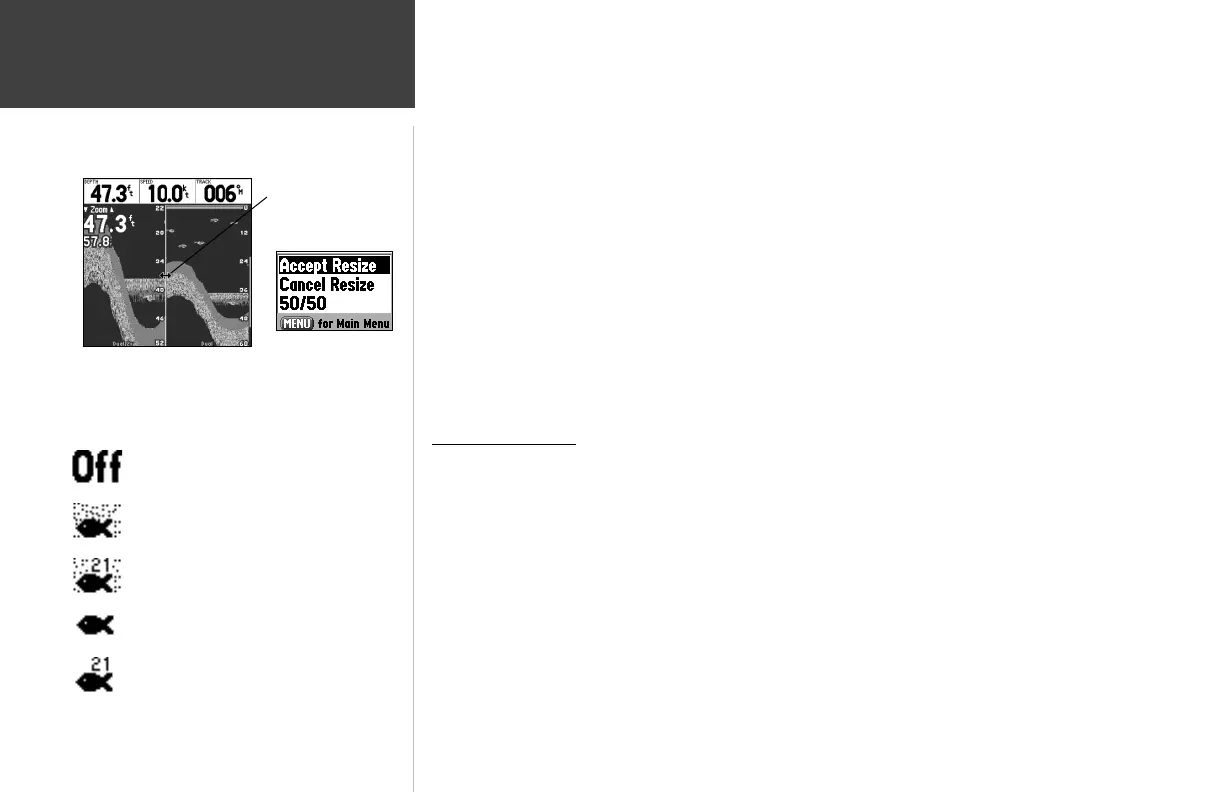
3. Move the horizontal double-arrow LEFT or RIGHT using the ARROW KEYPAD until the desired
vertical width line shows, then press ENTER.
4. If you wish to cancel this operation, press QUIT or press MENU, highlight ‘Cancel Resize’ and press
ENTER.
• Set Up Sonar — jumps to the Sonar tab of the Main Menu, which contains sonar confi gura-
tion settings that should not require frequent change. You may also press MENU twice from any
screen, then highlight the ‘Sonar’ tab using the ARROW KEYPAD. Press RIGHT on the ARROW
KEYPAD to access the selection fi elds. Each time the Setup Menu is accessed, the unit returns to
the last edited selection fi eld.
To change a setting on the Sonar tab:
1. Using the ARROW KEYPAD, highlight the desired fi eld and press ENTER and the available options
appears.
2. Highlight the desired setting and press ENTER.
3. Press QUIT to return to the Sonar Page or previous page.
Sonar Tab Options
Fish Symbols — allows you to determine how the graph displays underwater targets and back-
ground information. If Fish Symbols are set to ‘Off’, the unit displays all of the available informa-
tion about the underwater environment. If a fi sh symbol is selected, the graph displays only the
information related to that symbol. Actual fi sh returns may not always appear as perfect arches
(like in simulator mode), due to the speed, fi sh orientation and/or other conditions.
Water Type — since sound waves travel through ‘Fresh’ and ‘Salt’ water at different rates it is
necessary to select the ‘Water Type’ to ensure accurate readings on the unit.
Depth Number — controls the effi ciency of the digital depth update rate.’Fast Update’ updates
more quickly and is recommended for low-noise, deeper water (>50 ft.). ‘Auto’ is best for shallow
water or high noise areas, has a slower screen update and is best used if you travel a wide variety of
depths.
Resizing the Split Sonar Display
Double-Arrow
‘ Size Split’ Menu
Options
Fish Symbols Off— All available information
is displayed .
Suspended targets displays as fi sh symbols.
Background information is displayed .
Same as above with the target depth attached.
Suspended targets display as fi sh symbols. No
background information is displayed .
Same as above with target depth attached.
GPSMAP178CManual.indd 38 3/19/2004, 3:10:15 PM














 To Next Page