Quick Start
18
Viewing Nearest
Airports and Navaids
Nearest Airports and Navaids
To view the nearest airports and navaids (‘Aviation’ mode):
1. Press the NRST/FIND key and use the ARROW KEYPAD to select the desired fi le tab along the top
of the page.
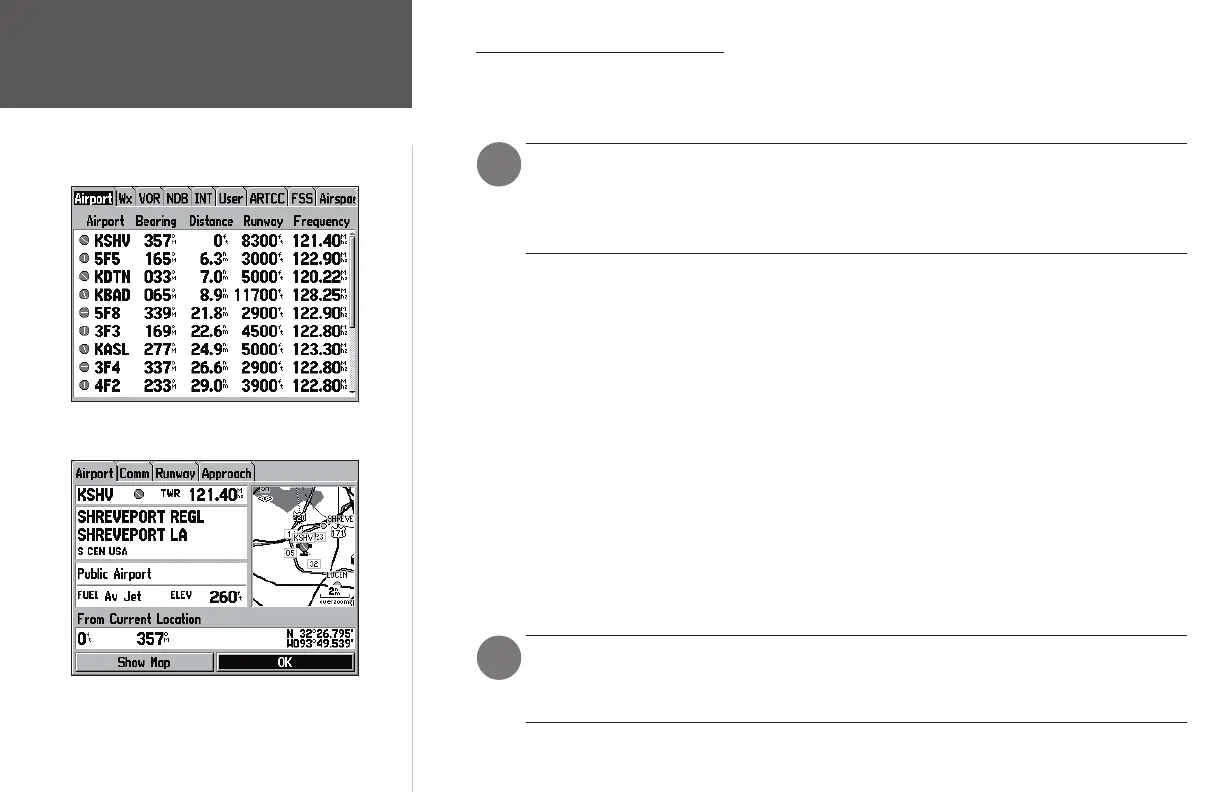
The nearest airports are displayed by selecting the ‘Airport’ tab at the top of the page.
When an airspace alert is provided, pressing NRST will automatically display the nearest
airspace information. Press NRST a second time to quickly display the nearest airport list.
Press NRST a third time to display the Find menu.
Additional information for airports, navaids and user-created waypoints is available from the
waypoint information pages.
To view additional information for a nearby airport, navaid, or user waypoint:
1. Press the NRST/FIND key and select the desired fi le tab, as described above.
2. Use the ARROW KEYPAD to highlight the desired waypoint on the list and press ENTER. The cor-
responding waypoint information page will appear, showing additional waypoint information.
3. For airports, use the ARROW KEYPAD to select the fi le tabs across the top of the waypoint informa-
tion pages and display the desired airport data.
4. Highlight the on-screen ‘OK’ button and press ENTER to return to the Nearest pages.
In an emergency, a few simple keystrokes can be used to guide you to the closest point to land, as
described below.
To select a nearby waypoint as your destination:
1. Press the NRST/FIND key and select the desired fi le tab, as described above.
2. Use the ARROW KEYPAD to highlight the desired waypoint, press DIRECT TO, then, press ENTER.
In order to stop navigation, press the DIRECT TO key, highlight the ‘Stop Navigation’
button (using the ARROW KEYPAD) and press ENTER. Selecting/activating another ‘Goto’
destination will override, and thus also stop, the current navigation.
In an emergency, a list of nearest airports can readily be displayed
by pressing the NRST/FIND key.
Use the ARROW KEYPAD to highlight an airport on the nearest
list, then, press ENTER to view additional airport information.
)
)
190-00283-01_0B.indd 18 2/6/2003, 11:13:04 AM


















 To Next Page