Quick Start
4
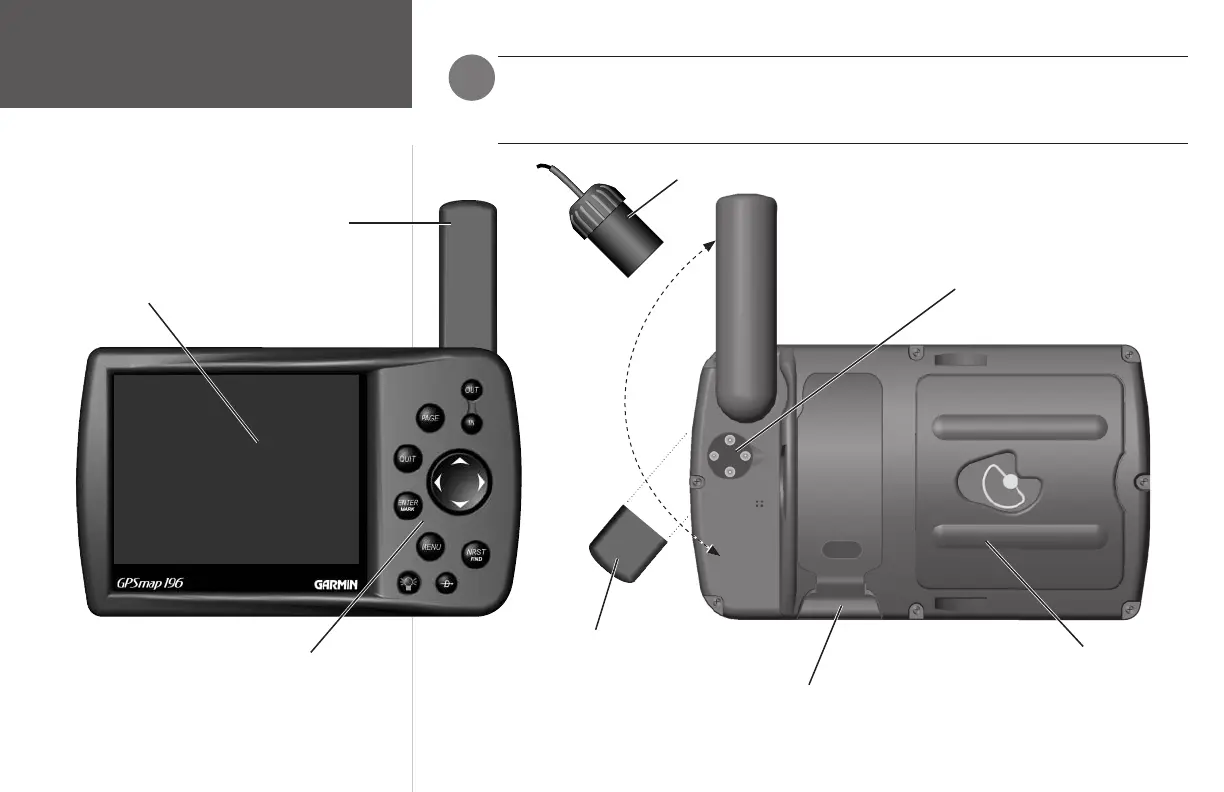
Unit Overview
12-level Grayscale LCD Display with Backlight
Backlit Keypad for easy night operation
Removable GPS Antenna
Connector for Cigarette
Lighter Adapter or PC
Interface Cable
Battery Compartment
Port for optional Data Card
R
o
t
a
t
e
A
n
t
e
n
n
a
t
o
D
o
w
n
P
o
s
i
t
i
o
n
f
o
r
S
t
o
r
a
g
e
To detach the removable antenna, rotate it to
this position (i.e., aligning the small tab located
at the base of the antenna with the notch on the
unit, at the antenna attachment point) and pull
straight out and away from the unit, while ensur-
ing that the unit is kept in place.
To install the remote GPS antenna: after detaching the removable GPS antenna from the
unit (as described in the instructions below), plug in the remote GPS antenna BNC connector
by pushing it down onto the antenna connector and rotating it clockwise to lock it in place.
)
Remote GPS Antenna BNC Connector
190-00283-01_0B.indd 4 2/6/2003, 11:11:48 AM

















 To Next Page