Quick Start
16
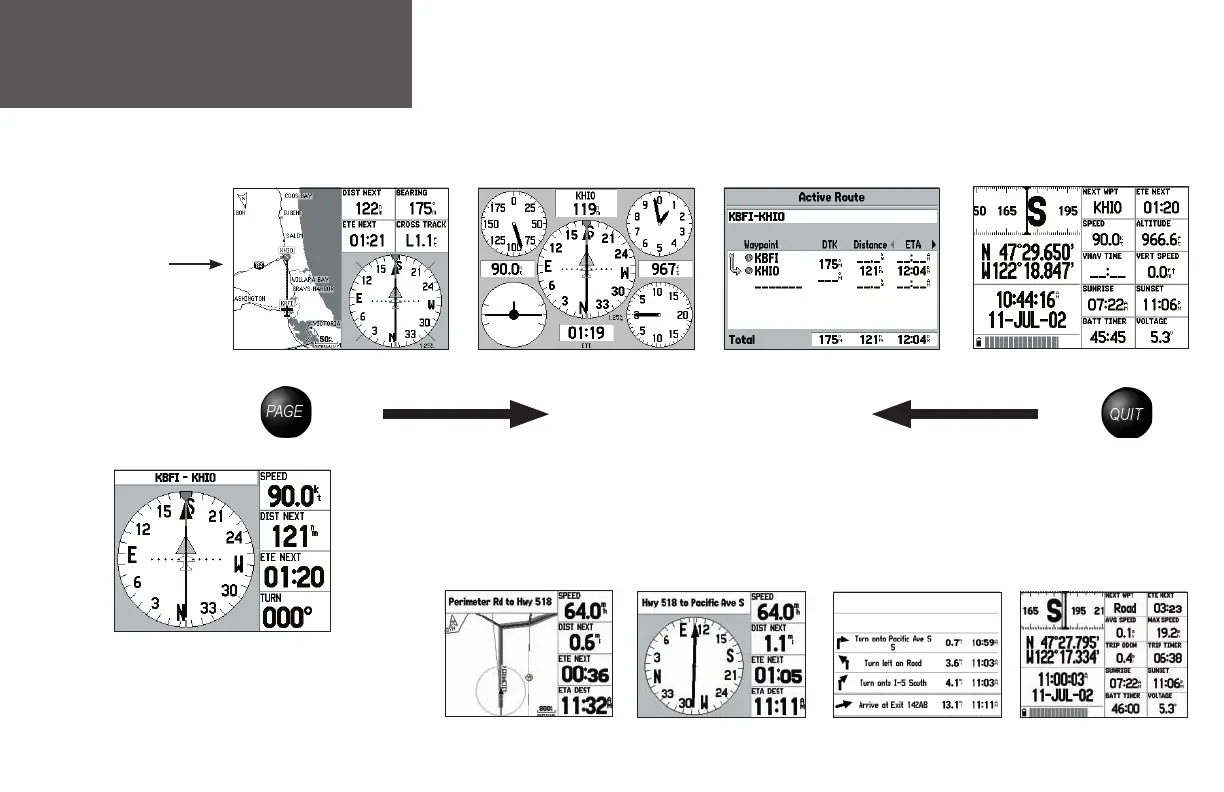
Main Page Sequence
The GPSMAP 196 features four main pages, which are linked together in series. You can quickly
cycle through these pages — in either direction — using the PAGE and QUIT keys. Each one of these
pages is described in greater detail in the Pilot’s Guide.
To display the next page in the sequence, press PAGE.
To display the previous page in the sequence, press QUIT.
The above sequence illustrates the pages for the ‘Aviation’ mode. As you become more familiar with
the GPSMAP 196, you will fi nd that using both the PAGE and QUIT keys allows you to quickly select
the desired page. For example, to quickly jump from the Map page to the Panel page, press the PAGE
key; to return from the Panel page to the Map page, press the QUIT key.
In ‘Land’ mode, the page sequence is slightly different, as illustrated below:
Position Page
Map Page
Panel Page Active Route Page
Map Page
RMI (Radio Magnetic Indicator) Page
Current Route Page
Position Page
When on the Panel page (default setting in the Aviation mode), you
can select the HSI (Horizontal Situation Indicator) page to appear in
the main page sequence in place of the Panel page by pressing on the
MENU key, selecting ‘Setup Page Layout’, then selecting ‘Panel’.
Page sequence
in ‘Aviation’ mode
190-00283-01_0B.indd 16 2/6/2003, 11:12:59 AM

















 To Next Page