GPSMAP 198C Sounder Owner’s Manual 85
USING SONAR > SONAR TAB OPTIONS
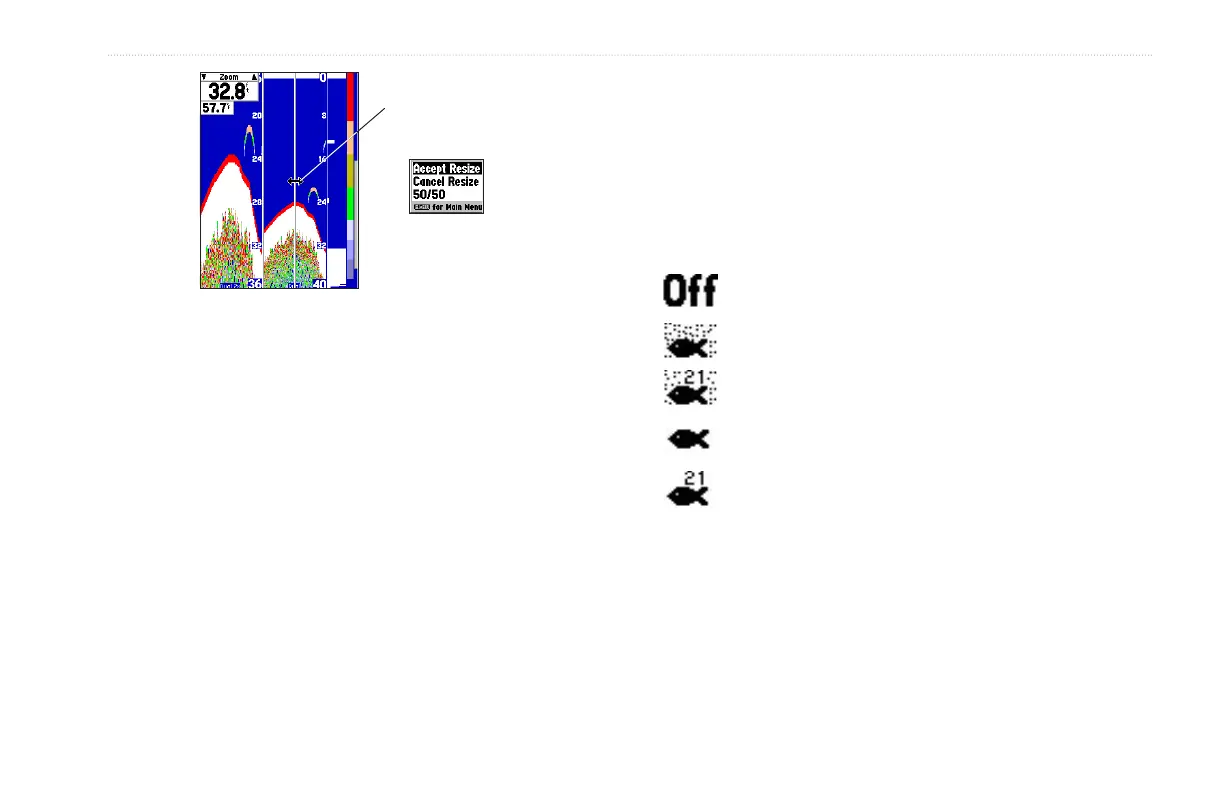
Resizing the Split Sonar Page
Double-Arrow
Size Split Menu Options
Sonar Tab Options
To access and change a setting on the Sonar tab:
1. Press MENU twice to access the Main Menu. Use the
ROCKER to highlight the Sonar tab.
2. Using the ROCKER, highlight the field, and press ENTER.
3. Highlight the setting, and press ENTER.
4. Press QUIT to return to the Sonar Page or a previous page.
Fish Symbols—allows you to determine how the graph shows
underwater targets and background information. If fish symbols
are set to Off, the unit shows all available information about the
underwater environment. If a fish symbol is selected, the graph
shows only the information related to that symbol. Actual fish
returns can not always appear as perfect arches (like in Simulator
Mode), due to the speed, fish orientation, or other conditions.
Fish Symbols Off— All available information is shown.
Suspended targets show as fish symbols. Background
information is shown.
Same as above with the target depth attached.
Suspended targets show as fish symbols. No background
information is shown.
Same as above with target depth attached.
Water Type—because sound waves travel through fresh and salt
water at different rates it is necessary to select the water type to
ensure accurate readings on the unit.


 To Next Page