68 GPSMAP 3005C Owner’s Manual
MAIN MENU > MAP TAB
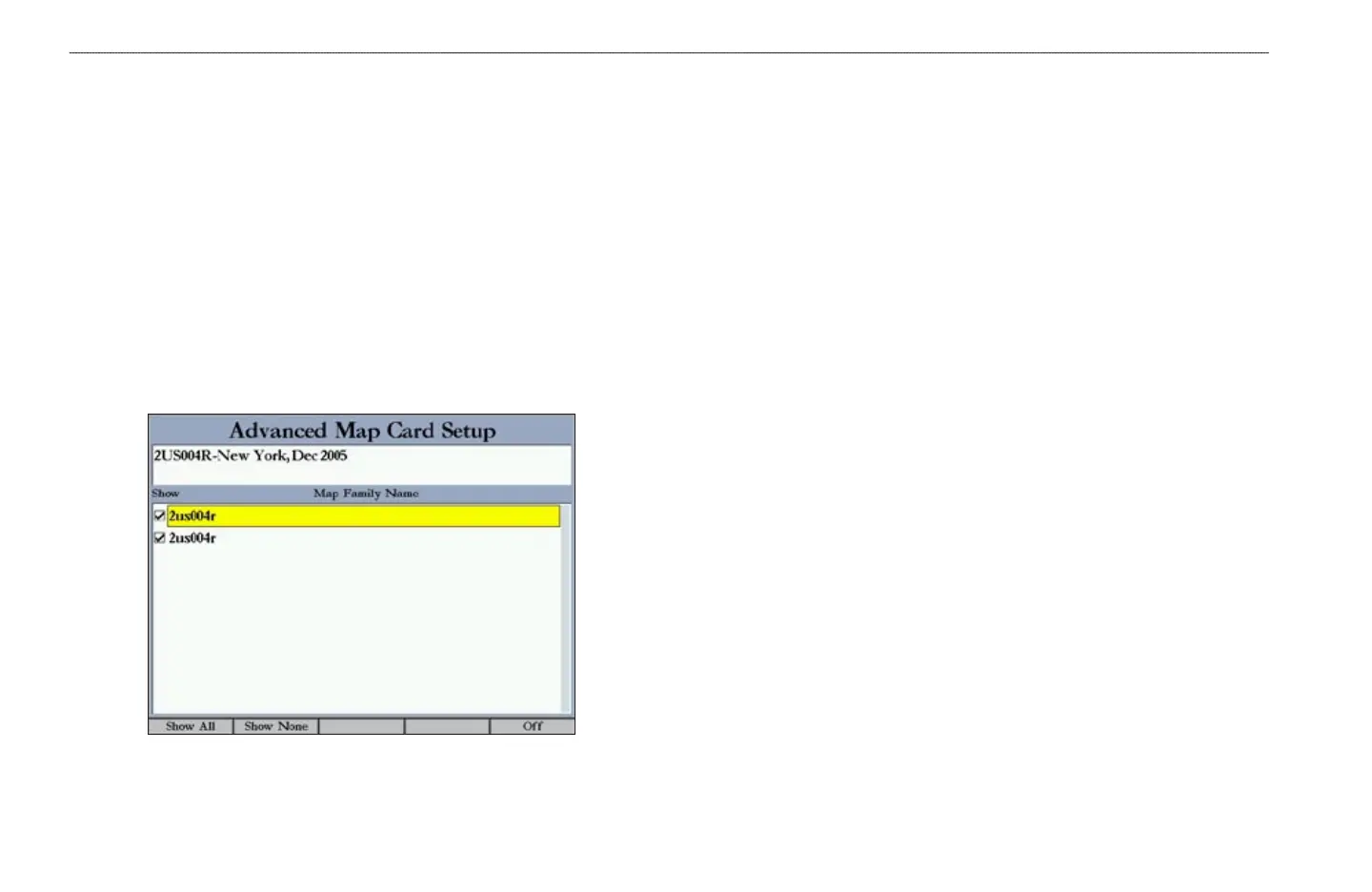
Use the Advanced soft key to show a list of the optional BlueChart or
MapSource data loaded on the data card. Each map family (or type) is described
by name and can be cleared if you do not want to show the data on the Map Page.
To show the
Advanced Map Card Setup:
1. Press the Advanced soft key to open the Advanced Map Card Setup
window.
2. Use the ROCKER to highlight a map family in the Map Family Name list.
3. Press the Off soft key to select or hide the map family, or press the On
soft key to show the map family. The map appears on the Map Page when
a check mark appears in the box adjacent to the map.
OR
Press the Show All soft key to show all map families. Press the Show
None soft key to clear all check boxes.
4 To view the notes or chart information for that map area, highlight the map
name, and press ENTER.
5. Press the Chart Info soft key to view chart information. Press the Notes
soft key to view chart notes.
6. To scroll through the notes, highlight the Notes fields, press ENTER, and
use the ROCKER to scroll up, down, left, and right.
7. Press QUIT to exit.















 To Next Page