EasyManua.ls Logo

Garmin GPSMAP 62s - User Manual

Garmin GPSMAP 62s
60 pages
Print Icon
To Next Page IconTo Next Page
Loading...
GPSMAP
®
62 series
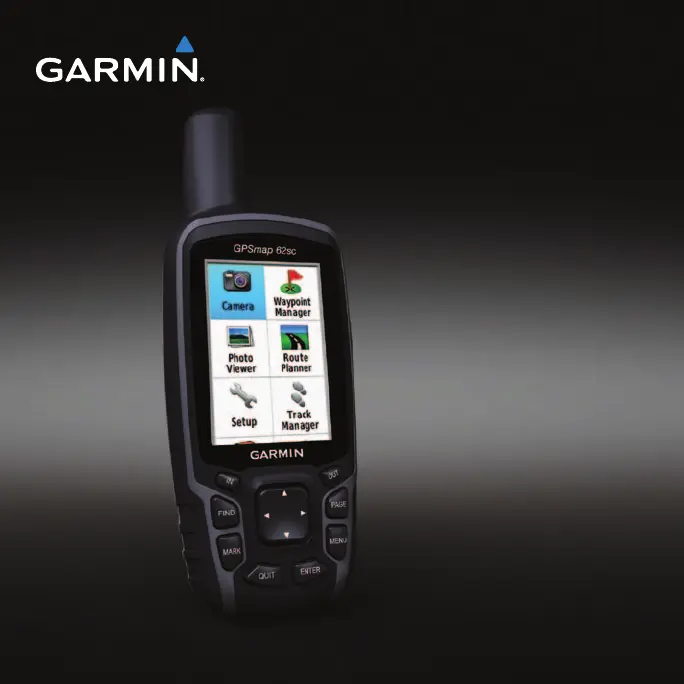
owners manual
For use with the GPSMAP 62,
62s, 62st, 62sc, and 62stc

Table of Contents

Other manuals for Garmin GPSMAP 62s

Questions and Answers

  • A
    Angela PetersonAug 4, 2025
    What to do if Garmin GPSMAP 62s does not acquire satellite signals?
    • B
      Bobby BradleyAug 4, 2025
      If your Garmin GPS device isn't picking up satellite signals, try the following: First, move away from obstructions like parking garages, tall buildings, and trees. Then, power on the device and remain stationary for a few minutes to allow it to connect.
  • M
    Mark WilliamsAug 8, 2025
    How to reset Garmin GPS when screen or buttons unresponsive?
    • A
      Austin MendezAug 8, 2025
      If the screen or buttons on your Garmin GPS are not responding, you can reset the device by removing and reinstalling the batteries. Note that this will not erase any of your data or settings.
  • V
    vazquezmelanieAug 12, 2025
    How to reset Garmin GPSMAP 62s GPS when screen or buttons do not respond?
    • T
      Tamara KelleyAug 12, 2025
      If the screen or buttons on your Garmin GPS device are unresponsive, you can reset it by removing and then reinstalling the batteries. Note that this action will not erase your data or settings.
  • W
    whitekevinAug 16, 2025
    How to reset Garmin GPS to factory settings?
    • T
      Timothy JohnsonAug 16, 2025
      To reset your Garmin GPS device to its original factory settings, go to the main menu, select Setup, then Reset, and finally Reset All Settings.
  • J
    Jesse RomanAug 20, 2025
    How to fix Garmin GPS not going into mass storage mode?
    • C
      carriegardnerAug 20, 2025
      If your Garmin GPS is connected to the computer but won't enter mass storage mode, it could be due to a corrupted file. To resolve this, disconnect the device, turn it off, then press and hold the Rocker while reconnecting it to your computer. Keep pressing the Rocker for 10 seconds, or until the device enters mass storage mode.
  • T
    Teresa HodgeAug 25, 2025
    What to do if my Garmin GPSMAP 62s won't go into mass storage mode?
    • M
      Molly FinleyAug 26, 2025
      If your Garmin GPS device is connected to the computer but doesn't enter mass storage mode, it might be due to a corrupted file. To resolve this, disconnect the device, turn it off, then press and hold the Rocker while reconnecting it to your computer. Keep pressing the Rocker for 10 seconds, or until the device enters mass storage mode.
  • L
    Lee GordonAug 29, 2025
    How to know if Garmin GPSMAP 62s is in USB mass storage mode?
    • J
      Jessica HarveyAug 29, 2025
      To determine if your Garmin GPS device is in USB mass storage mode, check the device screen for the Garmin logo and the USB symbol. On Windows computers, a new removable disk drive should appear in My Computer. On Mac computers, a mounted volume should be visible.

Summary

Getting Started

Device Overview and Controls

Introduction to device components, buttons, and initial setup.

Initial Setup Procedures

Steps for installing batteries, powering on, and acquiring satellite signals.

Navigating with Waypoints and Routes

Waypoints

Recording and storing locations on the device.

Routes

Creating, editing, and navigating sequences of waypoints.

Additional Maps

Information on purchasing and using preloaded map data cards.

Tracks

About Tracks

How the device records, saves, and views track logs.

Managing Track Log Recording

Settings for track log recording methods and intervals.

Navigating a Saved Track

Using previously saved tracks for navigation.

Map Features and Settings

Map Display and Orientation

Understanding map display, position icon, and changing map orientation.

Measuring Distance and Map Setup

Measuring distances and configuring map options like Auto Zoom and Shaded Relief.

Customizing Data Fields and Page Settings

Personalizing data fields and restoring default page settings.

Compass Features and Navigation

Map Information and Compass Calibration

Displaying maps and calibrating the electronic compass.

Using the Compass and Sight N Go

Navigating with compass and using Sight 'N Go feature.

Compass Setup Options

Settings for display, north reference, and guidance.

Altimeter and Elevation Plot

Altimeter Calibration and Elevation Plot Options

Calibrating altimeter and configuring elevation plot types and zoom.

Trip Computer

Trip Computer Setup Options

Resetting trip data and changing number size.

Dashboard Customization

Customizing the dashboard theme and displayed information.

Main Menu Features

Geocaches

Understanding geocaching and downloading geocaches.

Share Wirelessly

Sending and receiving data between compatible devices.

Device Alerts and Profiles

Proximity Alarms

Setting alerts for approaching predetermined areas.

Profile Management

Understanding profile changes and saving custom profiles.

Area Calculation

Walking perimeter to calculate area and saving the track.

Satellite Features

Satellite Settings

Options for GPS usage, track orientation, and color display.

Additional Main Menu Tools

Tools like Calendar, Calculator, Sun and Moon.

Camera and Photo Operations

Taking and Setting Up the Camera

Steps to take photos, low light mode, resolution, and save options.

Viewing and Managing Photos

Viewing, sorting, deleting, and navigating to photos.

Customizing Data Fields

Data Field Options and Descriptions

Detailed descriptions of various data fields available.

System Settings

GPS, Language, and Battery Settings

Configuring GPS modes, device language, and battery type.

Serial Interface Settings

Configuring serial interface formats like Garmin Serial, NMEA, Text Out, RTCM.

Display and Tone Settings

Display Settings

Backlight, battery save, colors, style, and screen capture options.

Setting Up Tones

Customizing button tones and message beeps.

Marine Features and Alarms

Marine Chart Mode and Soundings

Selecting chart modes and displaying depth soundings.

Marine Alarm Setup

Configuring anchor drag, off course, deep/shallow water alarms.

Device Management and Customization

Marine Alarms and Data Resets

Configuring marine alarms and resetting device data.

Page Sequence Customization

Reordering and managing device pages.

Device Settings and Configuration

Position, Map Datum, and Unit Settings

Configuring position, map datum, spheroid, units, and time.

Altimeter and Barometer Settings

Auto calibration, barometer modes, pressure trending, plot types.

Routing and Geocache Settings

Geocache Settings

Displaying geocache lists and entering found count.

Routing Options and Transitions

Guidance methods, route calculation, lock on road, off-road transitions.

Fitness and Profile Management

Fitness Accessory Information

Information on optional fitness accessories.

Profile Management

Saving, editing, and deleting custom profiles.

Device Support and Updates

Registering and Updating Your Device

Online registration and software update procedures.

Viewing Information and Contacting Support

Accessing device info and contacting Garmin support.

Battery and GPS Specifications

Battery Type and Life

Details on battery types, life expectancy, and operating range.

GPS and DGPS Accuracy

Information on GPS and DGPS accuracy metrics.

Maximizing Battery Life

Battery Save and Backlight Settings

Using battery save and reducing backlight for longer life.

Battery Management and Accessories

Battery Handling, Selection, and Storage

Warnings, selection, and long-term storage advice.

Optional Accessories and Fitness Features

Information on purchasing accessories and fitness features.

Device Accessories and Care

Attaching Wrist Strap and Carabiner Clip

Steps to attach wrist strap and carabiner clip.

Caring for the Device

Advice on cleaning and maintaining the device.

Cleaning and Troubleshooting

Cleaning the Device and Screen

Instructions for cleaning the device exterior and screen.

Troubleshooting Common Issues

Solutions for unresponsive buttons, signal acquisition, and battery life.

File Transfer and Management

Transferring Files to Computer

Copying and pasting files between device and computer.

Deleting Files and Disconnecting USB

Safely deleting files and disconnecting the USB cable.

Garmin GPSMAP 62s Specifications

General IconGeneral
Outdoor (hiking, trekking)Yes
Marine (chartplotters, sounders)No
Routes quantity200
Number of waypoints2000
Form factorHandheld
InterfaceUSB, NMEA 0183
Internal memory1724 MB
Display diagonal2.6 \
Display resolution160 x 240 pixels
Display number of colors65536 colors
Display size (HxV) (imperial)1.6 x 2.2 \
Battery typeAA
Battery life (max)20 h
Battery technologyNickel-Metal Hydride (NiMH)
Number of batteries supported2
Weight and Dimensions IconWeight and Dimensions
Depth36 mm
Width61 mm
Height160 mm
Weight260.1 g

Related product manuals