Introduction
WARNING
See the Important Safety and Product Information guide in the
product box for product warnings and other important
information.
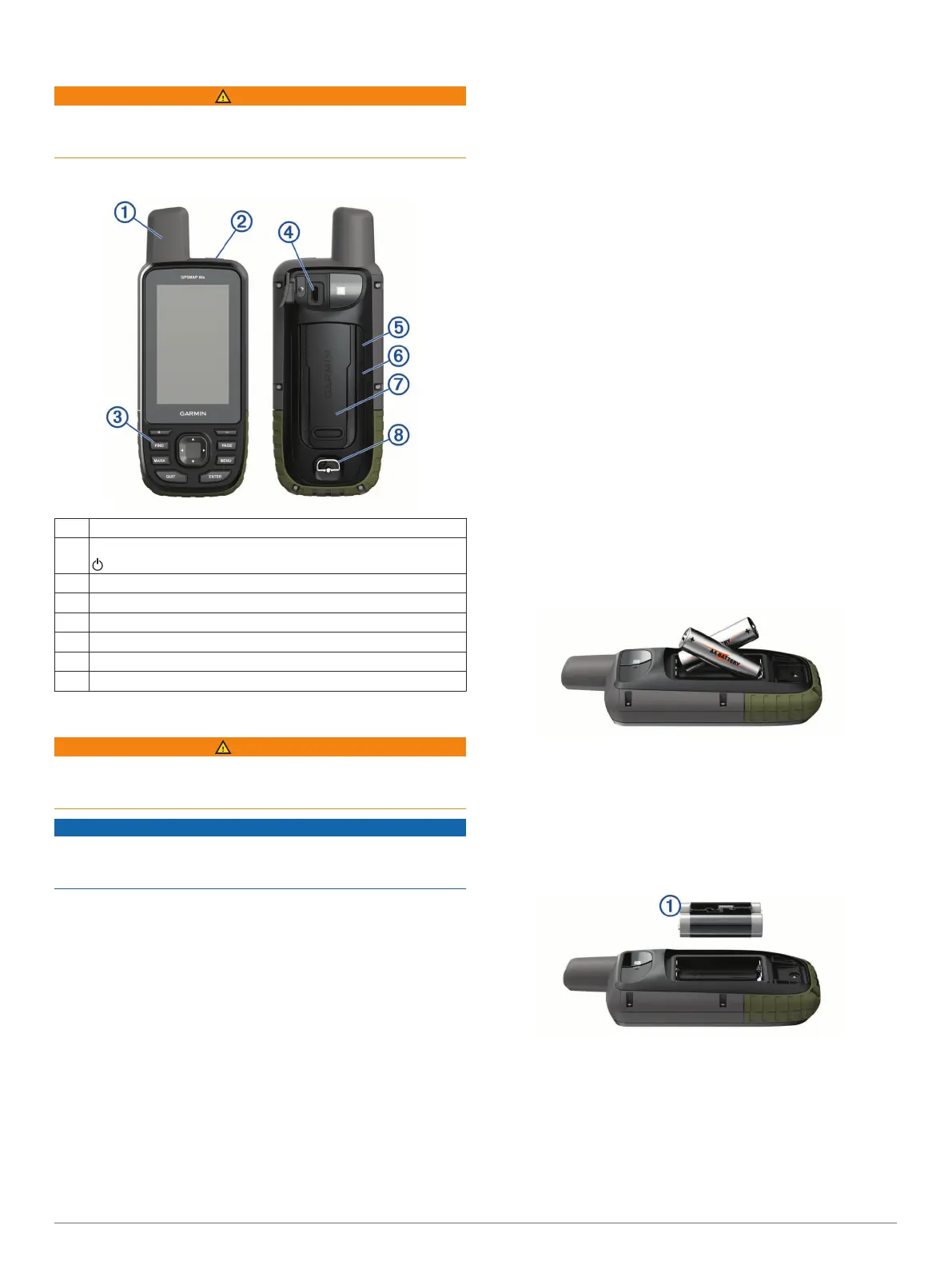
Device Overview
À
Internal satellite antenna
Á
Power key
Â
Keys
Ã
Micro-USB port (under weather cap)
Ä
microSD
®
card slot (under batteries)
Å
Battery compartment
Æ
Mounting spine
Ç
Battery cover D-ring
Battery Information
WARNING
The temperature rating for the device may exceed the usable
range of some batteries. Alkaline batteries can rupture at high
temperatures.
NOTICE
Alkaline batteries lose a significant amount of their capacity as
the temperature decreases. Use lithium batteries when
operating the device in below freezing conditions.
Maximizing Battery Life
You can do several things to extend the life of the batteries.
• Reduce the backlight brightness (Adjusting the Backlight,
page 2).
• Reduce the backlight timeout (Display Settings, page 12).
• Reduce the flashlight brightness or flash frequency (Using
the Flashlight, page 11).
• Use battery save mode (Turning On Battery Save Mode,
page 1).
• Use expedition mode (Turning On Expedition Mode,
page 1).
• Turn off wireless connectivity (Wi
‑
Fi Settings, page 12).
• Turn off Bluetooth
®
technology (Bluetooth Settings,
page 12).
• Turn off GLONASS or GALILEO (GPS and Other Satellite
Systems, page 12).
Turning On Battery Save Mode
You can use battery save mode to prolong the battery life.
Select Setup > Display > Battery Save > On.
In battery save mode, the screen shuts off when the backlight
times out. You can select the power key to turn on the screen.
Turning On Expedition Mode
You can use expedition mode to prolong the battery life. In
expedition mode, the screen shuts off, the device enters low
power mode, and the device collects fewer GPS track points.
1
Select Setup > Expedition Mode.
2
Select an option:
• To enable the device to prompt you to turn on expedition
mode when you turn off the device, select Prompted.
• To automatically turn on expedition mode after two
minutes of inactivity, select Auto.
• To never turn on expedition mode, select Never.
In expedition mode, the red LED next to the power key flashes
occasionally.
Long-Term Storage
When you do not plan to use the device for several months,
remove the batteries. Stored data is not lost when batteries are
removed.
Installing Batteries
The handheld device operates using two AA batteries (not
included). Use NiMH or lithium batteries for best results.
1
Turn the D-ring counter-clockwise, and pull up to remove the
cover.
2
Insert two AA batteries, observing polarity.
3
Replace the battery cover, and turn the D-ring clockwise.
Installing a NiMH Battery Pack
The device operates using a NiMH battery pack (optional) or two
AA batteries (Installing Batteries, page 1).
1
Turn the D-ring counter-clockwise, and pull up to remove the
cover.
2
Locate the battery pack
À
.
3
Insert the battery pack, observing polarity.
4
Gently press the battery pack into place.
5
Replace the battery cover, and turn the D-ring clockwise.
Introduction 1















 To Next Page