Peking to Paris 2013 - Garmin 78s GPS Setup & Use Guide
Garmin 78s P2P2013 - Setup & Use V2.doc Page 9 of 15
1. Find or ‘GoTo’ a Waypoint
The Organisers will load your GPS with several hundred Peking to Paris Waypoints.
In remote areas where there are few clearly defined roads or tracks you will need the ability
to navigate to a Waypoint.
Key sequence to Find a Waypoint
FIND >> ENTER >> [select
required waypoint] >> ENTER
>> ENTER
Explanation
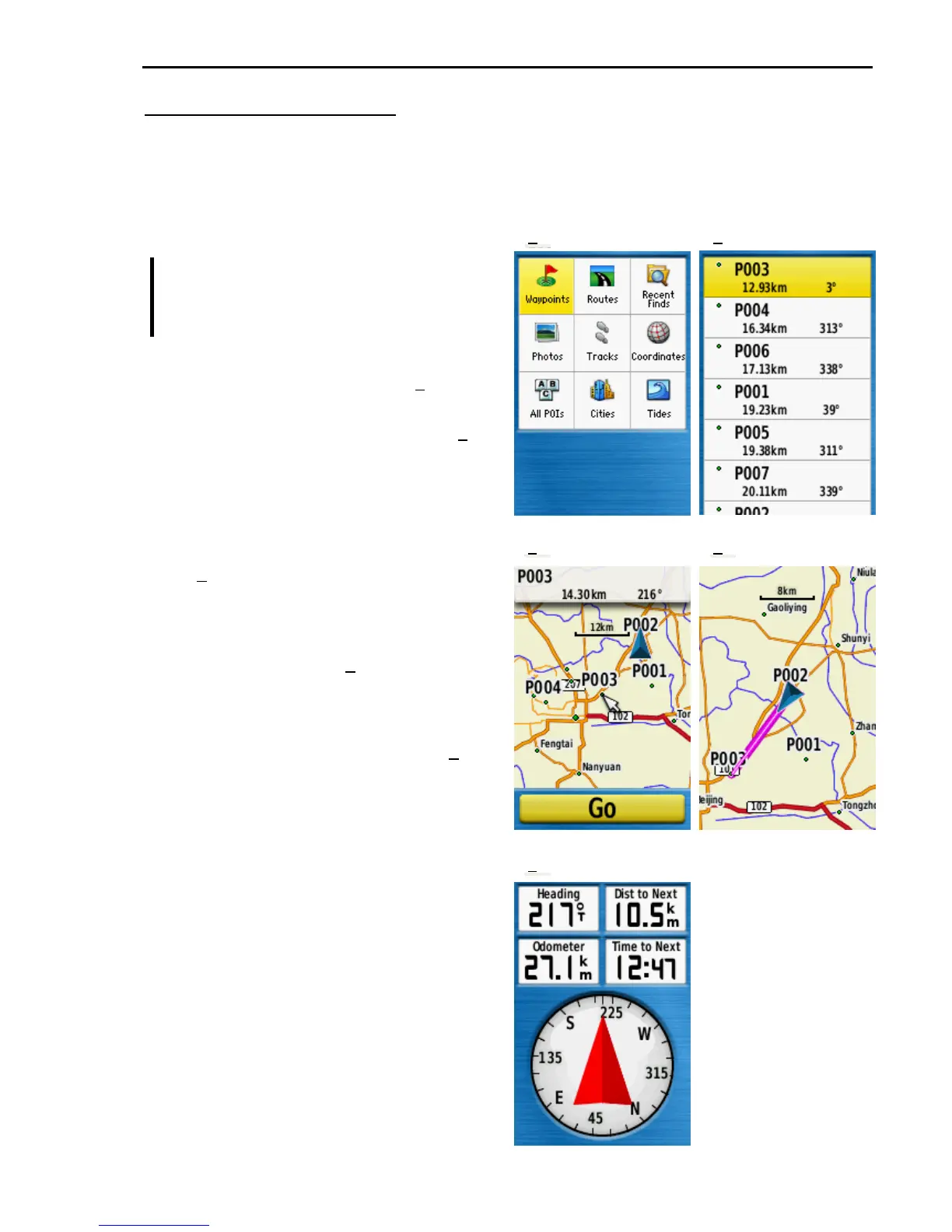
FIND shows the Find menu (1) with
Waypoints selected by default.
ENTER goes to the Waypoint list (2)
Use the rocker key to select the
desired Waypoint. (See Selecting
Waypoints on the next page)
ENTER displays the selected Waypoint
on the Map screen with a GO button
(3). Note that the screen also shows
the distance and direction to the
selected waypoint.
ENTER begins navigation to the
selected Waypoint (4).
Once the GPS is guiding you to a
Waypoint pressing PAGE from the Map
screen shows the Compass screen (5). In
this example the arrow indicates that you
are heading straight towards P003 on a
heading of 217° and that you are 10.5kms
from P003.
1
2
3 4
5











 To Next Page