4 nüLink!QuickStartManual
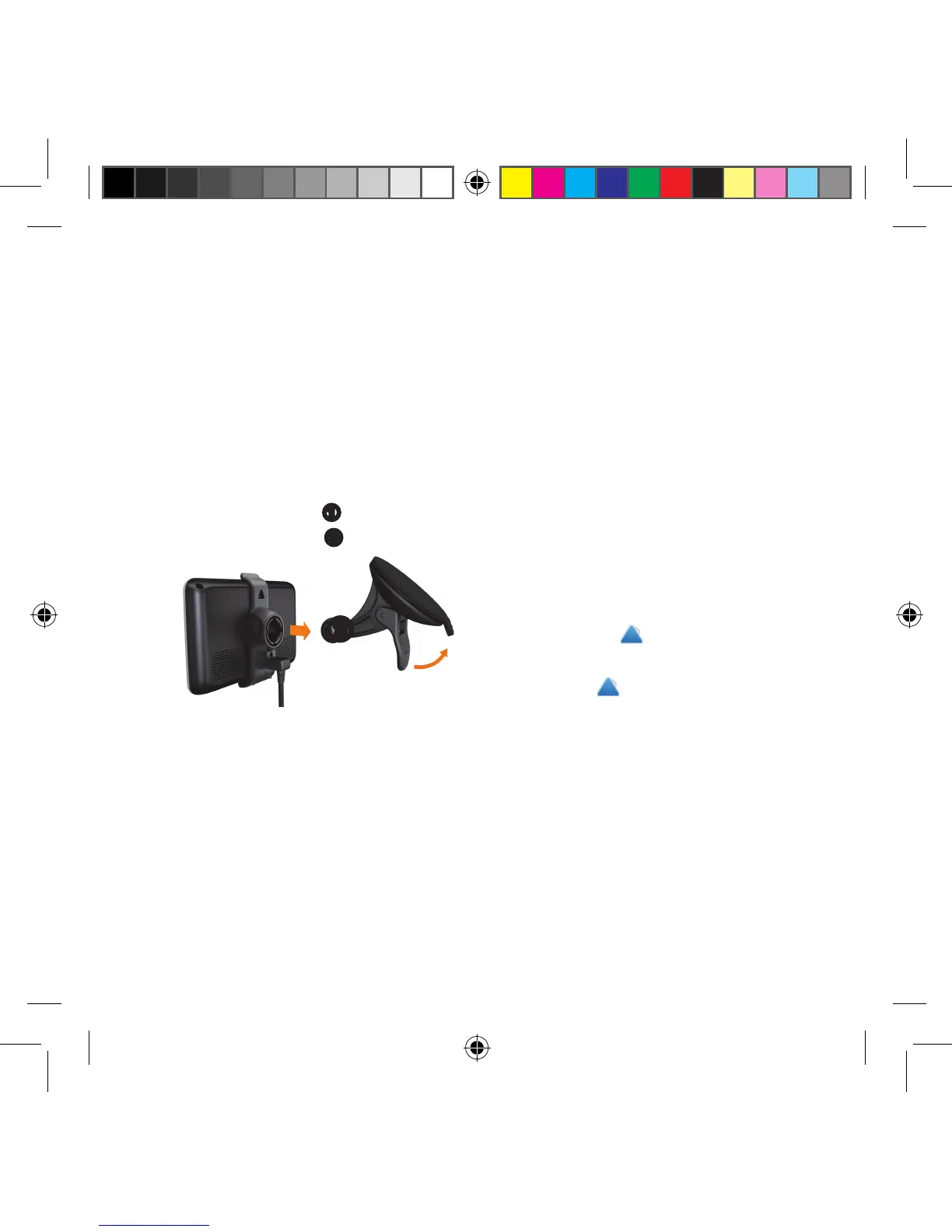
2. Clean and dry your windshield
and the suction cup with a lint-free
cloth.
3. Press the suction cup to the
windshield.
4. While pressing, ip the lever back
toward the windshield.
5. Snap the mount
➊
onto the
suction cup arm
➋
.
➊
➋
About myDashboard
Use myDashboard to register your
device, check for software and map
updates, access product manuals and
support, and more.
Setting Up myDashboard
1. Connect the USB cable to the
micro-USB connector on the
device.
2. Connect the USB cable to the
USB port on your computer.
3. Double-click to open the
myDashboard Web page.
NOTE: If does not appear, or
you are using Windows
®
7 or a
Mac
®
computer, go to www
.garmin.com/dashboard.
4. Follow the on-screen instructions.
Registering the Device
1. From myDashboard, click
Register Now.
190-01287-01_01.indd 4 12/9/2010 10:27:39 AM



 To Next Page