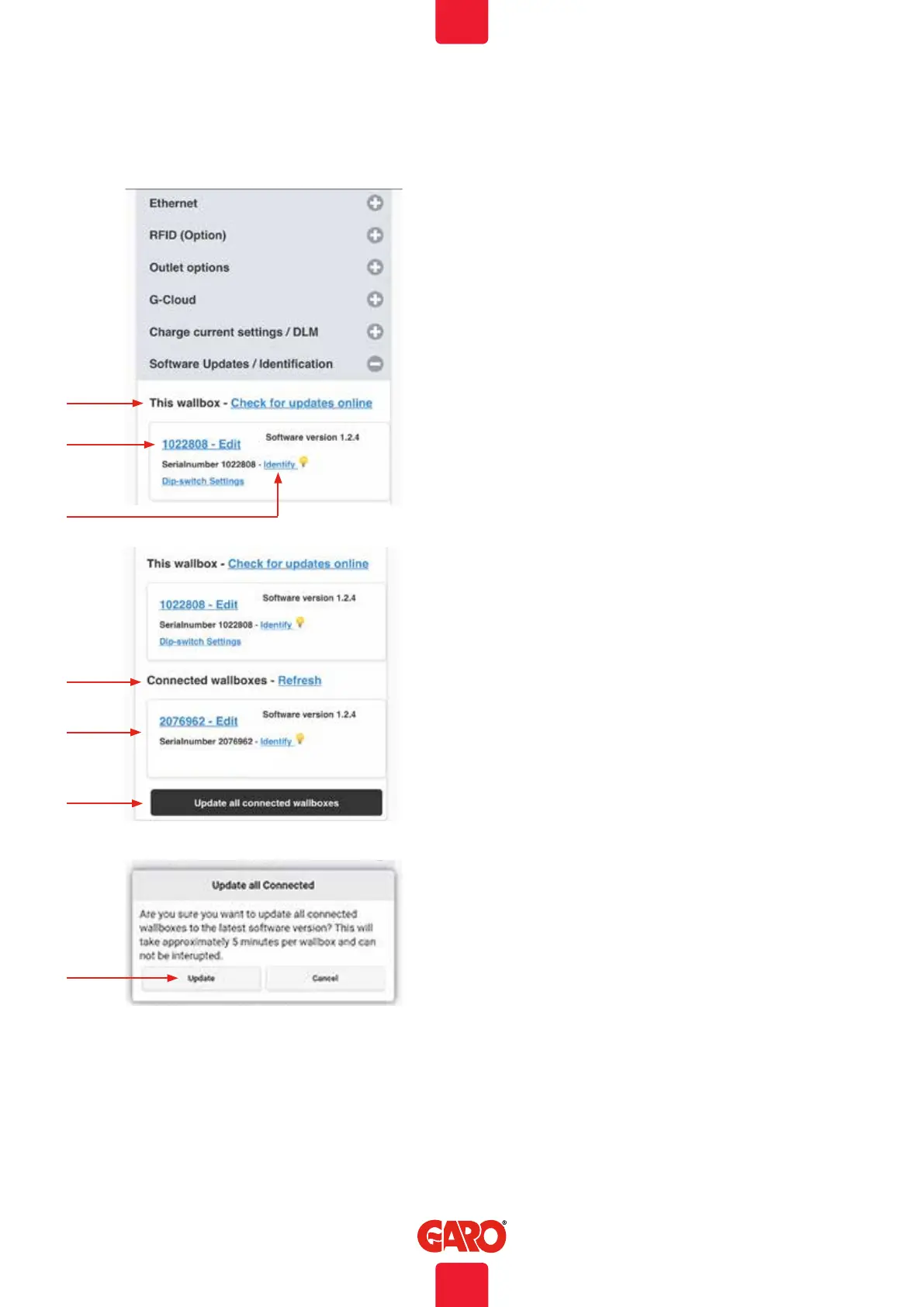
A. This wallbox– Check for updates online(wallbox needs to
be connected to internet)
B. Click serialnumber – Edit to add reference name.
C. Click Identify and the wallbox start with blinking white
light and a ticking sound.
Software Updates / Identification
A
B
C
D
E
F
D. Connected wallboxes– Refresh (in systems with multiple
connected wallboxes).
E. Click to update list of connected boxes.
F. Update all connected wallboxes*
G. Click to update connected wallboxes.
Note, a TWIN update will take up to 5 min.
G
Web interface
By Computer / Android mobile or tablet:
1. Open https://www.webel-online.se/wifi and download the
file. (device must be connected to internet)
2. Connect your device to the TWIN Wifi network. (Search for
TWIN<the box serial no> )
3. Open http://172.24.1.1:8080/update in your web-
browser
4. Press button “choose file” and mark the downloaded file.
5. Klick “Update” and wait for the update process to end.
Firmware update for TWIN not connected to internet
via Wifi or LAN
Standalone installed wallbox with wifi-module should have SW1.5 in ON
during manual update process.
40
EN


 To Next Page