Reset function
The reset function for meters and the resettable parameters
appears on the bottom line of the display, provided a reset is
permitted on the current operating line (enduser/commissioning
/ heating engineer).
0
4 8 12 16 20 24
Reset ? yes
After activation of the OK button, display shows a flashing “Yes“
0
4 8 12 16 20 24
Reset ?
yes
After confirmation with the OK button, the relevant parameter
When manual control is active, the relays are no longer energized
and deenergized according to the control state, but are set to a
predefined manual operating state depending on their function.
The burner relay energized in manual control can be deenergized
by the electronic temperature controller (TR).
After manual control has been activated, a change to the basic
display must be made. There, the maintenance / special mode
symbol Press the Info button to switch to info
display “Manual mode“, where the setpoint can be adjusted.
The chimney sweep function is activated by a short press
(maximum 3 seconds) on the chimney sweep button. It
produces the operating state required for making flue gas
or parameters will be reset.
Manual Control
appears.
Chimney sweep function
measurements.
SLT test
The SLT test (SLT = safety limit thermostat) is activated
by a long press (longer than 3 seconds) on the chimney
sweep button. The button must be kept depressed during
the entire test.If released, the test will be aborted. The
SLT test is shown on the display.
The test must be made by qualified technicians since
the boiler temperature will be raised above the maximum
limitations.
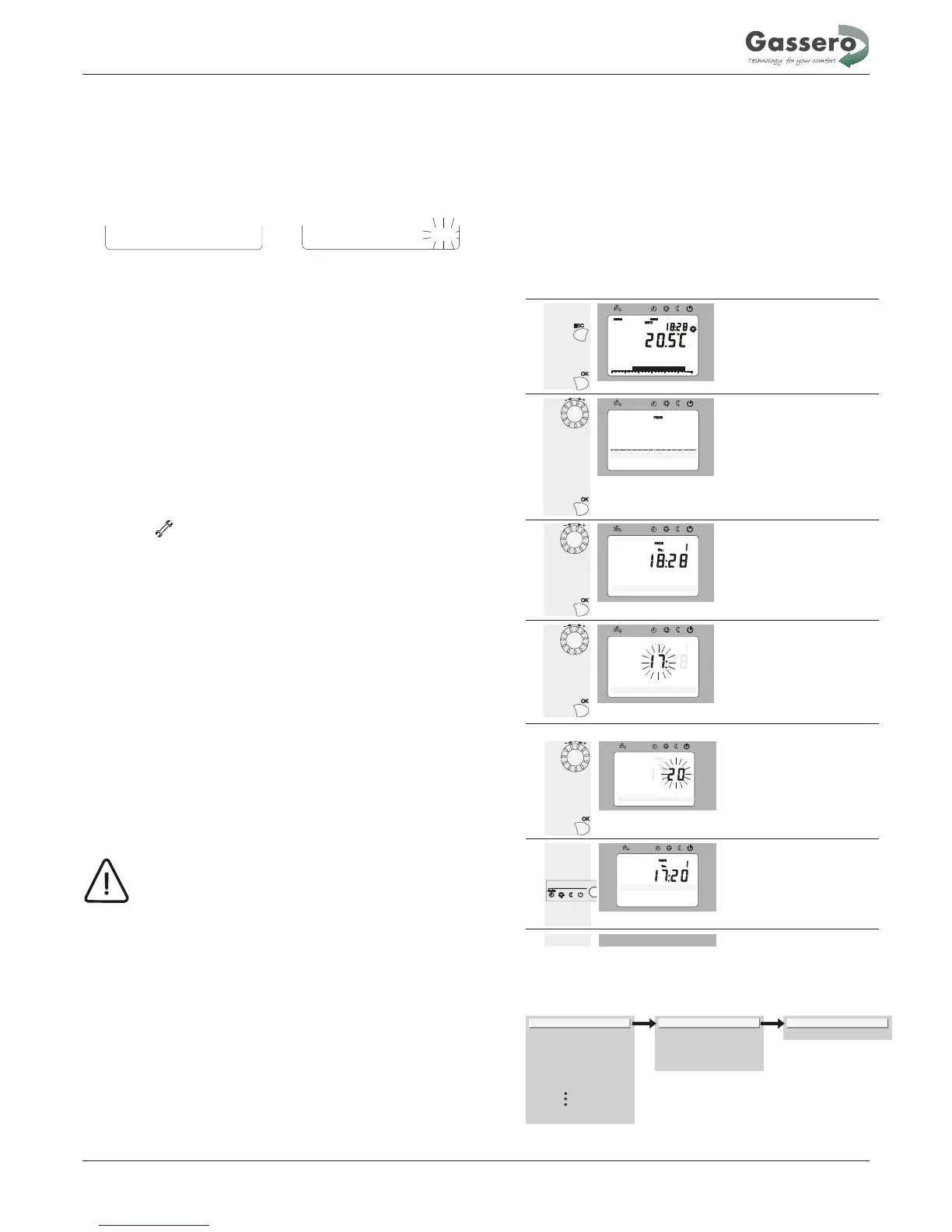
5.2 PROGRAMMING
Setting principle
Settings that cannot be made directly with the help of
operating elements are made through programming.
For this purpose, the individual settings are structured
in the form of operating pages and operating lines,
thus forming practical groups of settings. The following
Example “Setting the time of day“
When pressing the ESC button, you go back one step;
adjusted values will not be adopted
If any setting is made for 8 minutes, the unit will
automatically return to the basic display
•
Operating lines may be hidden, depending on the
type of unit, the configuration and
user level
operation Display example Description
1
0
4 8 12 16 20 24
AUTO
Room temperature
You will see the basic display.
If the basic display is not shown, press
the ESC button to return to it.
Press the OK button.
2
Text3
0
4 8 12 16 20 24
AUTO
Operator section
Time of day and date
The bottom section of the display
shows a number of operating pages.
Turn the setting knob until operating
page “Time of day and date“ appears.
To confirm, press the OK button.
3
0
4 8 12 16 20 24
AUTO
Time of day and date
Hours / minutes
In the bottom section of the display, the
first operating line of operating page
“Time of day and date“ appears.
Turn the setting knob until operating
line “Hours / minutes“ appears.
To confirm, press the OK button.
4
0
4 8 12 16 20 24
AUTO
Time of day and date
Hours / minutes
The display shows the hours flashing.
Turn the setting knob until the hours of
the time of day are correct.
To confirm, press the OK button.
example which shows the setting of the time of day and
date shall explain this.
•
•
5
0
4 8 12 16 20 24
AUTO
Time of day and date
Hours / minutes
The display shows the minutes
flashing.
Turn the setting knob until the minutes
of the time of day are correct.
To confirm, press the OK button.
6
Time of day and date
0
4 8 12 16 20 24
AUTO
Hours / Minutes
The settings are saved, the display
stops flashing.
You can continue to make other
settings, or
you press the operating mode button to
return to the basic display.
7
Now, you have returned to the basic
display.
Time of day and date
Operator section
Wireless
Time program heating circuit 1
Time program heating circuit 2
Time program heating circuit P
Holidays heating circuit 1
Diagnostics of consumers
Hours / minutes
Month / day
Year
Start of summer time
End of summer time
Hours 1...24 h
Minutes 0...60 min
Example of menu structure
Operation
28


 To Next Page