7
ENG
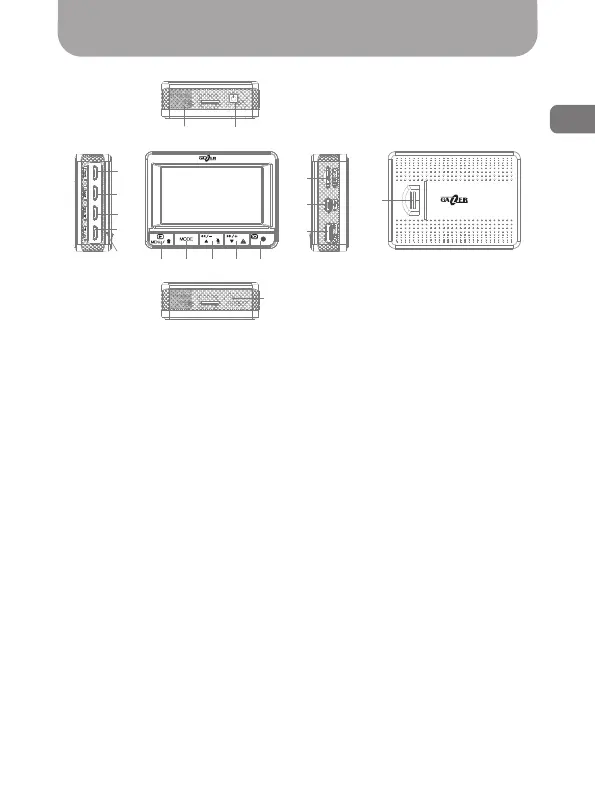
Controls
Fig. 1
MVR controls
1. Front video camera jack
2. Back video camera jack
3. Remote control button/op-
tional GPS module jack
4. Power socket/audio-video
output
5. LED status indicator: white
light – battery charging; red
light – recording mode; blink-
ing red light – error.
6. MENU button: enter/exit
from the settings menu.
7. MODE button: change display
modes.
8. ”Up” button: menu naviga-
tion; enable/disable sound
recording function (enabled by
default); rewind function and
volume control in the viewing
mode.
9. ”Down” button: menu
navigation; enable overwrite
protection for the current
video clip; rewind function and
volume control in the viewing
mode.
10. REC/ОК button: start
recording; menu navigation;
select parameter.
11. Speakers
12. ОN/OFF button: turn the
device on/off.
13. SD memory card slot
14. USB port
15. HDMI socket
16. RESET button: reset the
device.
17. Battery compartment
cover
11 12
13
14
15
16
5
6 7 8 9 10
4
3
2
1
17



 To Next Page