g
GE
OPM_SGS_ISG_M22_M30_0US_V011.doc 22/38 Installation Guide
SG Series
225 & 300 kVA
CAUTION !
Panel “E” should never be removed or replaced with power applied to the UPS.
This panel is in close proximity to 480V live buss bars.
Always disconnect the rectifier, bypass, load and battery sources from the
UPS before removing or replacing this panel.
If not serious injury or death could occur!
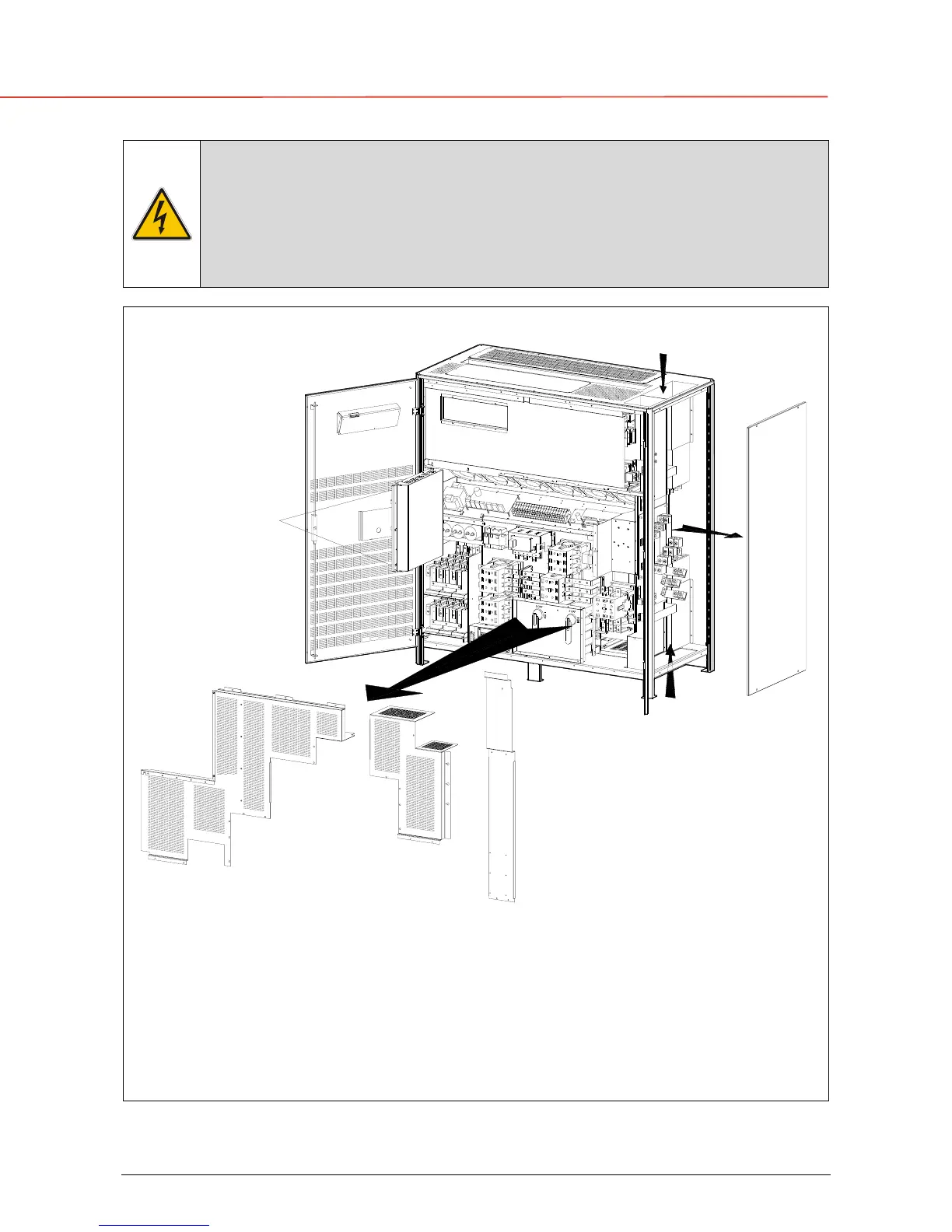
How to access the compression lugs for the cable connections.
SGS_225-300_UPS connection_01US
Q2
Q1
2
4
3
1
1
2
3
4
D
C
E
Bottom
Top entry cables
A
B
entry cables
F
Fig. 3.8.1-1 Access to the input / output connections
To access input, output and Battery Connections proceed as follows:
• Unscrew bolts “B” to open the electronics “A”.
• Remove protection panel “C”.
• Remove protection panel “D”.
• Remove protection panel “E”.
•
Remove UPS side panel “
F
”.



 To Next Page