27
EFFACEMENT DE L’INFORMATION DE
L
’APPELANT
Vous pouvez effacer un dossier d’appelant et laisser le
message associé.
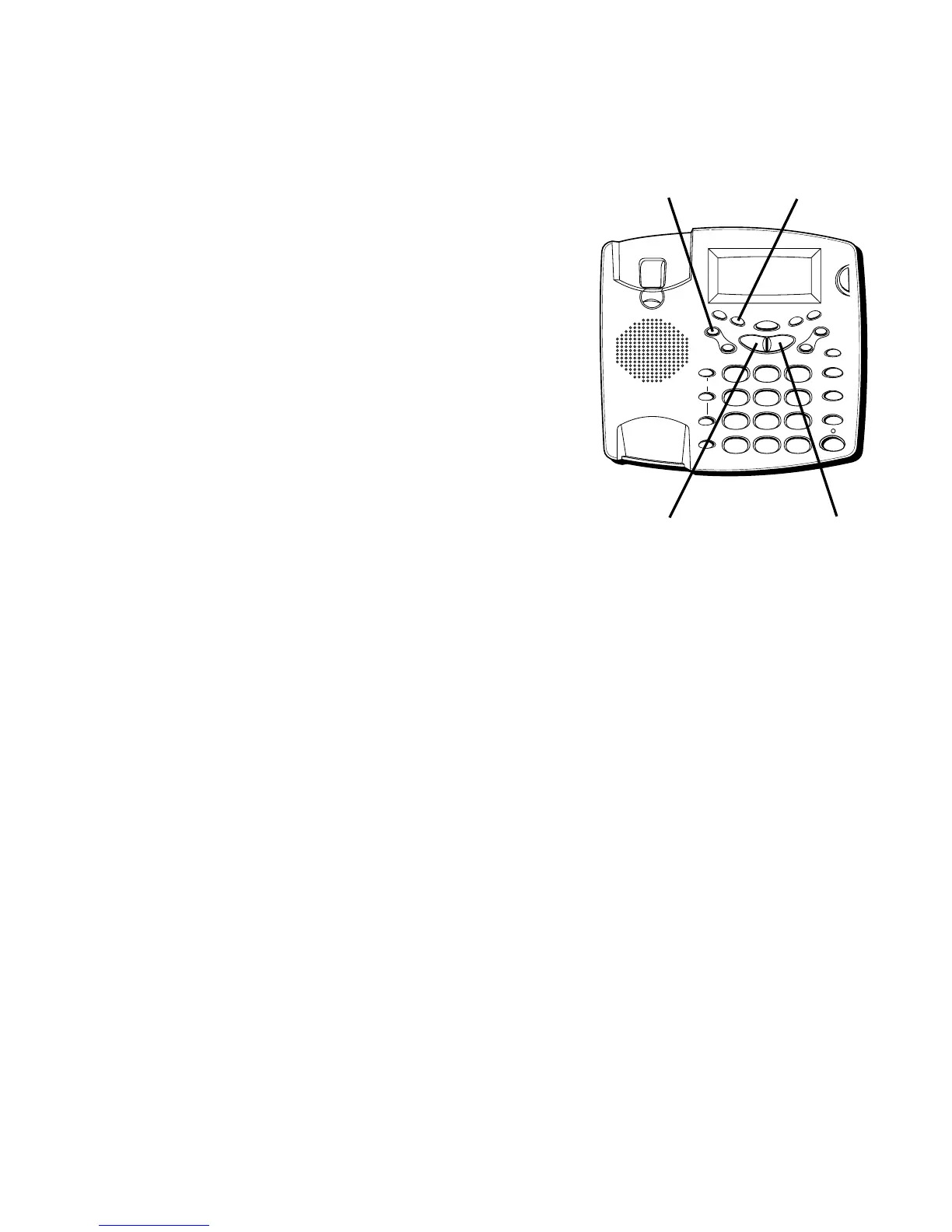
• Pendant que l’information est affichée, appuyez sur
ERASE. L’appareil efface l’information de l’appelant
et affiche le dossier suivant.
Vous pouvez aussi effacer tous les dossiers d’appelant
et laisser les messages associés.
• Appuyez sur PREV quand vous consultez le premier
dossier d’appelant ; l’appareil affiche
START OF LIST
(début de liste). Appuyez ensuite sur ERASE ;
l’appareil affiche
ERASE ALL CALLS?
(effacer tous les
appels ?) Appuyez de nouveau sur ERASE pour
effacer tous les dossiers d’appelant. OU
• Appuyez sur NEXT quand vous consultez le plus
récent dossier d’appelant ; l’appareil affiche
END OF
LIST
(fin de liste). Appuyez ensuite sur ERASE ;
l’appareil affiche
ERASE ALL CALLS?
(effacer tous les
appels ?) Appuyez de nouveau sur ERASE pour
effacer tous les dossiers d’appelant.
RAPPEL
Quand vous consultez vos dossiers d’appelants, vous
pouvez rappeler au numéro affiché en appuyant sur le
bouton DIAL.
1. Utilisez PREVIOUS ou NEXT pour afficher le numéro
d’appelant à composer.
2. Appuyez sur DIAL.
3. Décrochez le combiné ou appuyez sur SPEAKER. Le
numéro est composé automatiquement.
FLASH
REDIAL/PAUSE
HOLD
mic
ON/OFF
VOL -
VOL +
ERASE
MEM DIAL STORE
QUICK DIAL
MEM DIAL
SPEAKER
C
B
A
1
ABC
2
DEF
3
GHI
4
JKL
5
MNO
6
PQ
RS
7
TUV
8
WX
YZ
9
OPER
0
#
TONE
M
E
M
O
G
R
E
E
T
I
N
G
M
E
N
U
E
N
T
E
R
D
I
A
L
M
E
S
S
A
G
E
S
T
O
P
M
E
S
S
A
G
E
S
/
C
A
L
L
E
R
I
D
N
E
W
C
A
L
L
*
Bouton ERASE Bouton DIAL
Bouton NEXTBouton PREVIOUS



 To Next Page