36
STORING CALLER ID RECORDS
You can also store Caller ID records in memory. Rather than
re-entering the information the traditional way, you can
store the record in a memory location or quick dial button.
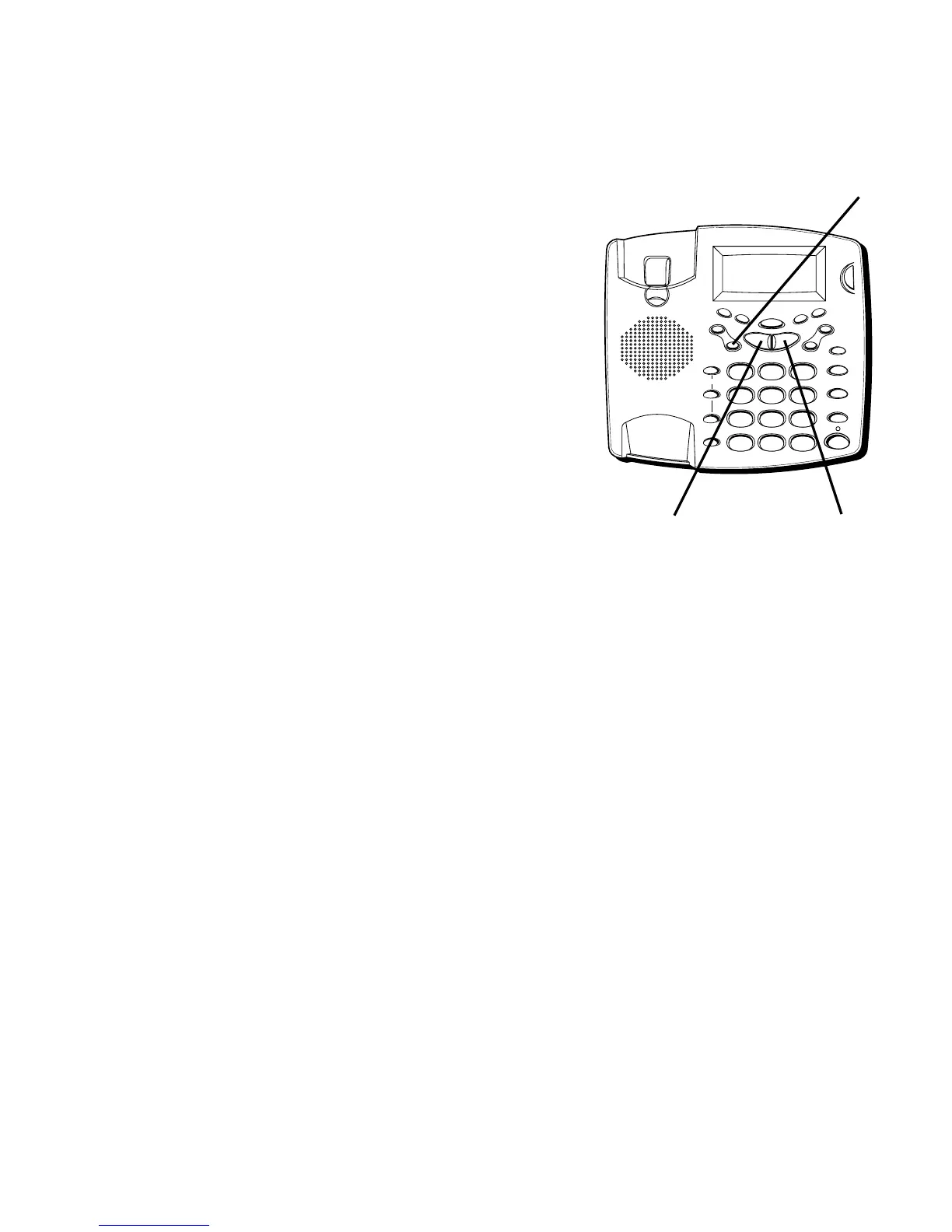
1. Use the NEXT or PREVIOUS buttons to scroll to the
Caller ID record you want to store.
2. Press STORE.
3. Press the memory location number (0-9 or A, B, C) to
store the record.
FLASH
REDIAL/PAUSE
HOLD
mic
ON/OFF
VOL -
VOL +
ERASE
MEM DIAL STORE
QUICK DIAL
MEM DIAL
SPEAKER
C
B
A
1
ABC
2
DEF
3
GHI
4
JKL
5
MNO
6
PQ
RS
7
TUV
8
WX
YZ
9
OPER
0
#
TONE
M
E
M
O
G
R
E
E
T
I
N
G
M
E
N
U
E
N
T
E
R
D
I
A
L
M
E
S
S
A
G
E
S
T
O
P
M
E
S
S
A
G
E
S
/
C
A
L
L
E
R
I
D
N
E
W
C
A
L
L
*
STORE button
NEXT buttonPREVIOUS button



 To Next Page