GE Security
FHSD700C Series Product Guide
5.3.6 TIME DATE: Set Time and Date
Minimum Access Code Required: Level 1
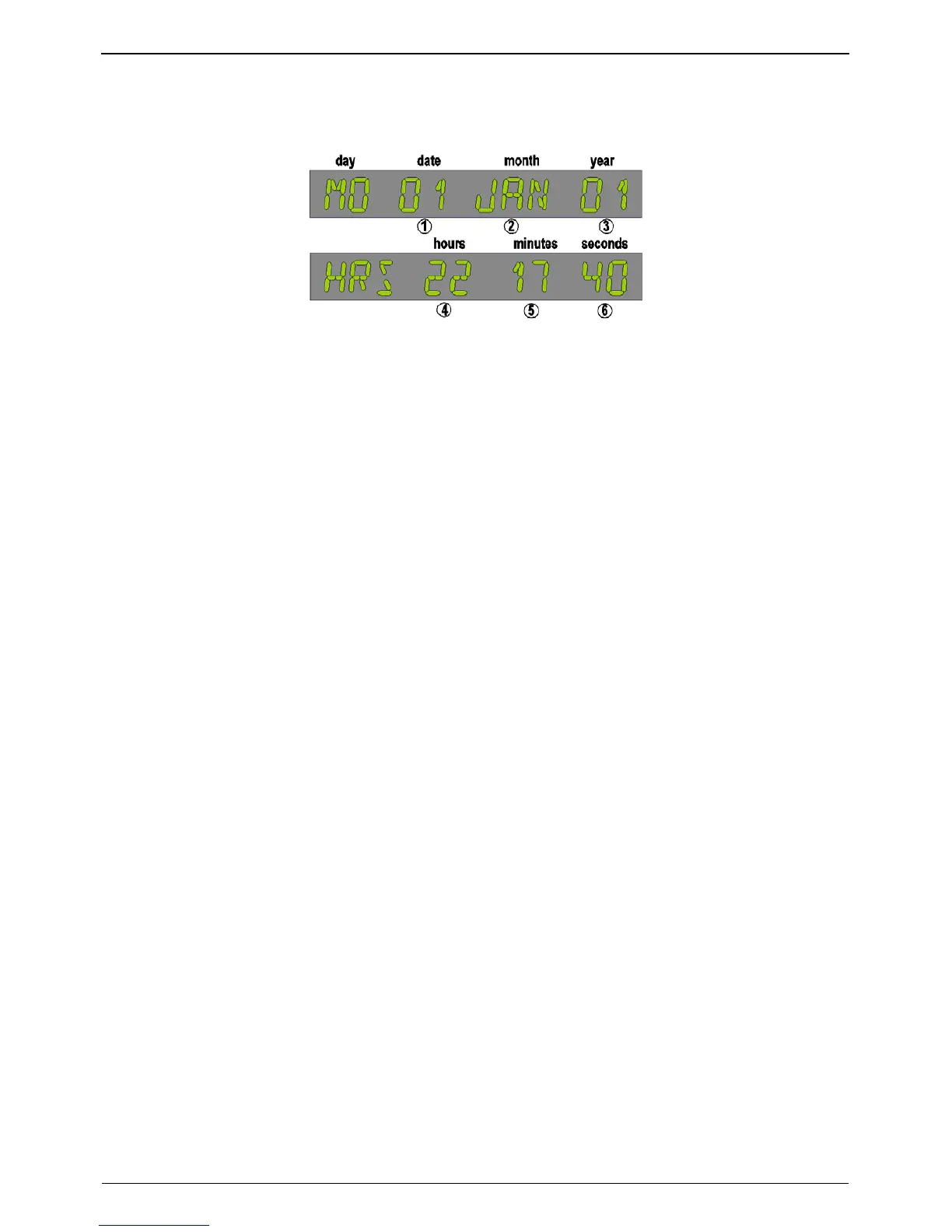
Figure 5-2: Display for setting time and date.
After accessing this menu item, the display will now show the date in the format 'day - date - month -
year' (please see Figure 5-2), with the date flashing. To change the time and date:
1. Press UP & DOWN buttons to change the date.
2. Press ENTER to update the date and move to the next step (month); month will flash.
3. Press UP & DOWN buttons to change the month.
4. Press ENTER to update the month and move to the next step (year).
5. Press UP & DOWN buttons to change the year.
6. Press ENTER to update the year.
Continue as above to change the time. When the ENTER button is pressed; the flashing element will
progress from date through to seconds, with the display format changing from date to time
appropriately. The day of the week is determined from the date, month and year.
The Parameter UP & DOWN buttons will switch the display between date and time.
Return to the Main Menu by pressing MENU.
www.gesecurity.net
27



 To Next Page