FHSD700C Series Product Guide
GE Security
5.3.7 WEB: Set IP Address and Mask
Minimum Access Code Required: Level 1
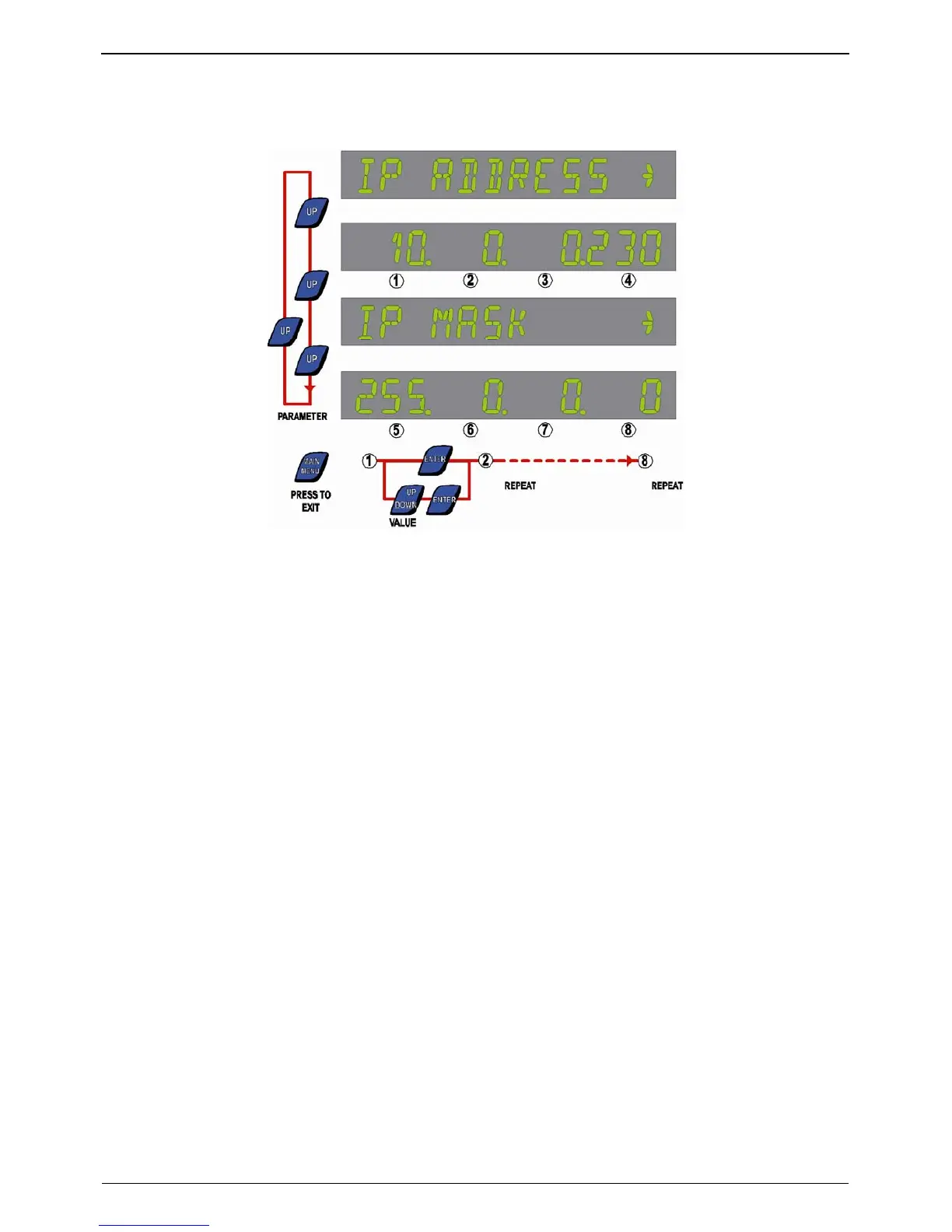
Figure 5-3: IP Address and IP Mask display - default values shown.
The display will now show the text IP ADDRESS. Press UP button to show the IP Address with the first
field flashing:
1. Use Value UP & DOWN buttons to set the first field.
2. Press ENTER to update and move to the next field.
3. Repeat the two steps for all fields.
Once the IP Address has been updated, the display will now show IP MASK. Press UP to show the
actual IP MASK with first field flashing:
1. Use Value UP & DOWN buttons to set the first field.
2. Press ENTER to update and move to the next field.
3. Repeat the two steps for all fields.
Return to the Main Menu by pressing MENU.
28
www.gesecurity.net



 To Next Page