EasyManua.ls Logo

GE JB860 - User Manual

GE JB860
64 pages
Print Icon
To Next Page IconTo Next Page
Loading...
49-80764 07-15 GE
Write the model and serial
numbers here:
Model # __________________
Serial # ___________________
You can find them on a label
behind the door or drawer.
Printed in the United States
For a Spanish version of this
manual, visit our Website at
GEAppliances.com.
Para consultar una version
en español de este manual
de instrucciones, visite
nuestro sitio de internet
GEAppliances.com.
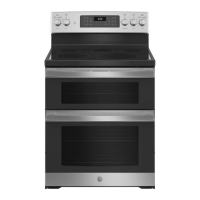
JB860 - 30" Free-Standing Double Oven
PB960 - 30" Free-Standing Double Oven
PB980 - 30" Free-Standing Double Oven
Owner’s Manual
Ranges
Electric Free-Standing
Safety Information ...............2
Warranty ..........................7
Assistance / Accessories ........8
Using The Range
Surface Units - Knob Models ..........9
Surface Units - Knob-Free Models . . . 10
Surface Units - All Models ...........11
Cookware for Radiant
Glass Cooktop ....................12
Double Oven Controls ..............13
Special Features ...................14
Sabbath Mode .....................15
Oven Racks ........................16
Aluminum Foil and Oven Liners .....17
Cookware ..........................17
Cooking Modes ....................19
Cooking Guide .....................19
Care and Cleaning
Cleaning the Range – Exterior ......21
Cleaning the Range – Interior .......22
Cleaning the Glass Cooktop .........23
Maintenance .......................25
Troubleshooting Tips ..........30

Other manuals for GE JB860

Questions and Answers

  • K
    karmstrongAug 27, 2025
    Why does the display on my GE oven go blank?
    • Z
      Zachary ThomasAug 28, 2025
      If the display on your GE oven goes blank, it could be due to a blown fuse or tripped circuit breaker in your home, so replace the fuse or reset the circuit breaker. It’s also possible that the clock is turned off, or the oven is in Sabbath Mode.
  • L
    Linda GreenAug 28, 2025
    Why does food not bake properly in my GE JB860 Oven?
    • R
      robinsonjasonAug 28, 2025
      If food isn't baking properly in your GE oven, it could be due to several factors. Ensure the oven controls are set correctly. Check that the rack position is correct and level. Use the correct cookware of the proper size. The oven temperature might need adjustment. Also, substituting ingredients can change the recipe outcome.
  • L
    Lisa MossAug 28, 2025
    Why do the clock and timer not work on my GE oven?
    • K
      kballardAug 29, 2025
      If the clock and timer on your GE range do not work, check whether a fuse in your home may be blown or the circuit breaker tripped and replace the fuse or reset the circuit breaker. Also, make sure electrical plug is plugged into a live, properly grounded outlet. Ensure that the oven controls are properly set.
  • R
    Robert Lowery MDAug 29, 2025
    Why does the "LOCK DOOR" flash in the display of my GE JB860 Oven?
    • W
      webbrebeccaAug 29, 2025
      If you see "LOCK DOOR" flashing on your GE oven display, it means the self-clean cycle has been selected, but the door is not closed. Ensure the oven door is fully closed to start the cleaning cycle.
  • L
    Lisa ColeAug 29, 2025
    Why will my GE JB860 will not self-clean?
    • S
      Sara BaileyAug 30, 2025
      If your GE oven will not self-clean, it could be because the temperature is too high. Allow the oven to cool, then reset the controls. Also, ensure the oven controls are properly set.
  • V
    Victoria HaleAug 30, 2025
    Why is the clock flashing on my GE JB860 after a power outage?
    • D
      David JacksonAug 30, 2025
      If there's a power outage and the clock on your GE oven is flashing, it indicates a power outage or surge. Reset the clock. If the oven was in use, you must reset it by pressing the Cancel/Off pad, setting the clock, and resetting any cooking function.
  • B
    Brittney RodriguezAug 30, 2025
    Why does my GE JB860 Oven sometimes takes longer to preheat to the same temperature?
    • G
      gallowaybridgetAug 31, 2025
      If your GE oven sometimes takes longer to preheat to the same temperature, it could be due to cookware or food in the oven, which will cause the oven to take longer to preheat. Remove items to reduce preheat time. Also, adding more racks to the oven will cause the oven to take longer to preheat, so remove some racks. The different cooking modes use different preheat methods to heat the oven for the specific cooking mode, and some modes will take longer than others.
  • D
    David HarrisonAug 31, 2025
    Why is the display of my GE oven flashing?
    • J
      Jennifer RiveraAug 31, 2025
      If the display on your GE oven flashes, it indicates a power failure. Reset the clock.
  • L
    Lisa PerezAug 25, 2025
    What to do if the GE JB860 door will not open after a clean cycle?
    • D
      davidcunninghamAug 25, 2025
      If your GE oven door won't open after a clean cycle, it's likely because the oven is still too hot. Allow the oven to cool down to below the locking temperature, and then try opening the door again.
  • C
    carlperkinsSep 1, 2025
    Why do surface units of my GE Ranges will not maintain a rolling boil?
    • C
      Christopher BlairSep 1, 2025
      The surface units may fail to maintain a rolling boil, because of improper cookware. Use flat pans that match the diameter of the surface unit. In some areas, low voltage can also cause this issue. Try covering the pan with a lid to retain heat.

Summary

Safety Information

General Safety Instructions

Essential safety guidelines for using the appliance, including warnings about flammable materials and general operation.

Specific Safety Areas

Covers safety instructions for fire prevention, cooktop usage, oven operation, and self-cleaning cycles.

Warranty

Assistance and Accessories

Contact and Support

Information on how to register your appliance, schedule service, and obtain customer support.

Using the Range

Surface Unit Operation

Instructions for operating both knob and knob-free surface units, including warming zones.

Oven Controls and Modes

Details on double oven controls, special features, cooking modes, and Sabbath mode operation.

Care and Cleaning

Exterior Cleaning

Guidelines for cleaning the range's exterior surfaces, including painted, stainless steel, and porcelain cooktops.

Interior Cleaning and Cooktop

Procedures for cleaning the oven interior, self-cleaning function, and the glass cooktop surface.

Troubleshooting Tips

GE JB860 Specifications

General IconGeneral
BrandGE
ModelJB860
CategoryOven
LanguageEnglish

Related product manuals