LX: OPM_MAE_XXX_2K2_3K0_XGB_V020 3 GE DE Match 2200-3000: user manual 2.0 (GB)
GE Digital Energy
g
2.2 Installation Procedure
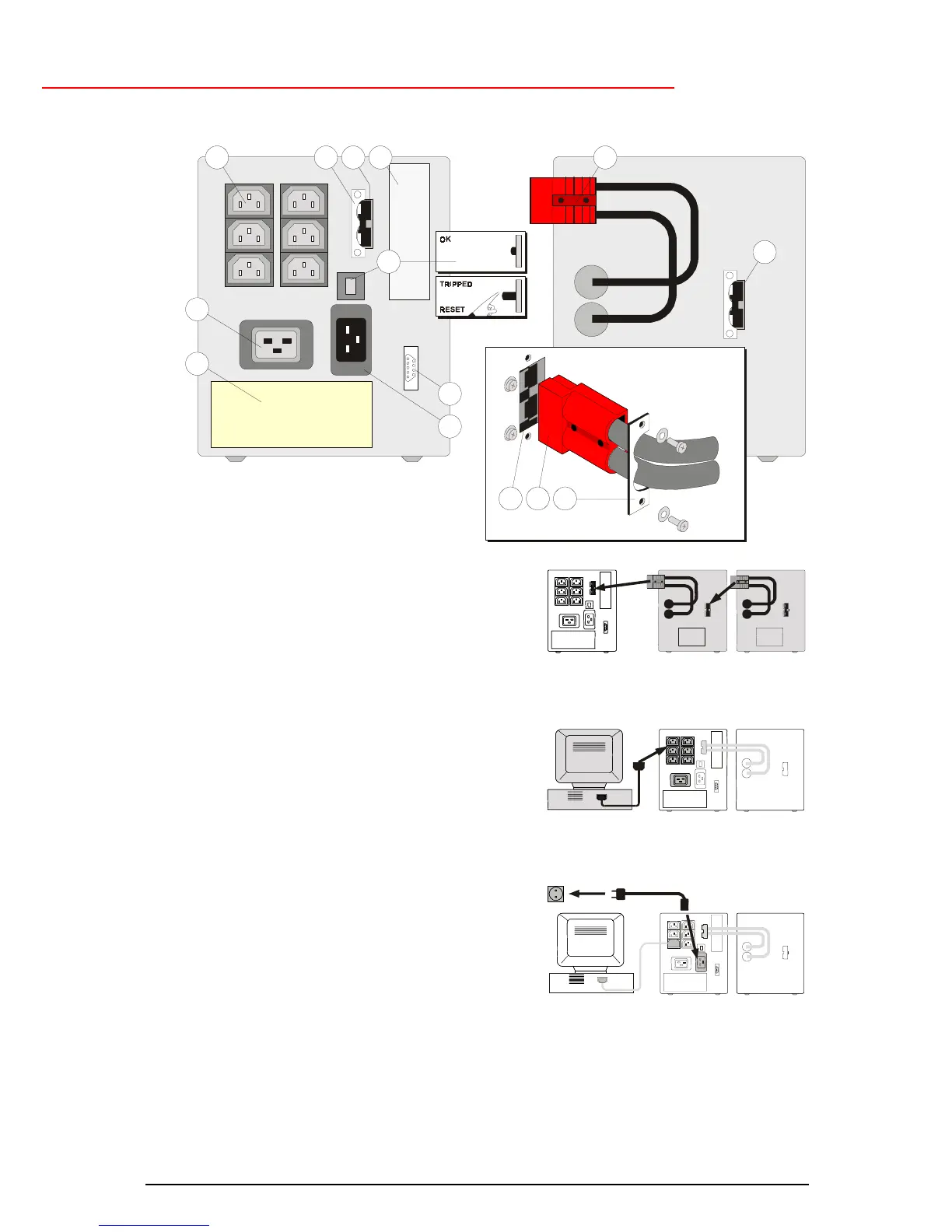
1. Loosen the two screws and remove the pull relief
(2a, fig. 1). Connect the DC connector of the battery
pack (8, fig. 1) to the DC socket (2, fig. 1) of the
UPS. Re-install the pull relief with the two screws.
Using the DC socket of the battery pack (9, fig. 1)
you can install a second, third, etc. pack. See fig. 2
and section 5.1.
2. Using the output cord(s) provided, connect the
computer(s) to the appliance outlet(s) (1, fig. 1) of
the UPS. Spread the loads over the appliance
outlets as equally as possible. If you use a
distribution box to connect more than one appliance
per outlet, please note that the maximum AC-current
rating of each appliance outlet is 10Amps (outlets 1)
or 16Amps (outlet 1a). An output cord to connect a
load to outlet 1a is not shipped with the unit. See fig.
3.
3. Connect the mains power cord to the mains input
socket (5, fig. 1) of the UPS. See fig. 4.
4. Connect the mains power cord to a working,
grounded AC wall socket outlet. See fig. 4.
The green LED 'on' (10, fig. 6) will blink, and after 30
seconds illuminate continuously: the unit has
switched on, output power is available.
5. For best results, allow the UPS to recharge the batteries during a period of approx. 2 hours. It is
acceptable to use the UPS without first charging the battery, but the runtime may be reduced.
6. For advanced communication possibilities, the RS232 interface port (6, fig. 1) can be connected
to a computer system and/or optional interface cards (3, fig. 1) can be added. See chapter 4.
fig. 2
fig. 3
fig. 4
12a23
6
1a
7
5
282a
8
9
4
fig. 1


 To Next Page