
 To Next Page
V
Victoria AndradeSep 23, 2025
Why can't I make a selection and the GE PFD95 beeps twice?
- JjosephbrownSep 23, 2025
The dryness Level, Temp or option that you are trying to select is incompatible with the chosen dry cycle. This is normal.

Why can't I make a selection and the GE PFD95 beeps twice?
The dryness Level, Temp or option that you are trying to select is incompatible with the chosen dry cycle. This is normal.
What to do if my GE PFD95 doesn’t start?
If your GE dryer doesn’t start, first, press the Power button to activate the control panel if it's "asleep". Ensure the dryer is plugged completely into the outlet. Check the building’s fuse/circuit breaker box and replace the fuse or reset the breaker, noting that some electric dryers use two fuses/breakers. If the light on the Start/Pause pad is flashing, press Start/Pause to restart the countdown, as the dryer may have been accidentally paused when starting Delay Dry.
What to do if clothes are still wet after a short cycle in my GE PFD95?
If clothes are still wet and the GE dryer shut off after a short time, ensure a dry cycle is re-selected each time a new load is put in. When drying 3 items or less, choose QUICK DRY or TIMED DRY. For loads with collars and waistbands, choose QUICK DRY or TIMED DRY to dry damp areas. Ensure the dryer is level by adjusting the leveling legs or moving it to an even floor space.
Why is my GE PFD95 Dryer shaking or making noise?
Your GE dryer may be shaking or making noise because it is sitting unevenly. To fix this, move the dryer to an even floor space, or adjust the leveling legs as necessary until it is even.
Why are garments still wrinkled after steam cycle on GE Dryer?
If garments are still wrinkled after a steam cycle on your GE dryer, load fewer garments and manually increase the time. Clean the lint filter. Use the Steam Refresh cycle if the load consists of children/infant garments.
Why do clothes take too long to dry in my GE Dryer?
Several factors can cause clothes to take too long to dry in your GE dryer. Check the Installation Instructions to ensure correct dryer venting. Other causes can include: improper or obstructed ducting (make sure ducting is clean, free of kinks and unobstructed, and check if the outside wall damper operates easily), improper sorting (separate heavy items from lightweight items), large loads of heavy fabrics (separate into smaller loads), controls improperly set (match settings to the load), a full lint filter (clean before every load), blown fuses or tripped circuit breaker (replace fuses or reset breakers, noting that some electric dryers use 2 fuses/breakers), overloading/combining loads (do not put more than one washer load in at a time), underloading (add a few items to ensure proper t...
Why are garments still wrinkled after steam cycle in my GE Dryer?
If garments are still wrinkled after a steam cycle in your GE dryer, try loading fewer garments and manually increase the time. Also, ensure the lint filter is clean. For children's or infant garments, use the Steam Refresh cycle.
Why do clothes shrink in my GE Dryer?
Some fabrics naturally shrink when washed, while others shrink in the dryer. To avoid shrinkage, follow garment care labels exactly. Some items may be pressed back into shape after drying. If you are concerned about shrinkage in a particular item, do not machine wash or tumble dry it.
What to do if the dryness level was chosen but load is still damp in GE PFD95 Dryer?
If the load is still damp after choosing a dryness level on your GE dryer, and the load consists of a mixture of heavy and light fabrics, choose More Dry. Inspect and clean the exhaust system.
What to do if clothes are wrinkled after using my GE PFD95?
To prevent clothes from wrinkling in your GE dryer, select a shorter drying time, removing items while they still hold a slight amount of moisture, or select a Less Dry or Damp setting. Remove items when the cycle ends and fold or hang them immediately, or use the Wrinkle Care option. Avoid overloading the dryer by separating large loads into smaller ones.
Essential safety precautions and warnings to follow before using the appliance.
Additional safety warnings and procedures specific to gas dryer operation, including fire hazards.
Instructions for proper and environmentally safe disposal or recycling of the appliance.
Overview of the control panel, power, start/pause, display, WiFi, and AI features.
Explains drying cycles, settings, and available options for optimizing drying performance.
Guidance on sorting, loading items, and routine care and cleaning procedures for the dryer.
Covers pre-installation checks, clearances, and requirements for various installation types.
Detailed steps for connecting water, gas, electrical power, and the exhaust venting system.
Includes leveling, startup, door reversal, and instructions for stacking with a washer.
Identifies common issues and provides solutions for dryer performance and operation problems.
Information on the limited warranty, extended warranties, and customer support resources.
 General
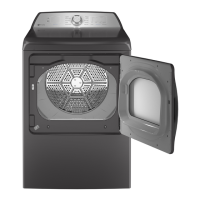
| Brand | GE |
|---|---|
| Model | PFD95 |
| Type | Electric Dryer |
| Color | White |
| Dryer Venting | Vented |
| Number of Temperature Settings | 5 |
| Wrinkle Care Option | Yes |
| Moisture Sensor | Yes |
| Energy Star Certified | No |
| Steam Option | No |
| Width | 27 in. |